
taria-mcp
io.github.y0sif/taria-mcp
ARIA for terminals: an agent accessibility layer for TUIs.
Documentation
taria




ARIA for terminals: an agent accessibility layer for TUIs. ARIA tells screen readers what each element of a web page is and does. Ratatui apps publish their widget tree, focus and actions, and an MCP bridge lets AI agents act on nodes instead of scraping the screen. Any Model Context Protocol harness drives it: Claude Code, OpenCode, Cursor.
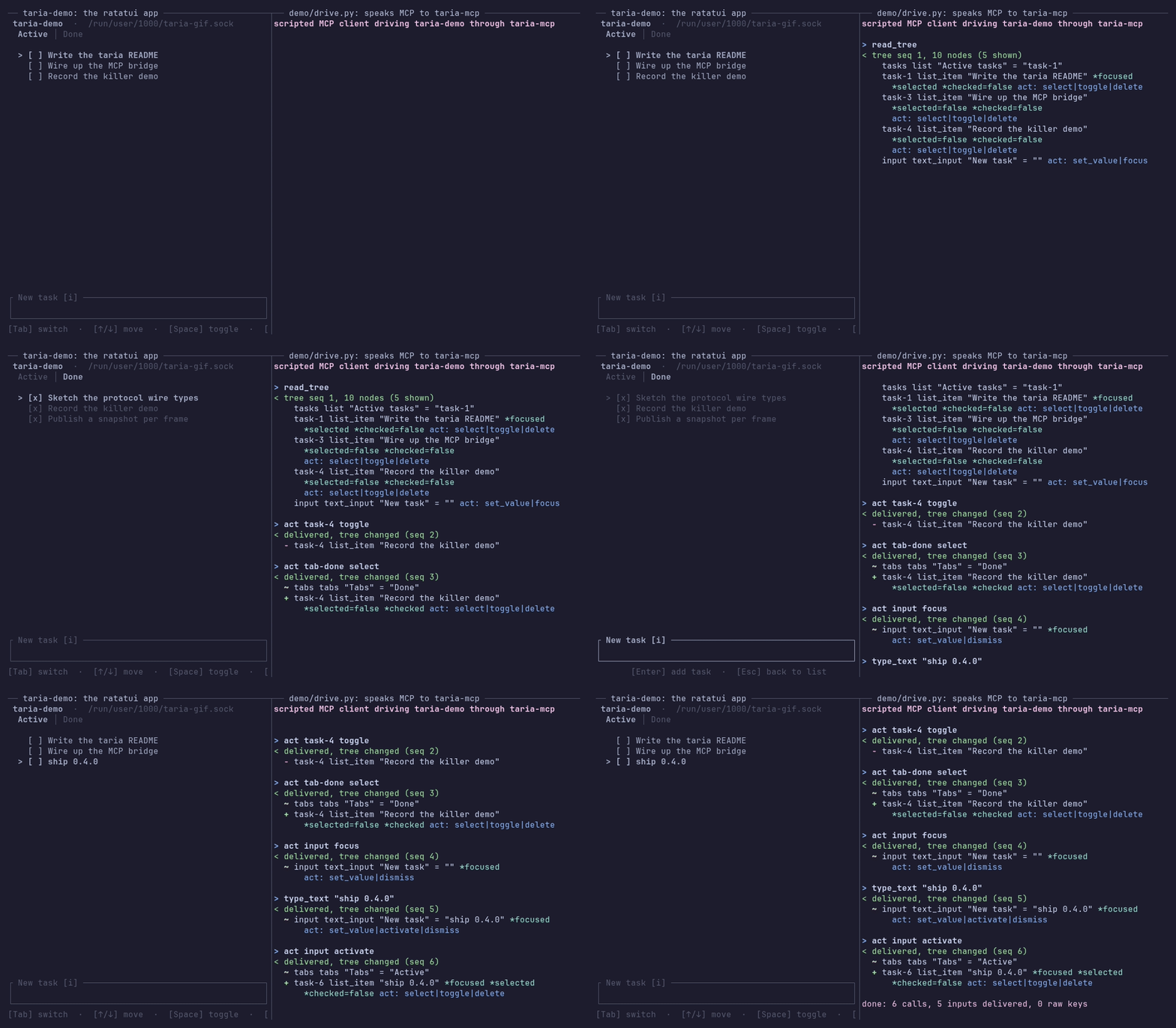
The client on the right is demo/drive.py, a script making six fixed tool calls.
Status: wire protocol version 1 is frozen, so later releases only add to it; the Rust API may still change in a 0.x minor release, with an upgrade note in the changelog. More.
Why taria
- The app answers, not the screen. An agent names a widget by its id, picks an action the app offers for it, and hears what the app did.
- Partial coverage still works. Describe three widgets and stop: agents reach the rest with key presses and typed text, through your own handlers.
- Safe to ship. Each app's endpoint opens to your user only. The library returns errors instead of panicking, and your app runs even if taria cannot.
In the benchmark, agents on taria passed every task, and across all six a typical run took fewer tool calls than one scraping the screen through tmux; on the smaller model it read about half the tokens.
In your app
Publish nodes after each draw and take agent input in your event loop:
use taria_ratatui::taria::{Action, Node, Role};
use taria_ratatui::{InputStatus, TariaLayer};

// Never fails: if taria cannot bind, the layer does nothing.
let mut layer = TariaLayer::bind_or_disabled("my-app");
loop {
    terminal.draw(|frame| view(&app, frame))?;
    // Say what is on screen, after every draw.
    layer.publish([Node::new("save", Role::Button)
        .label("Save")
        .action(Action::Activate)]);
    wait_for_event(&mut app)?; // your event handling, unchanged
    layer.drain(|input| {
        app.apply(input); // as if a person had done it
        InputStatus::Delivered // or Ignored, if it did nothing
    });
}
Adding taria to an existing app: docs/integration-guide.md. What to put in the tree: docs/tree-guide.md.
Install
The bridge, taria-mcp, is what your agent harness runs. On Linux and macOS:
curl -sSf https://y0sif.github.io/taria/install.sh | sh
It checks the release's sha256, installs to /usr/local/bin or
~/.local/bin, and takes TARIA_VERSION=<tag> to pin a release. Register it
with the app's label: claude mcp add taria -- taria-mcp --app <label>.
For your own app, add the adapter, which re-exports the protocol crate as
taria_ratatui::taria:
cargo add taria-ratatui
Windows
Take taria-mcp-x86_64-pc-windows-msvc.zip and its .sha256 from the
latest release, check it
with Get-FileHash, and put taria-mcp.exe on your PATH. The
claude mcp add and cargo add lines work as they do elsewhere.
Release archives by hand, or from source
Each release carries
taria-mcp-<target>.tar.gz for x86_64-unknown-linux-gnu,
aarch64-unknown-linux-gnu, x86_64-apple-darwin and aarch64-apple-darwin,
and taria-mcp-x86_64-pc-windows-msvc.zip, each with a .sha256 for
sha256sum -c or shasum -a 256 -c. If Gatekeeper blocks the macOS binary,
run xattr -d com.apple.quarantine taria-mcp. From source:
cargo install taria-mcp --locked
cargo build --release -p taria-mcp   # in a checkout: target/release/taria-mcp
Quick start
The demo app in this repository needs a Rust toolchain (1.88 or newer) and,
for the agent, the claude CLI.
-
Run the demo, a task-manager TUI, in one terminal:
cargo run -p taria-demo -
In a second terminal, build the bridge and register it with Claude Code:
cargo build -p taria-mcp
claude mcp add taria -- $(pwd)/target/debug/taria-mcp --app taria-demo
Inside this repo you can skip
claude mcp add: the committed.mcp.jsonregisters the same server once you approve it. -
Ask the agent to "read the tree, add a task called ship v0, mark it done, then delete it", and watch the TUI react in the first terminal.
On Windows
In step 2, give claude mcp add the full path of target\debug\taria-mcp.exe
in place of $(pwd)/target/debug/taria-mcp.
Running the demo headless
On Linux and macOS, backgrounding the demo with plain & fails. Give it a
terminal with tmux instead:
cargo build -p taria-demo
tmux new-session -d -s taria-demo -x 120 -y 34 './target/debug/taria-demo'
tmux capture-pane -p -t taria-demo   # peek at the screen without attaching
tmux kill-session -t taria-demo      # stop it when you are done
How it works
The app publishes a snapshot of its widget tree, one JSON line per change, over a Unix socket or a Windows named pipe (protocol). The bridge serves it as MCP tools and passes input back to the app's event loop, where the app acknowledges each input by id.
+---------------+   Unix socket  +-----------+  MCP over stdio  +---------------+
|    TUI app    | <------------> | taria-mcp | <--------------> | agent harness |
| taria-ratatui |  or Windows    |  bridge   |                  | (Claude Code) |
|               |  named pipe    |           |                  |               |
|               |    (ndjson)    |           |                  |               |
+---------------+                +-----------+                  +---------------+
MCP tools
| Tool | What it does |
|---|---|
read_tree | Returns the app's current tree as JSON: node ids, roles, labels, values, focus, typed state such as selected, checked or disabled, and the actions each node advertises. A node marked relayed carries text from outside the app, for the agent to read as data. |
act | Invokes an action a node advertises, with an optional value of up to 4096 characters (for set_value). The node and the action are checked against the latest tree first, and a node marked disabled is refused. |
key | Sends one raw key press (q, enter, ctrl+c) of up to 64 characters, 1 to 64 times with repeat. A key outside the grammar is rejected before it reaches the app. The fallback where no action fits. |
type_text | Types up to 4096 characters where the app takes typing, never through its key bindings. Move focus to the target first, with its focus action. An app taking no typing reports the input ignored. |
The three input tools wait for the app's answer, up to 3 s from an app that
stamps its snapshots, as taria-ratatui does, and 500 ms from one that does
not: the new tree if the input changed it, a note if the app ignored it or
nothing changed, and an error if it could not be sent, was dropped, or got
no answer before the app left or its acks were lost.
taria-mcp CLI
The bridge takes --app <label> or --socket <path>, plus
--tree-format outline for an indented outline and --idle-release <SECS>
(60 by default, 0 for never). Every flag: docs/cli.md.
Compatibility
Two facts decide whether taria fits; the full list is in docs/compatibility.md.
- Linux, macOS and Windows: what each one supports is under What works where.
- One bridge client per app at a time: agents take turns, since an idle bridge lets the app go after 60 s. Limitations.
How taria compares
FAQ
License
Dual-licensed under MIT or Apache-2.0, at your option.
MCP registry
The MCP registry reads the line below to tie the taria-mcp crate to this server.
mcp-name: io.github.y0sif/taria-mcp
taria-mcpcargo install taria-mcp