
dsh-any-agent
io.github.xmtlzzz/dsh-any-agent
Drive DeepSeek Harness (DSH) as a long-lived, resumable coding agent from any MCP client.
Documentation

Give any MCP client a coding buddy that sticks around.


Website · Quick start · Features · Tools · Live view · Usage notes · Changelog
🧪 Offline suite green in CI on Linux, Windows and macOS · 👀 new live call-chain view (watch / dashboard, with token usage) · 🔌 MCP over stdio · 📦 Zero dependencies · 📜 MIT
An MCP server that drives DeepSeek Harness as a long-lived coding agent. Hand it a goal, let it write code and run scripts, steer it mid-flight, and collect the result when you are ready.
Claude Code · Claude Desktop · Codex · Cursor · Windsurf · Zed · Gemini CLI · Antigravity · opencode · VS Code — or any client that speaks MCP over stdio.
🎯 The problem this solves
You already have a coding agent in your editor. What you do not have is one that can:
- hand a multi-hour job to another agent and walk away — then collect the result when it's done;
- keep the job alive across restarts of your editor, your session, your machine's idle reap (the conversation always survives; for a turn that is still running to survive the client closing or reconnecting, turn on resident process mode,
DSH_MCP_DAEMON=1); - cut in mid-flight when it's going the wrong way, without destroying the work;
- run several of them at once and switch between them;
- see what it is doing without asking the agent — which tools it called, which approvals went through, how many tokens it spent.
DSH (DeepSeek Harness) can do all of that — it has file/shell tools, skills, subagents and workflows — but it is a GUI-first application. Its own sdk profile exposes only 3 requests and can't resume, cancel, or answer approvals.
This server is the missing adapter: it makes DSH into a well-behaved background agent that any MCP client can hire, supervise and collect from.
Think of it as
&job— like&in a shell, but for an agent.
✨ Why it's different
| Capability | What you get |
|---|---|
| 🔄 A dead process never kills a conversation | The identity lives on disk. A crash, an idle reap, even restarting this whole server costs you nothing — the next call transparently resumes it, memory intact (verified across processes). |
| 🗣️ You are never stuck waiting | Steer a conversation mid-flight — interject to stop and redirect (~100 ms to reach idle, measured over four cancelled turns), or queue a remark for after the current turn. Interrupting never damages the conversation. |
| 📡 Completion notification, not polling | Long tasks return instantly with a run_id; when the turn ends, a sentinel file is written atomically so a background task in your host wakes you. No polling, no occupied turn. |
| 🪟 Many conversations at once | dsh_list(only_running) shows what's live; dsh_read gives cursor-based incremental output. Cycle between them like windows. |
| 👀 You can see it yourself | dsh-any-agent watch (terminal) or dsh-any-agent dashboard (local read-only web page) lays dispatched work out as a call chain — client → conversation → run → tool calls / approvals — with per-run tokens and context-window use, updating while the run is going. Separate processes, never touch the write lock, and show work from every client together. |
| 🧠 Reasoning hidden by default | You get "thought for N chars / M seconds" statistics instead of context-burning prose — and it is never logged, never written to disk. |
| 🤫 Silent by default | Not one byte on stderr, so nothing pollutes your host's logs. stdout carries the protocol and nothing else. |
| 🧩 Capabilities compose | DSH can mount its own MCP servers (IDA Pro, browsers, your internal tooling), so this is a bridge to a whole toolbox. |
| 🛡️ Read-only that really is read-only | read-only sandbox plus auto-denied approvals, for working on untrusted samples. |
| 🔎 Caller review, not blind relay | Every result carries a review ticket (checklist + evidence + dsh_review entry). The caller verifies with its own tools, then records pass / partial / fail. Advisory by default — it never blocks the next dispatch, and a failed review is not silently fed back to DSH. |
🧭 Positioning: a dispatcher, not a capability aggregator
This server dispatches; it does not re-implement what DSH already does. The caller gives a goal, and DSH decides which tools, skills, subagents or team to use. Nothing from DSH's tool surface is proxied, duplicated or preloaded.
| Owned by DSH (this server stays out) | Owned by this server (dispatch semantics) |
|---|---|
| File I/O, shell, search, editing | Session identity and cross-crash resume |
| Skills, subagents, Agent Teams, task board | Async dispatch, receipts, completion sentinels |
| Model routing, sandbox, approval policy | Incremental read, interject, interrupt, live call-chain view |
| Memory/context/compaction | Approval bridge, write-lock governance, queue, inbox |
| worktrees (the agent creates them with git) | Setup, status, doctor, audit |
Dispatch on demand: dsh_send passes a goal, not a tool manifest, and the caller
does not need to know DSH's tool list. The DSH agent picks what it needs — including
capabilities added after this server was built (for example the experimental Agent
Teams). This server does not grow one MCP tool per DSH feature.
Team mode (opt-in since 0.5.0): off by default. Run dsh-any-agent team on
and reconnect; the profile switches to dsh-team (the experimental Agent Teams
packages), and dsh_send then adds a short "form a team if this needs parallel or
multi-role work" line; simple tasks are not forced into a team. Turn it off with
dsh-any-agent team off, or for one call with dsh_send(team=false). The team
profile disables the legacy subagent tools and replaces them with nine team
tools; teammates share one workspace.
Only dispatch semantics become tools: start, send, read, get, review, interject, interrupt, approve, queue, inbox, status, release, takeover, doctor. No file I/O, no shell, no editor, no task board.
When to add something outside DSH: only when you need a guarantee rather than a behavior — for example, several top-level sessions editing the same repository need outer worktree isolation. For collaboration, prefer letting DSH run the team itself (mount the experimental team packages into the profile; teammates share one workspace).
Quick start
Requires Node.js ≥ 22.15 and DSH installed with a working model route and credentials. See Requirements for details.
npm install -g dsh-any-agent
dsh-any-agent-setup
dsh-any-agent-setup --yes
The second command previews the changes; --yes applies them. Reconnect your client's MCP server, then ask your agent to start a DSH conversation in your project, dispatch a task, and collect the result. The dispatch workflow shows the tool sequence.
Only using Cursor or VS Code? Add it in one click instead (runs npx -y dsh-any-agent@latest; DSH still has to be installed):


Want to see it first? Watch the 54-second promo — dispatch, interject, the sentinel landing and the caller's review, with the terminal replayed from a real run:
Before your first task: read the Usage Notes, especially the model-config and external-MCP permission boundaries. External MCP tools bypass DSH's sandbox. For a fresh machine, follow Setup.
Permissions: this server only dispatches; permissions follow DSH and your configuration. The default is
workspace-write(writes limited to the workspace; out-of-workspace requests are auto-allowed and listed in the result). For personal use on your own machine most people just turn on full access:dsh-any-agent-setup --yes --permission danger-full-access, after which DSH asks for nothing and everything is allowed. Anyone who can call these tools can run commands on your machine (including a caller agent that got prompt-injected); useread-onlyfor untrusted content. See Permissions & privacy.
Full contents
- Quick start — Install and connect · Changelog
- Start here — The problem · Why it's different · Why not just wrap the DSH CLI · Requirements · Setup
- Using it — Tools · Live view · Dispatch then collect · Completion notifications · Many conversations
- Behavior — Permissions · Reasoning · Logging and privacy · Workspace & GUI
- Hard parts — The write lock
- Reference — Environment · Tests · Known limitations · Why the old profile name?
🧰 Tools
| Tool | What it does |
|---|---|
dsh_start | Create a conversation: workspace, permission tier, approval policy, reasoning effort (default max), model |
dsh_send | Hand it a task. Defaults to wait=false: returns a run_id + sentinel_file immediately, the turn runs in the background and the sentinel file notifies you when it's done (recommended). wait=true blocks until the turn ends; hitting timeout_ms (default 0 = wait forever) only downgrades to background — the turn is never cancelled and the result is never lost |
dsh_list | All conversations with live state: running / idle / detached, elapsed time, current tool, output so far. only_running=true for active ones |
dsh_read | Cursor-based incremental read of what a running conversation is producing right now. The cursor is a revision number: an entry whose text grew since your last read reappears — match it by seq and replace its text, don't append again |
dsh_get | Conversation details; with run_id, the final result of that dispatch (the "collect the result later" entry point) plus its review ticket. Run records live in memory (last 20) — use the sentinel file after a restart |
dsh_review | Caller review. Submit pass / partial / fail for a completed run, with notes and optional findings. The verdict is written to <state dir>/reviews/<conversation_id>/<run_id>.review.json and back into the in-memory run and sentinel. Advisory by default: it never blocks the next dsh_send |
dsh_interject | Interject while it's busy: interject = stop and redirect, queue = wait for the current turn, then speak. This round writes a sentinel too, and the reply carries its sentinel_file. In both modes, and on an idle conversation, it blocks until the new turn ends; to queue without blocking, use dsh_send(queue=true) |
dsh_takeover | Preempt the write lock. The only way out when another DSH process holds it (DSH has no steal API — preempting means killing the holder). It classifies the holder first: our own orphaned child → taken automatically; another live instance → needs force; GUI/unknown → never killed, reported instead |
dsh_interrupt | Stop the current turn without sending anything new (the conversation stays healthy); to stop and redirect, use dsh_interject |
dsh_release | Hand the conversation back (frees the write lock so you can open it in your own DSH GUI). Still resumable; forget=true writes a tombstone — by-id lookups are refused until you delete $DSH_HOME/.dsh-any-agent-forgotten/<id>.json |
dsh_approval_decide | Adjudicate a pending approval (only when on_approval=ask) |
dsh_status | Lightweight status check (single conversation), including the write-lock holder lock_holder |
dsh_inbox | Cross-conversation approval inbox: every pending approval with reason, input and age; decide with dsh_approval_decide |
dsh_queue | Inspect/modify the session queue: list / remove / update / promote (created by dsh_send(queue=true), memory only) |
dsh_doctor | Read-only health check: DSH version, profile, state/dir writability, orphan locks, sessions and RSS, effective config |
Every tool declares all four MCP annotations (readOnlyHint, destructiveHint, idempotentHint, openWorldHint). Six only read state and are marked read-only: dsh_list, dsh_read, dsh_get, dsh_status, dsh_inbox, dsh_doctor. Tool titles, descriptions and the server instructions come in English and Chinese: they follow your system language, or set DSH_MCP_LANG=en|zh. Tool results follow the same setting; a few less common error messages are still Chinese only.
👀 Live view: see what the dispatched work is doing
The tools above are for the calling agent. You, sitting at the client, usually see one dsh_send and nothing else. Since 0.6.1 the server writes each conversation's activity to a local event stream, so you can watch the call chain without going through the agent:
claude-code  pid 8328
└─ e896d16a  temperature module  running · total 278k/17k · context 3%
   ├─ ✓ run-…-1  [send] · done · 1m24s · 8 tools · 69k↑ 4.1k↓ tok
   └─ ▶ run-…-2  [queue] · running · 156k↑ 12k↓ tok
         ✓ read   temp.js                  13ms
         ✓ edit   temp.js                  18ms
         ◆ approval auto-allow ⚠ danger-full-access  node --test
         ▶ pwsh   node --test
dsh-any-agent watch
dsh-any-agent dashboard --open
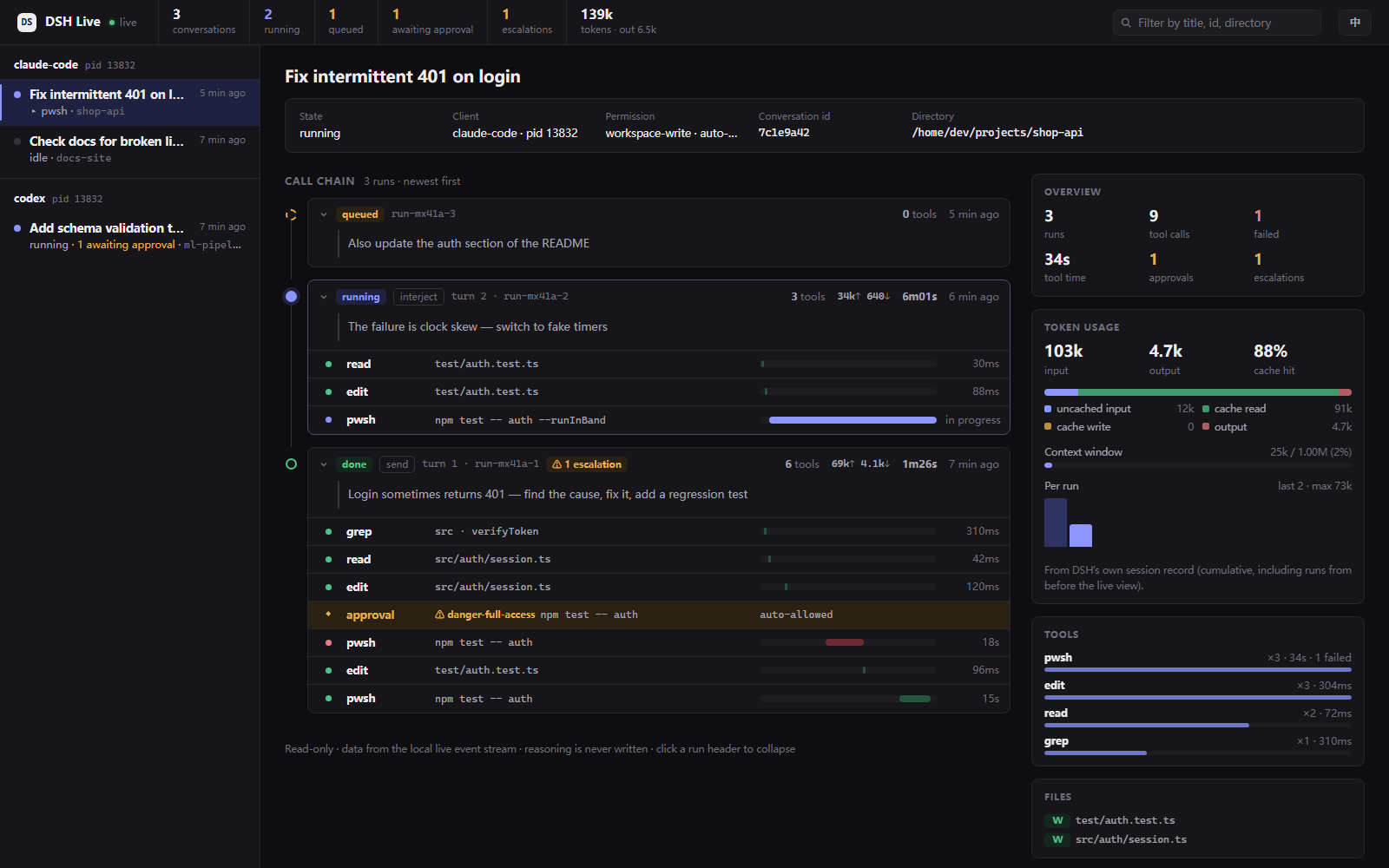
watch: the call chain in your terminal, redrawn in place liketop(no scrolling spam).watch <conversation id prefix>follows one conversation;--onceprints once and exits.dashboard: a local read-only web page;--openlaunches it in your default browser. Left: conversations grouped by client. Middle: the run timeline, with a timing bar per tool call and approvals/escalations highlighted. Right: overview, tool breakdown, files touched, approvals, and token usage (input / output / cache hit, context window, per-turn chart).- English / 中文: follows your system language by default; pass
--lang en|zhto choose, or switch from the page's top-right corner. - Doesn't disturb running work: both are separate processes that only read event files — they never touch the write lock or DSH. Use them to watch progress, and don't open MCP-driven conversations in the DSH GUI (that takes the write lock; see usage notes 3.10).
- Safety and privacy: the dashboard binds
127.0.0.1only, its URL carries a one-time token, it checks the Host header, and it has no control that changes state. Command, path and prompt previews are redacted first; reasoning is never written at any level.DSH_MCP_LIVE=metakeeps only tool names and status;offdisables it.
Details in Usage · side view; event format and design trade-offs in the live view design.
📚 Documentation map
| Document | Contents |
|---|---|
| Setup | Requirements, profile bootstrap, 10 MCP clients |
| Usage | Dispatch/collect, sentinels, many conversations, live view, reasoning |
| Usage notes | Pitfalls: model routing, cost, concurrency and the write lock, permissions, privacy, troubleshooting |
| Live view design | Event stream format, watch / dashboard, token source, privacy trade-offs |
| Team mode | Default behavior, how to disable (per client), verify and revert |
| Permissions & privacy | Tiers, approvals, GUI visibility, logging |
| Write lock | Four holder classes, takeover, GUI contention |
| Environment variables | Every switch and its default |
| Tests | Offline/integration suites and coverage |
| Known limitations | Limits, profile naming |
| Compatibility | DSH version matrix, team-package requirements, upgrade checks |
| Architecture | Why ACP, sdk/plugin comparison |
| Release process | Release checklist |
🧑🤝🧑 Team mode (opt-in)
Off by default. Run dsh-any-agent team on and reconnect; the profile switches
to dsh-team (the experimental Agent Teams packages) and dsh_send adds a
short "form a team when this needs parallel or multi-role work" line. Simple
tasks are not forced into a team. Turn it off with dsh-any-agent team off, or
for one call with dsh_send(team=false).
Full steps (commands, verification, rollback) are in Team mode.
📇 Listed on


🙏 Acknowledgements
dsh-any-agent started from Moer2831/Deepseek-DSH-MCP (MIT), where this server was called dsh-mcp. The ACP client, the session hub, write-lock handling, sentinel files, the original design draft and the first test suites come from that project; client setup and restore, team mode, the live view, caller review and the release pipeline were added here. The original copyright notice is kept in LICENSE.
Star History
dsh-any-agentnpm install dsh-any-agent