
lobster
io.github.the-omics-os/lobster
Bioinformatics analyses from plain-language questions: single-cell, bulk RNA-seq, proteomics, more.
Documentation

 |  |  |
Lobster AI is an open-source multi-agent system for bioinformatics. Describe an analysis in plain language: specialist agents for each omics domain find and load the data, run the analysis with scientific libraries such as Scanpy and PyDESeq2, and record the analysis steps, which you can export as a Jupyter notebook. It runs on your machine, in its own terminal chat or from your coding agent over MCP.
简体中文:README.zh.md · 命令行加上 --lang zh,或设置 LOBSTER_LANG=zh。
Quickstart
1. Install (macOS and Linux):
curl -fsSL https://install.lobsterbio.com -o install.sh && bash install.sh
The installer asks a few questions, so download it first: a piped curl | bash cannot read the answers.
Windows: open PowerShell or Command Prompt, paste this line and press Enter. When it finishes, close the window, open a new one and type lobster.
powershell -ExecutionPolicy ByPass -c "irm https://install.lobsterbio.com/windows | iex"
To install with uv or pip, add analysis packages later or upgrade, see the installation guide.
2. Make a project:
lobster init ~/my-study    # any folder below your home folder
cd ~/my-study
lobster init asks for your LLM provider and the analysis packages you need. The project keeps that setup next to your data and runs, so chats, runs and MCP calls in the folder use it: see Lobster projects. Setting up from an agent, CI or a script: non-interactive setup.
3. Ask in plain language:
lobster chat
> Load pbmc3k_raw.h5ad as pbmc3k and describe it.
> Filter cells with 200 to 2500 genes and under 5% mitochondrial counts, keep genes
  seen in at least 3 cells, then normalize to 10,000 counts per cell and log1p.
> Select 2000 highly variable genes, run PCA, cluster with Leiden, compute a UMAP
  and find marker genes for each cluster.
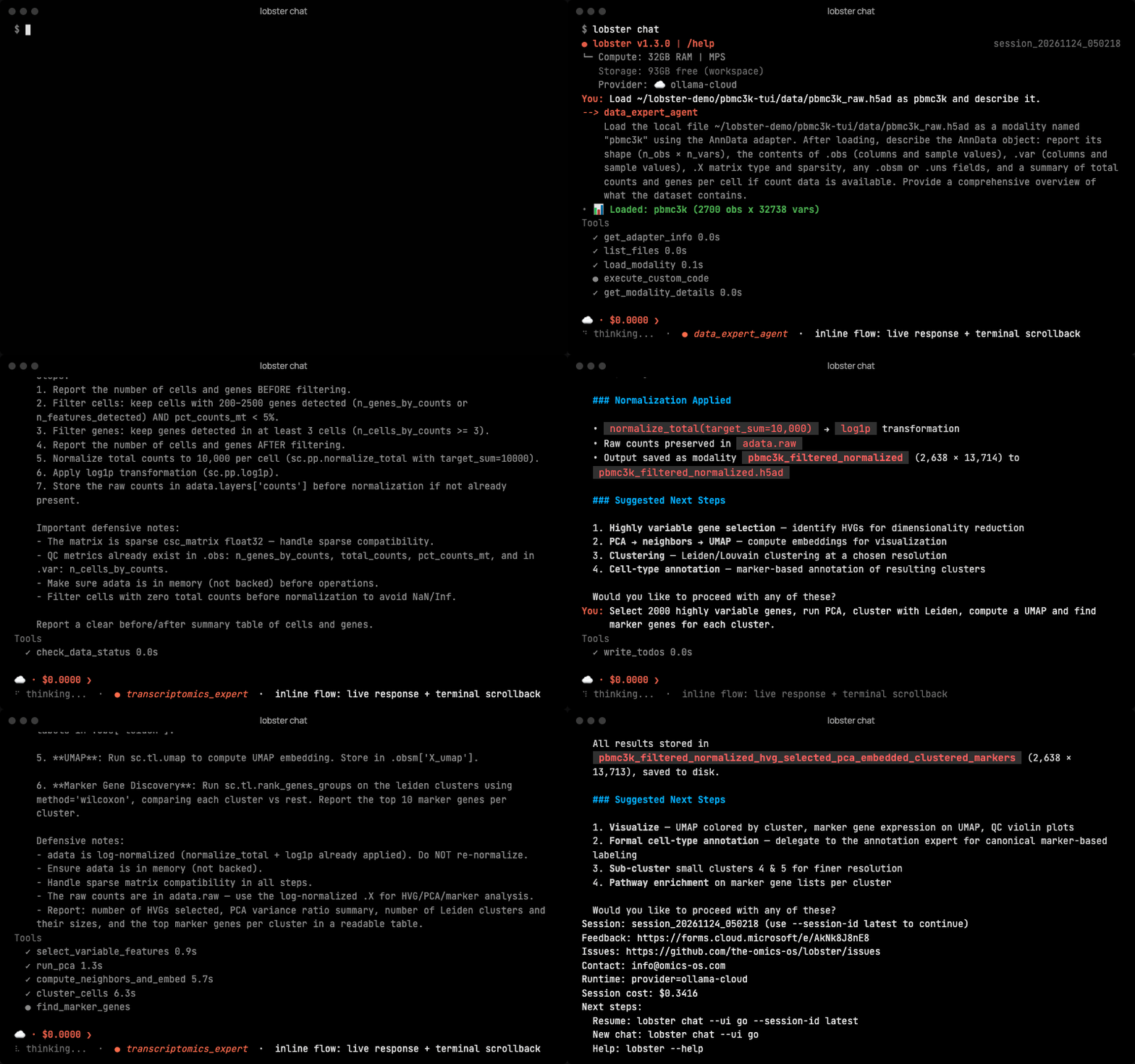
A replay of a real
lobster chat session with Lobster AI 1.3.0: load PBMC 3k, filter and normalize, then cluster. Waits between steps are shortened.
Use Lobster from your coding agent (MCP)
lobster mcp --stdio runs Lobster as an MCP server. Claude Code, Codex, pi, OpenCode, Cursor or Claude Desktop hands it an experimental question and gets back the result, a notebook and the files. Add it with one command, inside your project folder:
# Claude Code
claude mcp add --transport stdio lobster -- lobster mcp --stdio

# Codex
codex mcp add lobster -- lobster mcp --stdio

# pi, plus short readable rows for Lobster's tools
pi mcp add lobster --exposure direct -- lobster mcp --stdio
pi install npm:@omicsos/pi-lobster
In Claude Code you can install Lobster as a plugin instead, which also adds Lobster AI's skills: claude plugin marketplace add the-omics-os/lobster, then claude plugin install lobster@omics-os.
A Lobster run often takes longer than a minute. Codex and pi stop a tool call after 60 seconds unless you raise the limit, and their mcp add commands cannot raise it. The agent then has to ask again every minute. To let it wait for a whole run in one call, add tool_timeout_sec = 3600 to the lobster entry in ~/.codex/config.toml, or "timeout": 3600 to the lobster entry in ~/.pi/agent/mcp.json.
The configuration for OpenCode, Cursor and Claude Desktop, the nine tools and how you approve Lobster's plan are in the MCP guide and in lobster/integrations/.
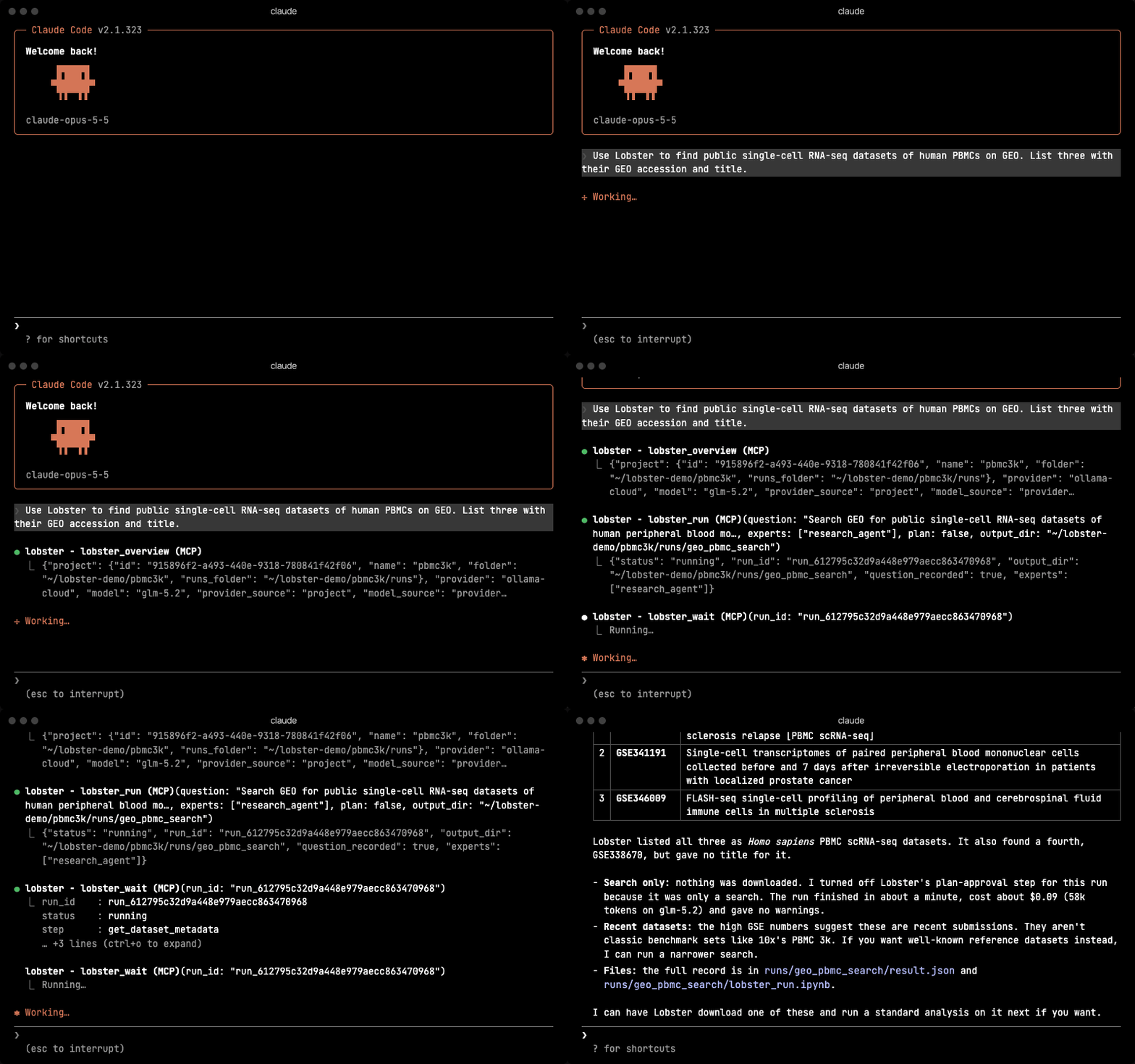
A replay of a real run: Claude Code 2.1.323 asks Lobster AI 1.3.0 for public PBMC datasets on GEO. Waits between steps are shortened.
Notebooks, replay and the catalog
- Export: in
lobster chat,/pipeline exportwrites the recorded analysis steps as a Jupyter notebook. - Check:
lobster replay --verify analysis.ipynb --input my_data.h5adruns the notebook again and compares what it writes with the files the session saved. It detects changes it can see; it does not prove how the outputs were computed. See replay and verify. - Catalog (optional, off by default): with
lobster init ~/my-study --lamin, Lobster records sessions, the datasets you save (with versions and content hashes) and exported notebooks in a local LaminDB catalog in your workspace. See the LaminDB catalog guide.
CLI reference
lobster chat                        # Interactive session
lobster query "your request"        # One request, no chat
lobster init [folder]               # Set up a provider; a folder makes a project
lobster projects list               # Projects Lobster knows about
lobster replay --verify nb.ipynb    # Re-run an exported notebook and compare its output
lobster mcp --stdio                 # MCP server for coding agents and desktop apps
lobster --help                      # Every command
The other commands and the slash commands inside lobster chat: CLI commands.
Agents and LLM providers
Agents: ten agent packages cover transcriptomics (single-cell and bulk RNA-seq), genomics, proteomics, metabolomics, machine learning, drug discovery, structural visualization, visualization, metadata, and research (literature and dataset search). Install only the ones you need: agent packages.
LLM providers: Omics-OS Cloud (the default), Anthropic, AWS Bedrock, Google Gemini, OpenAI, OpenRouter, Nebius AI Studio, Azure AI and Ollama Cloud, or a local Ollama, where no messages go to an LLM provider (online database searches still use the internet). See configuration.
Case studies: single-cell transcriptomics · CML drug resistance · drug discovery · clinical genomics · mass-spec proteomics · literature mining · multi-omics ML
Architecture
Lobster AI is a multi-agent system: specialist agents for each omics domain, orchestrated by a LangGraph supervisor.
- Local execution: Analysis runs on your machine. Your data files stay on your machine; messages and tool results are sent to the LLM provider you configure (with a local model such as Ollama, they stay on your machine too).
- Scientific libraries: Agents call Scanpy, PyDESeq2, Harmony and others through tool functions. Some agents also have a code tool for custom analysis, which you can switch off per agent.
- Provenance: Analysis steps are recorded and can be exported as a Jupyter notebook. Decisions Lobster asks you to make are recorded with the answer and who gave it (
humanormodel).
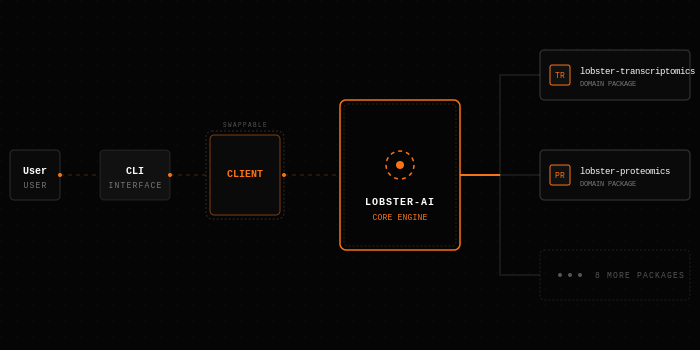
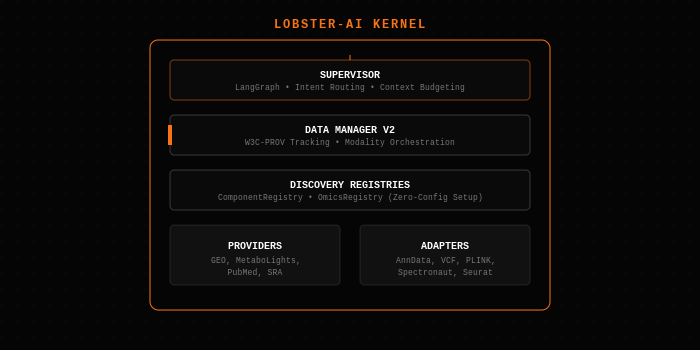
More in the architecture overview.
Build your own agent
Agents are standalone Python packages that Lobster finds through entry points. lobster scaffold agent generates one with tool stubs, AQUADIF metadata and contract tests; lobster validate-plugin checks it. The lobster-dev skill gives your coding agent the package layout, the tool rules and the AQUADIF contract:
curl -fsSL https://skills.lobsterbio.com | bash # also lobster-use, for analysis workflows
The same skills ship inside the package (lobster skills list, lobster skills install). Guide: creating agents.
Acknowledgements

| Structural inspiration for the drug discovery agent package — CLI design patterns and domain decomposition. |

|
Foundation for the lobster-use and lobster-dev skills — domain knowledge structure and skill distribution patterns.
|

| UI component architecture and streaming patterns used in the Omics-OS Cloud frontend. |

|
BubbleTea, Lipgloss, Glamour, and huh — the entire terminal UI stack powering lobster chat.
|

|
The optional local data catalog behind lobster init --lamin: sessions, saved datasets with versions and content hashes, and exported notebooks.
|
lobster-aipip install lobster-ai