
orchstep
io.github.orchstep/orchstep
Run, plan and lint OrchStep YAML workflows: deterministic, replayable tasks for CI/CD and agents.
Documentation

OrchStep




Automate everything — built for developers and AI agents. Run anywhere as a single binary, no vendor lock-in.
⚡ Describe it. Get automation. Install the
orchstep-workflow-designskill, answer a few questions from a built-in prompt generator (orchstep run prompt_migrate), and paste the result into your AI agent — it builds your OrchStep workflow from the codebase you already have, or migrates your existing Makefile / Justfile / Taskfile / Gradle build / shell scripts / CI pipeline for you. Generated once — replayed forever, zero tokens.
🚀 Setup — 1, 2, 3
# 1. Install OrchStep
curl -fsSL https://orchstep.dev/install.sh | sh   # verifies the release SHA-256 checksum
#    or: brew tap orchstep/tap && brew install orchstep · npm install -g orchstep · pip install orchstep
#    or let your AI agent do it: npx skills add orchstep/orchstep, then ask it to "install orchstep"

# 2. Grab this repo — it ships runnable demos
git clone https://github.com/orchstep/orchstep.git && cd orchstep

# 3. The must-see demo — interactive task menu
orchstep menu

# 4. The GUI — run tasks from a local web dashboard
orchstep serve        # -> http://127.0.0.1:7777   (or pick "dashboard" in the menu)
More install options: Distribution below · full guide: installation docs on orchstep.dev.
📖 Docs & live demos: orchstep.dev
OrchStep runs multi-step workflows for developers and AI agents. It delegates to your existing tools (terraform, kubectl, aws, docker) rather than reimplementing them.
CI/CD Pipeline — with YAML editor and syntax highlighting

Data Pipeline — dark mode with Smart layout

Try the live Workflow Visualizer → Paste any OrchStep YAML to see it as an interactive diagram.
The
@orchstep/workflow-viewerpackage powers the visualizer — an interactive React component that renders OrchStep workflows as directed graphs. Features include Smart/Vertical/Horizontal layouts, dark mode, collapsible tasks, search, export to PNG, and copy to clipboard. Available atpackages/workflow-viewer.
🎬 Capture agent work → replay with zero tokens
When an AI coding agent (Claude Code, Cursor, …) solves a real task for you —
running a test suite, a deploy, a multi-step shell sequence — that reasoning
costs tokens every single time you run it. With OrchStep you capture the
solved session once into a replayable orchstep.yml. Every run after that
executes the same business logic deterministically — no LLM, no tokens, no
drift.
For repeated testing and operational work that's up to ~80% less agent token
spend: the first run pays for the reasoning; every run after is just
orchstep run.

# In Claude Code, right after the agent finishes the task:
/orchstep-capture                       # compress the session into orchstep.yml

# Forever after — same result, no model in the loop:
orchstep run -f captured.orchstep.yml
Record your test steps or shell scripts as a workflow once, and re-running the same logic never touches an LLM again. The
orchstep-captureskill turns "the agent already did this once" into a permanent, shareable, deterministic workflow.
🧠 Design workflows with your agent
The orchstep-workflow-design skill teaches
Claude (and any MCP-capable agent) to author production-grade OrchStep YAML —
real failure handling, not just the happy path. It ships dense references,
annotated examples, and a guided wizard:
- Quick mode — give a concrete task, get a correct workflow, no questions.
- Wizard mode — "help me design this" → 2–4 intent questions → a tailored workflow.
Claude Code — one command (installs all OrchStep skills + the MCP server as a plugin):
/plugin install orchstep --marketplace orchstep/orchstep
Or from a terminal: claude plugin marketplace add orchstep/orchstep && claude plugin install orchstep@orchstep.
Any other agent: one command. The skills use the open Agent Skills SKILL.md format, and the skills installer puts them where your agent looks (Codex, Cursor, GitHub Copilot, Gemini CLI, Kimi Code, OpenCode, Cline, Windsurf, Amp, Goose, Qwen Code and about 70 more):
npx skills add orchstep/orchstep          # pick agents interactively; add -g for user-wide
npx skills add orchstep/orchstep -a codex -a cursor -a kimi-code-cli -y
No Node? Copy the skills/ folders into .agents/skills/ in your project: most agents read that shared directory. Then connect the MCP server (orchstep mcp serve) so the agent can list, preview and run workflows as tools. Per-agent config is in skills/orchstep-mcp-integration.
| Agent | Skills | MCP | Status |
|---|---|---|---|
| Claude Code | plugin | plugin | tested |
| Kimi Code CLI (with Kimi K3 and DeepSeek V4 models) | .agents/skills | .kimi-code/mcp.json | tested 2026-11 |
| OpenCode (with a DeepSeek model) | .agents/skills | opencode.json | tested 2026-11 |
| Codex | .agents/skills | codex mcp add | skills confirmed by a user report; MCP + CLI: help verify |
| Cursor, GitHub Copilot, Gemini CLI, Windsurf, Cline | .agents/skills | standard mcpServers config | documented; help verify: Cursor, Copilot, Gemini CLI, Windsurf, Cline |
See skills/README.md for details and alternatives.
Or let OrchStep write the prompt for you. This repo's built-in prompt generators interview you with select/checkbox/text questions, then emit a ready-to-paste prompt engineered for this skill — CI/CD pipelines, release automation, environment setup, and migrations from Make / Just / Task / Ant / Gradle / shell scripts / GitHub Actions, out of the box:
orchstep run prompt_migrate    # migrate existing automation (Make, Gradle, CI, scripts) to OrchStep
orchstep run prompt_features   # design a new workflow from a feature checklist
orchstep run prompt_scenario   # common scenarios: env setup, CI/CD, release, runbooks, data pipelines
Paste the generated prompt into Claude Code (or any agent with the skill installed) and it designs the workflow for you — from your actual codebase, with error handling and assertions included:

🚀 Try it right in this repo
The repo root ships an orchstep.yml so a fresh clone gives you something to run immediately — orchstep menu opens the picker, or run any task directly:
Interactive picker: Run
orchstep menuin any directory with anorchstep.ymlto open a keyboard-driven task picker. Single-keystroke hotkeys, fuzzy search (arrow keys or/), and a filter cycle (fto cycle all → a-z → public → internal). Running plainorchstepin a terminal also auto-launches the menu; in a pipeline it exits cleanly instead of hanging.
| Task | What it shows |
|---|---|
orchstep run demo | All demos in sequence: hello world, HTTP GET, HTTP POST |
orchstep run hello --var greet_name=you | Variable substitution from the CLI |
orchstep run http_get / http_post | Templated HTTP calls with retries and status assertions |
orchstep run dashboard | The local web GUI (orchstep serve) — run tasks from a browser, watch live output |
orchstep run prompt_migrate | Interview → prompt: migrate a Makefile / Justfile / Taskfile / Ant / Gradle / shell scripts / GitHub Actions to OrchStep |
orchstep run prompt_features | Checkbox feature picker (env groups, dotenv, retries, parallel, …) → prompt to design a new workflow |
orchstep run prompt_scenario | Common scenarios (dev env setup, CI/CD, release automation, ops runbooks, data pipelines) → prompt |
orchstep run install_skill | Install the workflow-design skill into Claude Code |
orchstep run upgrade | Upgrade the OrchStep binary via the official installer |
orchstep run todos | Planned additions + how to contribute |
The prompt_* tasks are OrchStep dogfooding itself: the engine interviews you with select/checkbox/text prompts, then prints a copy-paste prompt engineered for the orchstep-workflow-design skill. Paste it into any agent that has the skill installed and it writes the workflow — from your actual codebase, with error handling and assertions included. More classic examples live in demos/.
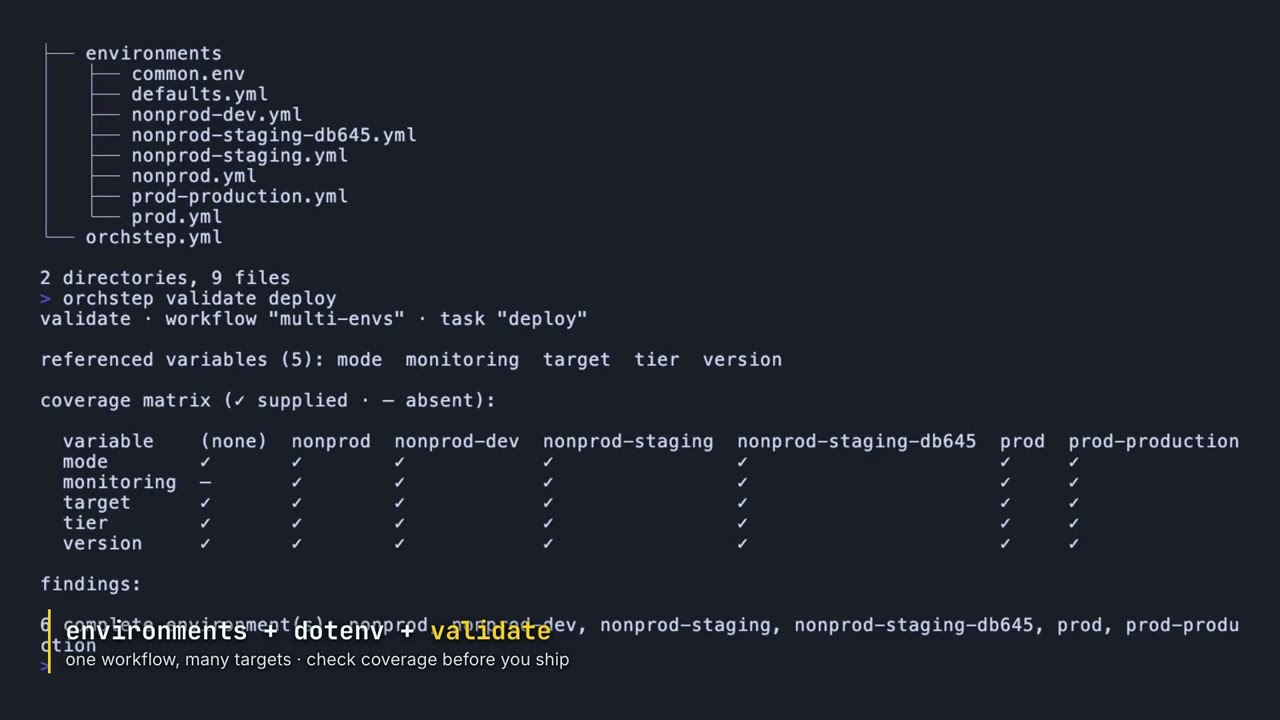
🎬 OrchStep CLI — 90-second tour
run with live logs, menu, --dry-run preview, environments, JSON for CI/agents, and capture → replay (zero tokens) — the whole CLI in a minute and a half.
🖥️ OrchStep Pipeline — a web dashboard for the CLI
The command line is the product. orchstep run, orchstep menu, orchstep mcp — that's the first-class interface: scriptable, CI-friendly, agent-friendly, no browser required.
OrchStep Pipeline is the optional companion to it — a second-class citizen by design. It's a local web dashboard you open with a single command when you'd rather click, watch, and inspect. Everything it does is an orchstep command underneath, and it prints the exact CLI invocation for every run, so nothing you do in the browser is locked to the browser.
orchstep serve # -> http://127.0.0.1:7777 (one static binary, nothing else to set up)
Pick a task and read it as source, a resolved plan, or the full execution graph; launch it with an environment and pretty logs; watch every step light up live as the run descends into each called task; jump from a step straight to its logs; and inspect exactly what any step saw — its variables, environment, and output. Run history lives in a single SQLite file, it binds to 127.0.0.1, and there's no infra or signup.
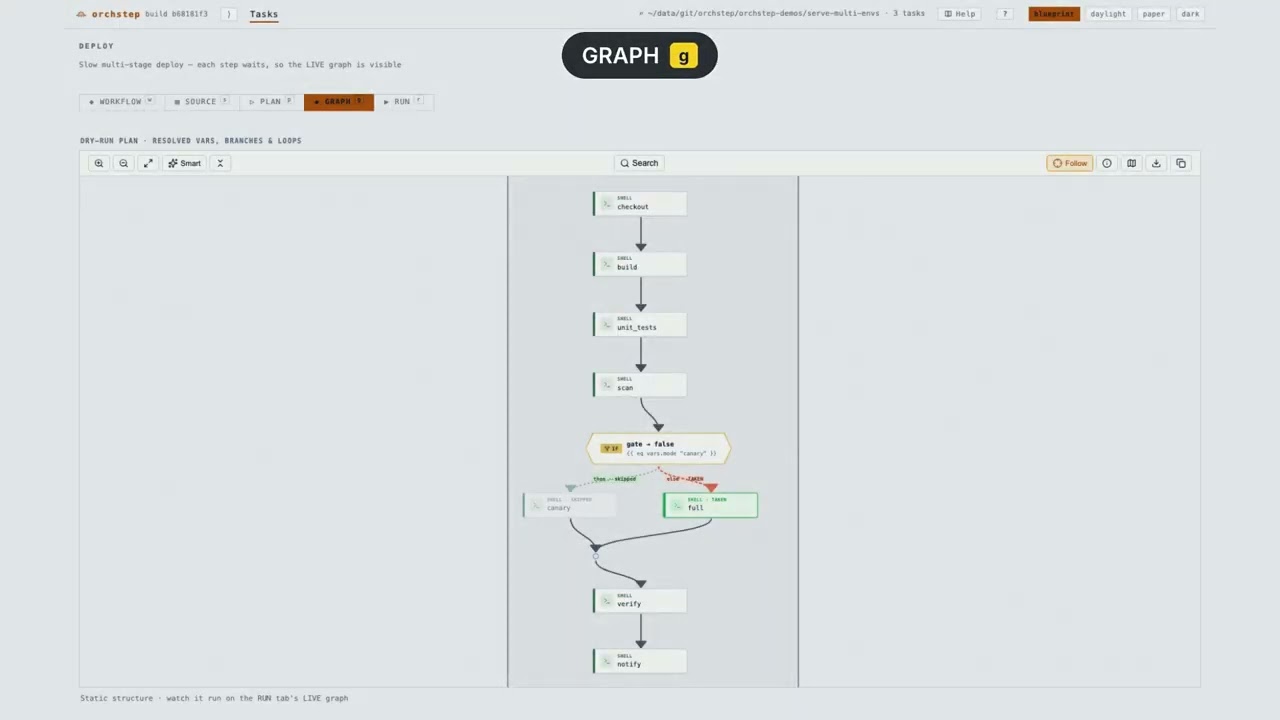
▶ Watch the 60-second tour · full walkthrough at orchstep.dev/learn/serve
What's in This Repo
| Directory | Contents |
|---|---|
spec/ | OrchStep YAML language specification |
modules/ | Official and community module registry |
skills/ | LLM agent skill documents |
mcp/ | MCP server interface specification |
demos/ | Example workflows for real-world use cases |
docs/ | User documentation |
Quality & Testing
The OrchStep engine is rigorously tested with a comprehensive regression suite:
| Metric | Value |
|---|---|
| Regression test cases | 545 across 182 spec directories |
| Pass rate | 100% (545/545) |
| Feature categories tested | 14 (execution, variables, control flow, loops, error handling, HTTP, git, templates, environment, config, assertions, modules, data flow, advanced) |
| Platforms verified | 6 (darwin/amd64, darwin/arm64, linux/amd64, linux/arm64, windows/amd64, windows/arm64) |
| CI pipeline | Build, lint, vet and unit tests on every engine change; full regression suite on a weekly schedule and before every release |
Every release is gated by the full regression suite. The test infrastructure includes mock HTTP servers, mock CLI simulators, and authenticated git operation tests to ensure real-world reliability.
What's Tested
- Workflow execution — task pipelines, step sequencing, shell command execution
- Variable management — 4-level scoping, precedence, dynamic resolution, type preservation
- Control flow — if/elif/else, switch/case, loops (items/count/range/until), task delegation
- Error handling — retry with exponential backoff + jitter, try/catch/finally, timeouts, on-error modes
- HTTP integration — GET/POST/PUT/DELETE, authentication (bearer/basic/API key), JSON parsing, batch requests
- Git operations — clone, checkout, push, fetch, branches, tags, submodules, authenticated operations
- User prompts — text, password, select, confirm, multiselect with non-interactive mode for CI/agents
- Module system — config schemas, exports, versioning, dependencies, nesting, remote git modules, lockfiles
- Templates — Go templates, Sprig functions, JavaScript expressions, regex extraction
- Environment — .env file loading, inheritance modes, groups, hierarchical configs
The Engine
The OrchStep engine is distributed as a compiled binary. Install it using any method above, then use the spec and modules in this repo to build workflows.
Distribution
| Channel | Install Command |
|---|---|
| curl | curl -fsSL https://orchstep.dev/install.sh | sh |
| Homebrew | brew tap orchstep/tap && brew install orchstep |
| npm | npm install -g orchstep |
| pip | pip install orchstep |
| Docker | docker pull orchstep/orchstep:latest |
| GitHub Action | uses: orchstep/setup-orchstep@v1 (install) / uses: orchstep/run-orchstep@v1 (one-step run) |
All channels pull binaries from GitHub Releases.
| Directory | Contents |
|---|---|
homebrew/ | Homebrew formula (auto-updated by GoReleaser) |
npm/ | npm wrapper package |
pip/ | pip wrapper package |
docker/ | Docker image configuration |
action/ | GitHub Action for CI/CD |
For LLM Agents
OrchStep is designed for AI agent integration:
- CLI:
orchstep run task --output jsonfor structured output - MCP Server:
orchstep mcp servefor native tool_call integration (bundled in the Claude Code plugin) - Skills: Install skill documents from
skills/to teach agents OrchStep patterns — includingorchstep-install(ask your agent to install and set up OrchStep),orchstep-capture(turn a solved session into a replayable, zero-token workflow) andorchstep-workflow-design(author production-grade workflows) - Prompts: Interactive input for humans, auto-skipped for CI/agents with
ORCHSTEP_NON_INTERACTIVE=true
Cross-Platform
OrchStep runs on Linux, macOS, and Windows:
- Default shell: POSIX
sh— works on Alpine, distroless, all Linux/macOS - Go-native shell: Set
type: "gosh"for Windows support without bash - Explicit shells:
bash,zsh,pwshavailable as opt-in
Module Registry
OrchStep has a tiered module ecosystem:
@orchstep/*— Official modules maintained by the OrchStep team@community/*— Verified community contributions@ai/*— LLM-generated modules (auto-validated)
Browse available modules in the modules/ directory or search with:
orchstep module search deploy
Contributing
We welcome module contributions from humans and AI agents! See CONTRIBUTING.md.
License
- The OrchStep engine binary is free for individual and commercial use under the one-page OrchStep Binary License (also at orchstep.dev/license).
- Open content in this repo (spec, modules, skills, demos, docs) is licensed under Apache 2.0.
orchstepnpm install orchstep