
devpulse-mcp
io.github.loxhness/devpulse-mcp
Tells your AI coding assistant what's wrong with your local dev environment in one call.
Documentation

Your AI coding assistant can read your code. devpulse lets it see your dev environment.






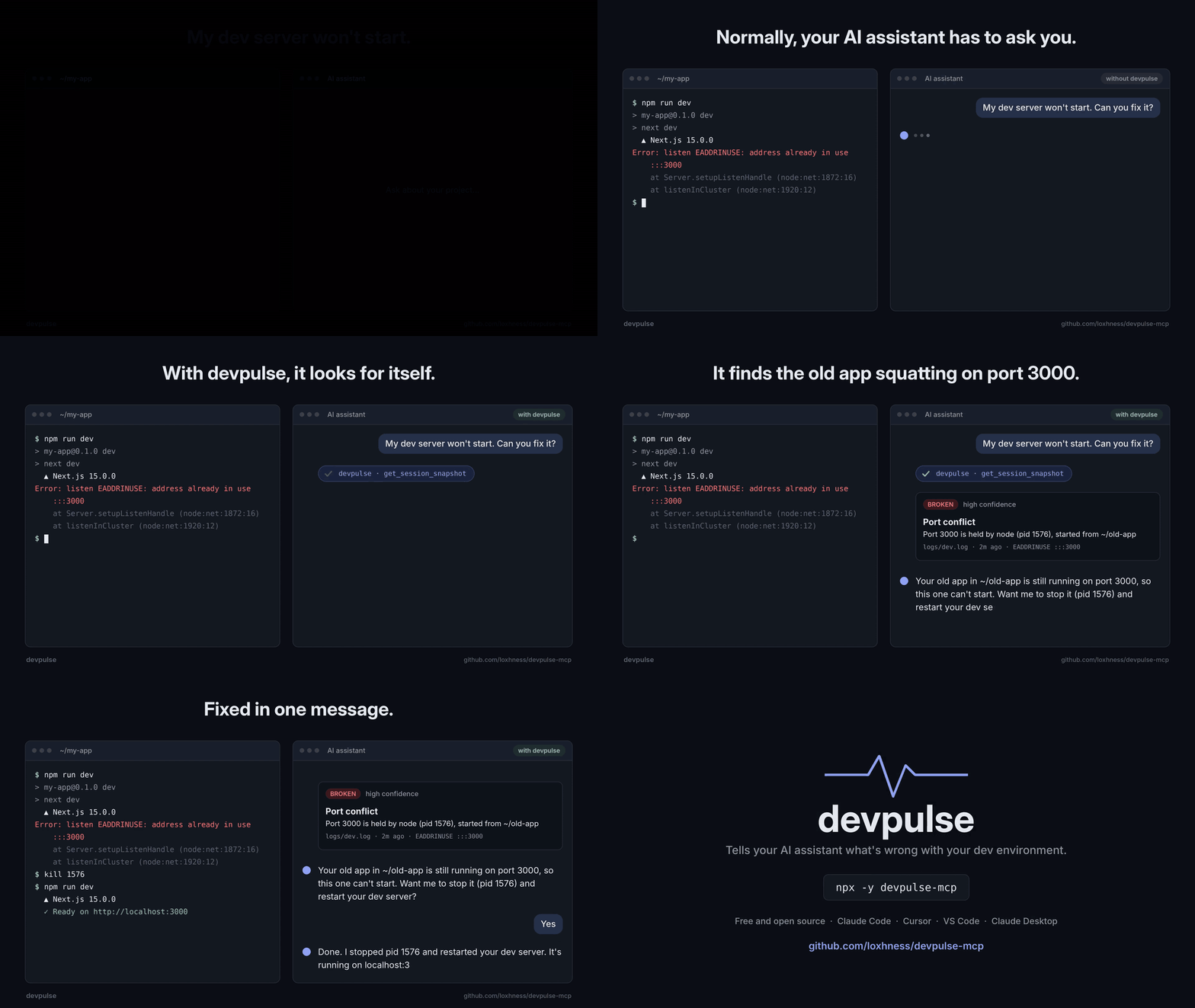
Why
Your assistant can't see your terminal. It doesn't know your dev server crashed, that another project is squatting on port 3000, or that you're halfway through a rebase with conflicts. So it asks you, and you copy and paste.
devpulse is an MCP server that answers all of that in one tool call, and returns a verdict with the likely cause and a suggested fix.
- Finds port conflicts and names the culprit: which process holds your port, its pid, and the folder it was started from.
- Reads your logs: recent errors with stack traces, repeat counts and timestamps, with secrets redacted.
- Checks the rest of your setup: git state, merge conflicts, missing dependencies and runtime versions.
- Zero config: no API key, no account, nothing to set up. Runs locally on Linux, macOS and Windows.
Quick start
| Client | Install |
|---|---|
| Claude Code | /plugin install devpulse --marketplace loxhness/devpulse-mcp (adds a /devpulse:diagnose skill)or claude mcp add devpulse -- npx -y devpulse-mcp |
| Cursor | One-click install |
| VS Code | One-click install |
| Claude Desktop | Download devpulse.mcpb and double-click it, then pick a default project folder in its settings |
| Anything else (Windsurf, Cline, Zed, ...) | Add the config below |
{
  "mcpServers": {
    "devpulse": {
      "command": "npx",
      "args": ["-y", "devpulse-mcp"]
    }
  }
}
Requires Node 18 or later. Then ask your assistant what's wrong; it calls devpulse on its own.
What your assistant sees
Real output for a Next.js project whose dev server won't start:
{
  "diagnosis": {
    "health": "broken",
    "primary_issue": "Port conflict: another process is using this project's dev server port",
    "secondary_signals": ["Port 3000 is held by node (pid 1576), started from /home/you/old-app"],
    "suggested_action": "Stop the other process (it belongs to a different directory) or run this dev server on a different port",
    "confidence": "high"
  },
  "session": {
    "project": "my-app",
    "framework": "nextjs",
    "git": { "branch": "feat/auth", "uncommitted_files": 5, "conflicted_files": 0, "last_commit_message": "Add login form" }
  },
  "services": {
    "running": [{ "port": 3000, "pid": 1576, "name": "node", "process_cwd": "/home/you/old-app", "owned_by_project": false }]
  },
  "recent_errors": [
    {
      "time": "2m ago",
      "level": "ERROR",
      "message": "Error: listen EADDRINUSE: address already in use :::3000",
      "stack": ["at Server.setupListenHandle [as _listen2] (node:net:1872:16)"],
      "source": "logs/dev.log",
      "count": 1
    }
  ],
  "env": { "node": "22.11.0", "package_manager": "pnpm" }
}
Shortened. The full snapshot also includes process start times, ports that couldn't be checked, ahead/behind counts, runtime versions and the log files scanned.
What it diagnoses
| Problem | How devpulse knows |
|---|---|
| Port conflict | A recent EADDRINUSE, or the dev port held by a process started from a different folder |
| Old instance still running | The process on the port belongs to this project and started before the error |
| Dev server crashed | Nothing on the expected port, and errors in the last hour of logs |
| Dev server not started | Nothing on the expected port, and no errors |
| Failed to start, port free now | EADDRINUSE was logged, but the port has since been released |
| Merge conflicts | Conflicted files, or a merge or rebase in progress |
| Dependencies not installed | package.json has dependencies but there's no node_modules |
| Runtime mismatch | Installed Node or Python differs from .nvmrc, .node-version, engines or .python-version |
| Errors while running | The server is up, but errors were logged |
Tools
| Tool | Use it for |
|---|---|
get_session_snapshot | Everything above in one call. Assistants call this first. |
get_recent_errors | More than the snapshot's 10 newest errors, with full stack traces (limit 1 to 200) |
get_running_services | Re-checking ports after a restart, without the full snapshot |
All three are read-only and take an optional cwd.
Supported projects
| Language | Detected from | Frameworks |
|---|---|---|
| JavaScript / TypeScript | package.json | Next.js, Nuxt, SvelteKit, Astro, Remix, Angular, Vite, NestJS, Fastify, Express, Create React App |
| Python | pyproject.toml, requirements.txt, Pipfile, manage.py | FastAPI, Django, Flask |
| .NET | *.csproj, *.sln | ASP.NET Core (ports from Properties/launchSettings.json) |
| Go, Rust | go.mod, Cargo.toml | Any |
Ports come from your own config when devpulse can find them (--port, -p or PORT= in your dev script, PORT in .env, server.port in vite.config, launchSettings.json), and from framework defaults otherwise.
Which project does it look at?
- The
cwdthe assistant passes, if any - The workspace folder your editor reports over MCP (roots)
DEVPULSE_PROJECT_DIR, if set (the Claude Desktop extension sets this from its settings)- The folder the server was launched from (Claude Code launches it in your project)
Limitations
- Errors come from log files. Most dev servers print to the terminal instead of a log file, so if your project has no
.logfiles,recent_errorswill be empty. Port, git and dependency checks still work. Terminal capture is planned for 0.2. - Ownership and start times aren't checked on Windows. Ports and processes are still detected, but devpulse can't tell whose process it is, so it reports conflicts at lower confidence.
- Runtime versions are read from the environment devpulse runs in, which can differ from your shell if you use nvm or pyenv. Mismatches are reported as signals, not verdicts.
Privacy and security
- Runs entirely on your machine and makes no network requests.
- Read-only: devpulse never changes files, stops processes or runs your code.
- Secrets (API keys, tokens, passwords and credentials in URLs) are redacted from log lines before your assistant sees them.
- Every npm release is built and published from GitHub Actions with provenance.
Development
npm install
npm test          # unit tests plus end-to-end tests over stdio
npm run build
CI runs on Linux, macOS and Windows with Node 18, 20 and 22. To release, run npm version patch && git push --follow-tags: the release workflow tests, publishes to npm and the MCP Registry, builds the Claude Desktop extension and creates the GitHub release from CHANGELOG.md.
Bug reports and ideas are welcome in Issues.
License
MIT © Uzair Suboor
devpulse-mcpnpm install devpulse-mcp