
legato
io.github.legatolabs/legato
A computer for any agent: a desktop container, your screen or the cloud, with settled screenshots.
Documentation
Legato
Open-source computer-use harness for any OpenAI-compatible model: Qwen, DeepSeek, Claude, or your own vLLM server.
It drives a desktop with a computer tool, waits for the screen instead of sleeping, and bounds every model call.
Bring your own computer: your own screen (macOS, Windows, Linux), any sandbox you already run, or a cloud desktop.
Give your coding agent a computer
Claude Code, Codex, Cursor or any MCP client gets a desktop to look at and click: a container on your machine (needs only Docker), your own screen, or a cloud desktop (guide).
pip install "legatolabs[mcp]"
claude mcp add legato -- legato mcp --sandbox docker
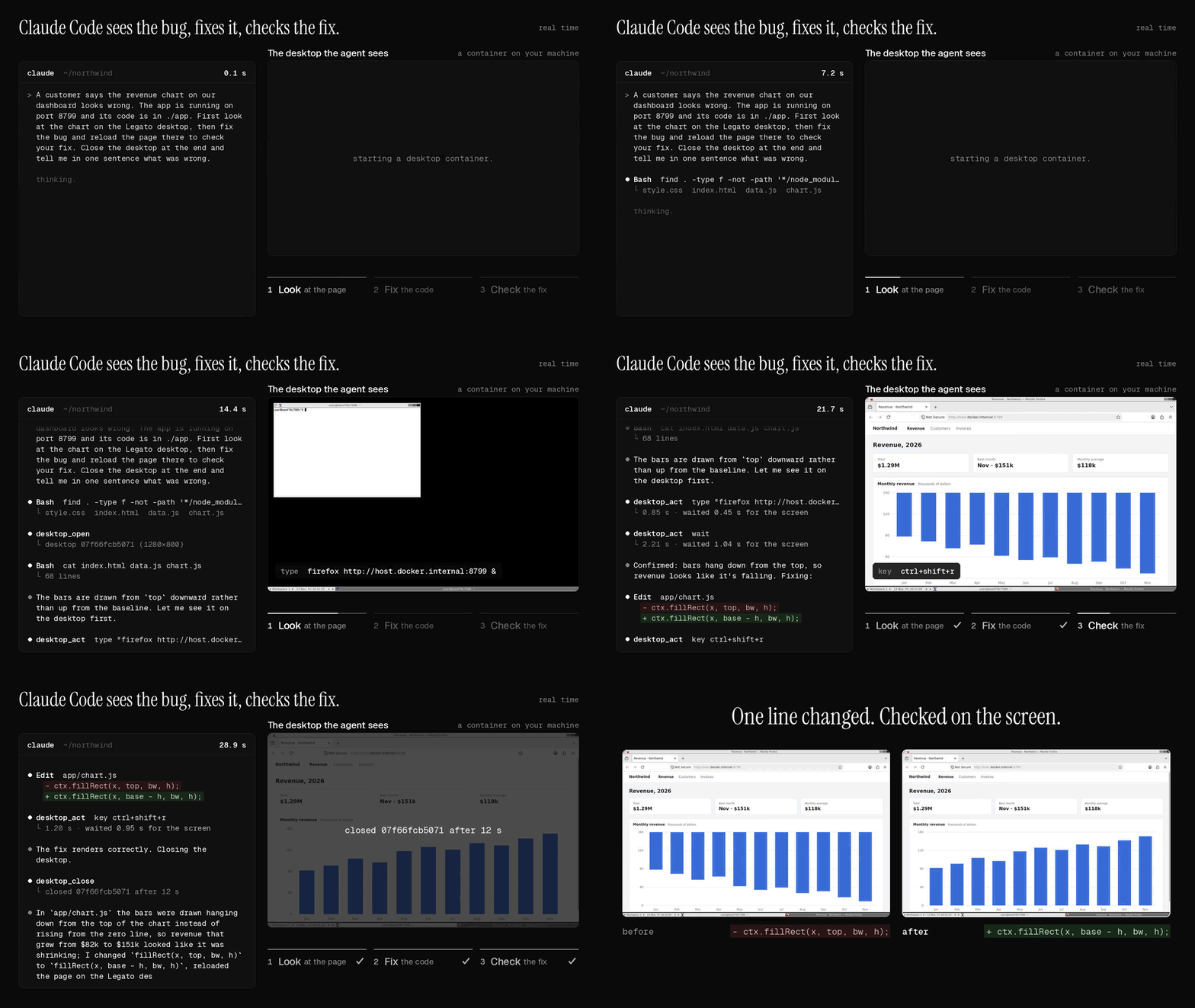
A real run in real time: told that a revenue chart looks wrong, Claude Code opens the dashboard in a desktop container, sees the bars hanging from the top, changes one line and reloads to check the fix. Each image is a screenshot the MCP server returned.
Or install the Claude Code plugin, which adds the server and a skill: /plugin install legato --marketplace legatolabs/legato. One click for other editors (these run the same server with uvx):



Build an agent in Python
pip install "legatolabs[e2b]" # PyPI name: legatolabs. Import name: legato.
import os, legato
from e2b_desktop import Sandbox                       # needs E2B_API_KEY

agent = legato.Harness(model="qwen/qwen3.8-27b", base_url="https://openrouter.ai/api/v1",
                       api_key=os.environ["OPENROUTER_API_KEY"])
desk = Sandbox.create()
result = agent.run("Open the terminal and print the date", legato.attach(desk))
print(result.report())                                # where the time went
desk.kill()
legato.local() drives your own screen instead, legato.providers.docker(w, h) a desktop container on your
machine, and legato.attach(shell=run) any Linux sandbox you can run a command in, such as a VM
(sandboxes). With a model on your own GPU, nothing leaves your machine:
pip install "legatolabs[local]"
legato run "Open the terminal and print the date" --sandbox local --model Qwen/Qwen3.5-9B --base-url http://localhost:8000/v1
Results
Same model, same desktops, 24 office tasks per run. Method and raw data.
| Model | Compared with | Time | Success |
|---|---|---|---|
| Claude Sonnet 5.5 | Anthropic's reference loop | 1.48x faster | 48/48 vs 48/48 |
| Qwen3.8-27B | OSWorld's Qwen agent | same | 71/96 vs 53/96 |
How
- Waits until the screen stops changing instead of a fixed 2 s sleep.
- Up to 3 actions per turn, one screenshot after them.
- Drops old screenshots in chunks so the prompt cache keeps hitting.
- A wall-clock timeout and a token budget on every model call.
More
- Guides: a computer for your coding agent · test a desktop app · local model · office apps · why agents are slow
- Models · Sandboxes · MCP server · RL rollouts · FAQ
- Compare: computer-use MCP servers · Playwright MCP · Anthropic's demo · OSWorld's Qwen agent · Agent S3 · UI-TARS-desktop
- Migrate: from cua-agent · from Bytebot
- For coding agents: llms.txt · AGENTS.md
Apache-2.0. Hosted desktops and models: legato.computer.
legatolabspip install legatolabs