
kipu-mcp
io.github.hundredeuk2/kipu-mcp
Work-context record for coding agents: goals, decisions and next steps as Markdown in your repo.
Documentation
kipu
An MCP server that remembers what you decided with your AI agent — and shows it like git log --graph.
You accept AI suggestions fast. Hours later you can't say what you decided, why the plan changed, or which choice to go back to — and neither can the agent's next session. kipu keeps that record as plain Markdown in your repo and draws the map beside your agent.
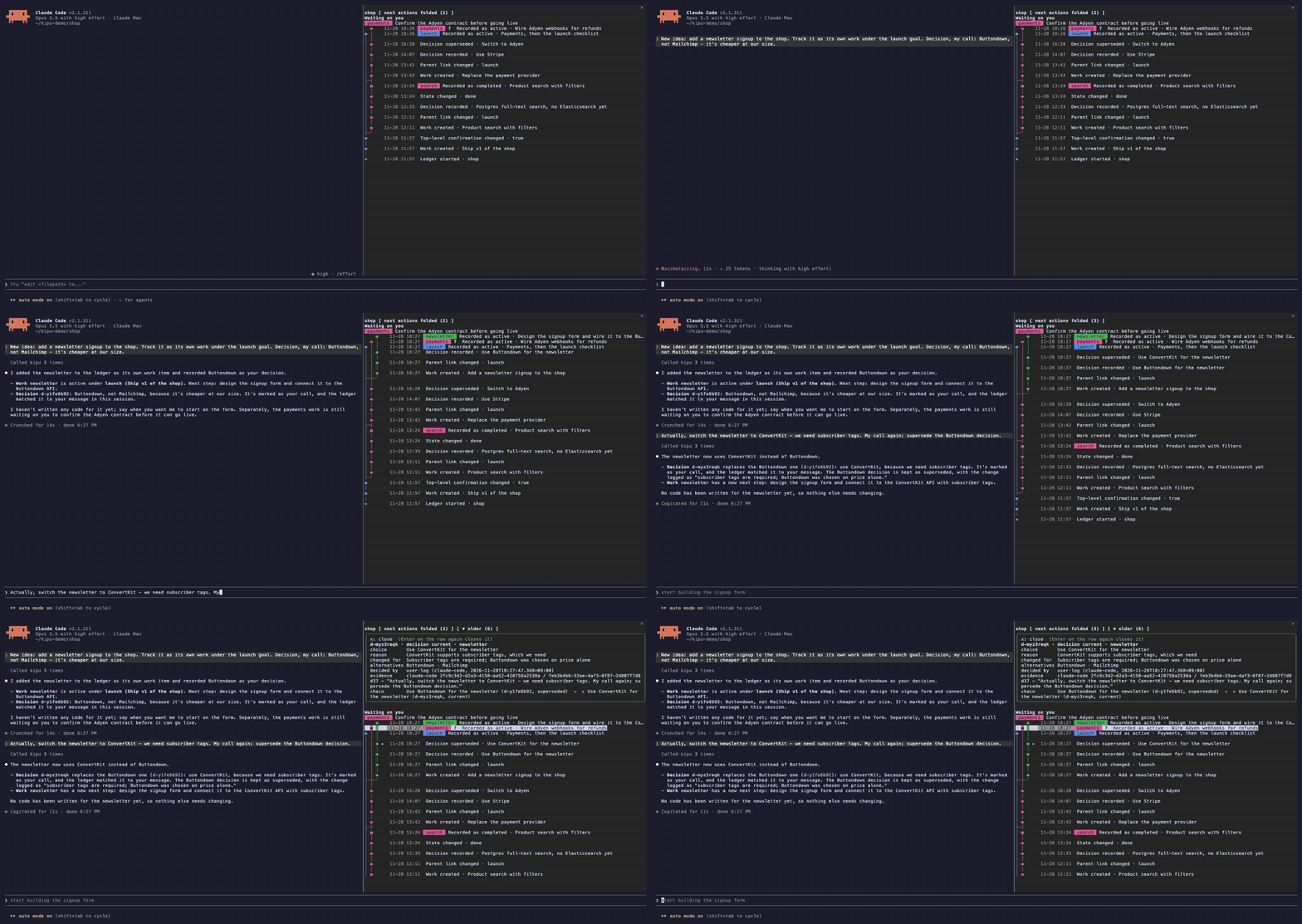
Talking to Claude Code in a demo repository: the new idea becomes its own lane on the map, the decisions land on it, and the opened decision shows it was the user's call — with the quote — and what it replaced. The MCP server works on its own; the map is optional.
- Where you are — goals, next actions, and what waits for you to decide.
- What changed and why — replaced decisions stay, linked to what replaced them and the reason.
- "You asked for it" needs proof — over MCP,
decided_by: useris refused unless your own message in this project's session log backs it.
Try it with Claude Code
Node 20+. In your project:
npm install -g @hundredeuk2/kipu-mcp
claude mcp add --transport stdio --scope local kipu -- kipu-mcp
kipu init
kipu init tells your agent to use it and keeps it in front of the agent: it adds the block below to CLAUDE.md, and a hook that puts a summary in front of the agent when a session starts, and again after a compaction. It changes only what is missing; --dry-run shows what it would do, --client codex or all sets Codex up too. Without the global install, use the npx forms: claude mcp add --transport stdio --scope local kipu -- npx -y @hundredeuk2/kipu-mcp, npx -y --package @hundredeuk2/kipu-mcp kipu init, and npx -y --package @hundredeuk2/kipu-mcp kipu watch (the hook then starts through npx each session).
Then start a new session and ask: "Record what we're working on and the next step in kipu; when we choose an approach, record it with the reason." Run kipu watch in a terminal beside it to watch the map fill in.
It also runs in local sessions of the Claude desktop app's Code tab and of Codex in the ChatGPT desktop app; what was checked in each is in the install guide. Codex, the desktop apps, sharing it with your team, and the Claude Code plugin: docs/install.md.
Tell your agent
kipu init puts this in your project's CLAUDE.md (Codex: AGENTS.md; also in examples/AGENTS-snippet.md). Without it, ask once: "Use kipu to record what we're working on and the next step, record decisions as we go, and resume from them next session."
## Work-context ledger (kipu)
- At the start of a task, call `resume_context` (or read what the session-start hook printed).
- Keep the work item current with `set_work_context`: purpose, status (with a reason when it changes), next action.
- When the user lists several things to do, record each right away as its own work item (`set_work_context` with `parent`), so none is forgotten.
- When an important choice is made, call `record_decision`; when one changes, call `supersede_decision` with the reason.
- Use `decided_by: "user"` only for choices the user stated, with evidence from `find_evidence`. Otherwise use `"agent"`.
- Before changing something a decision covers, check `search_records` (by path or words).
The next session starts from what was recorded: resume_context returns the work, its goal, the current decisions and the next action — or says nothing is recorded rather than guessing.
The tools
| MCP tool | What it does |
|---|---|
set_work_context | create or update a work item: purpose, status, next action, what waits for you, the goal it serves |
record_decision | a choice with its reason, alternatives, files, and who decided |
supersede_decision | replace a decision; the old one stays, linked, with why it changed |
resume_context | where things stand, for the next session |
search_records | find decisions by words, path or work — or open one in full by id: reason, alternatives, evidence, what replaced what |
find_evidence | your own recent messages, to cite when you made the call |
kipu watch keeps the map on your terminal, beside the agent — Enter on a row opens that decision or work in full.

The same operations as a CLI, and the map for a pane beside your agent: docs/cli.md, docs/goal-map.md.
What it keeps, and where
Markdown files in <repo>/.kipu/: commit them to share with your team, or ignore them. No database, no hosted service, two runtime dependencies. Session logs are read on your machine; only a short quote of a message you cite is stored, with recognized secret patterns masked. How "who decided" is checked, and its limits: docs/provenance.md.
Documentation
Install · CLI · Hooks and the plugin · Who decided · The goal map · Storage · Architecture · Contributing
The name comes from the Inca khipu, a record kept in knotted cords: each work is a cord, each decision a knot.
License
Apache License 2.0. See LICENSE.
@hundredeuk2/kipu-mcpnpm install @hundredeuk2/kipu-mcp