
sextant
io.github.hulagerushikesh/sextant
Search your own PDFs, Markdown and text files from any assistant. Local, no key, cited passages.
Documentation
sextant
Search your own documents from any AI assistant — and see the numbers that say how well the search works.
sextant is a knowledge base that runs on your own machine as a standard Model Context Protocol server. Point it at a folder of PDF, Markdown or text files, plug it into Claude Desktop or any other MCP client, and ask. Answers come from your documents and name the file and the page.
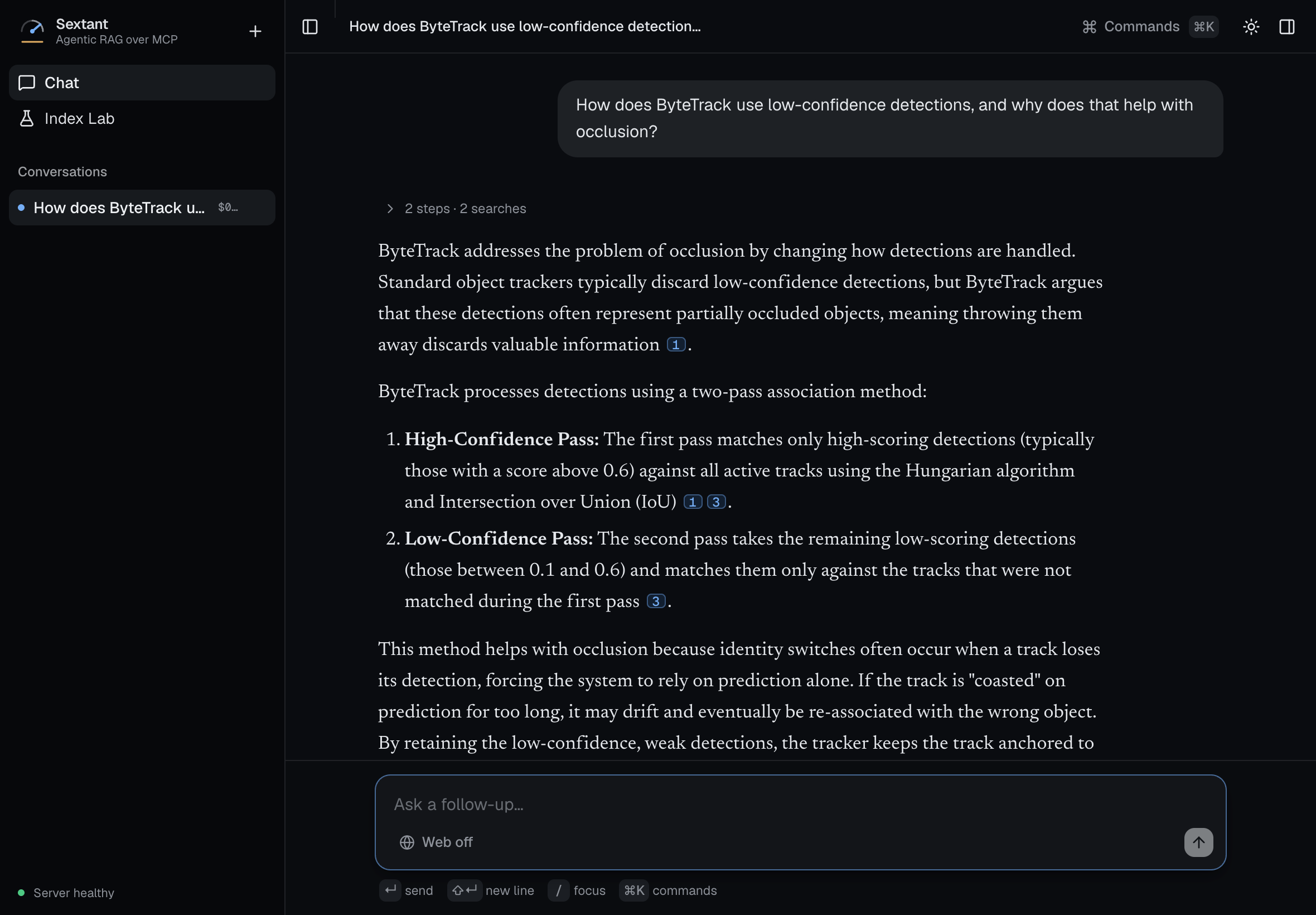
A real answer from the project's own web interface (2026-11-12). Each numbered marker opens the passage it came from.
Quickstart
Four steps. Most of the time is two downloads — about 170 MB of libraries, then about 180 MB of search models. No account and no key. It needs Python 3.11 or newer — check first, because an older one fails with a confusing "no matching distribution" message:
python3 --version
1. Install it into a folder of its own, so its location is known:
python3 -m venv ~/sextant
~/sextant/bin/pip install sextant-kb
2. Add your documents — any folder of PDF, Markdown or text files:
~/sextant/bin/sextant-ingest ~/Documents/notes -r
The first run downloads the search models, once; after that it works offline. A note that it is storing text only is expected: an optional model-written overview per document needs a Gemini key, and nothing else does. Searching happens on your machine; the passages it finds go to whichever assistant you plug it into.
3. Plug it into your assistant. In Claude Desktop: Settings → Developer →
Edit Config, then add this and restart the app. The command must be a full
path; echo ~/sextant/bin/sextant-kb prints yours.
{
  "mcpServers": {
    "knowledge-base": {
      "command": "/Users/you/sextant/bin/sextant-kb"
    }
  }
}
4. Ask. For example: "Search my knowledge base — what do my notes say about onboarding?" The assistant calls the search tool and answers from your documents, with the source of each passage.
To see what is indexed, or take a document back out:
~/sextant/bin/sextant-forget --list
Any other MCP client works the same way: its server command is the full path
to sextant-kb. On Windows the config file is
%APPDATA%\Claude\claude_desktop_config.json and a virtual environment keeps
its commands in Scripts\ rather than bin/; this project has not been
tested on Windows.
One line instead: Claude Code, VS Code, Cursor
With uv installed, one pasted line replaces the
four steps: it installs sextant, tells the assistant about it, and points it
at a folder. Change ~/Documents to the folder you want searched. Each line
runs --version first, so the first install (a few hundred MB) finishes in
the terminal rather than timing out inside the assistant. When the assistant
starts it, the folder is indexed in the background and kb_stats shows the
progress and any file it could not read.
Claude Code:
uvx --from 'sextant-kb>=0.10' sextant-kb --version && claude mcp add sextant --scope user --env SEXTANT_FOLDER=~/Documents -- uvx --from 'sextant-kb>=0.10' sextant-kb
VS Code (needs the code command: in VS Code run Shell Command: Install
'code' command in PATH once):
uvx --from 'sextant-kb>=0.10' sextant-kb --version && code --add-mcp '{"name":"sextant","command":"uvx","args":["--from","sextant-kb>=0.10","sextant-kb"],"env":{"SEXTANT_FOLDER":"~/Documents"}}'
Cursor: add this to ~/.cursor/mcp.json. It has not been tried in
Cursor yet.
{"mcpServers": {"sextant": {"command": "uvx", "args": ["--from", "sextant-kb>=0.10", "sextant-kb"], "env": {"SEXTANT_FOLDER": "~/Documents"}}}}
What your assistant gets
| Tool | Does |
|---|---|
kb_search | Finds the passages that answer a question, ranked, with source and page |
kb_list | Lists every document with its title, size and what it is about |
kb_ingest | Adds documents; re-using an id replaces the old version |
kb_stats | Library size, search model, where it is stored |
kb_ann_benchmark, kb_ann_compare | Compare index types on your own library |
Your library is stored in your user-data folder (set SEXTANT_CHROMA_DIR to
move it), never inside the install, so reinstalling does not lose it.
How good is the search
Measured, on a committed test set, and re-checked on every change:
| Search stage | Right passage first |
|---|---|
| Meaning search only | 87% |
| Keyword search only | 78% |
| Both, fused | 91% |
| Both, fused, then re-read (the shipped pipeline) | 93% |
65 test questions over 21 documents. Asked 10 questions those documents cannot answer, it declines 8.
The full comparison, the nine ideas that were measured and rejected, and what
a question costs are on one page: docs/RESULTS.md. Every
figure there is generated from the measurement files.
The full app (optional)
The package above is the reusable part. This repository also holds what is built on it: an agent that decides for itself what to look up, a web interface with clickable citations, and the evaluation tools. That part needs a Gemini API key, which is the only key the project reads.
git clone https://github.com/hulagerushikesh/sextant && cd sextant
python3 -m venv .venv && ./.venv/bin/pip install -e ".[dev]" && (cd frontend && npm install)
cp .env.example .env
Add your key to .env, then:
./start_all_services.sh
The interface opens on http://localhost:3000. Or run both halves in
containers with docker compose up --build. Details, every setting and the
HTTP routes are in docs/running.md.
Honest status
Last checked 2026-11-12.
| What | State |
|---|---|
| Search over your own documents: PDF, Markdown, text; add, replace, remove | Working |
Standard MCP server, published as sextant-kb | Working — on the public package index and in the official MCP registry as io.github.hulagerushikesh/sextant; the quickstart installs the latest release |
| Measured search quality with a check on every change | Working |
| Agent, web interface, citations, cost per question, daily spend cap | Working |
| Each person's uploads kept apart on a shared deployment | Working — proven on a hosted box 2026-11-04 |
| Hosted demo | None. The hosted box was removed 2026-11-13; deploy/ is the recipe to build one |
| Used by anyone outside the project | Not yet — see planning/PLAN.md |
Known limits, stated plainly, are in docs/known-issues.md.
The two that matter most to a new user: a scanned PDF with no text layer is
refused rather than read, and the test questions were written alongside the
test documents, so the numbers grade the search pipeline, not your library.
Read more
| Page | What is in it |
|---|---|
docs/RESULTS.md | The numbers, and what was rejected |
docs/how-it-works.md | The agent loop, the search stages and why each exists, the model port |
docs/running.md | Setup, settings, routes, repository layout |
docs/interface.md | What the web interface does and why |
docs/known-issues.md | Limits and deliberate trade-offs |
docs/history.md | The roadmap as it was built, phase by phase |
learning/ | A study path, plus the note behind every measurement |
planning/ | The plan, progress and cost |
Credits
Started as SudhanshuR37/AgenticRAG
with Sudhanshu Randive; rebuilt from the ground up in September 2026 and
renamed from AgenticRAG in 0.7. MIT licensed — see LICENSE.
PDF reading uses PyMuPDF, which is AGPL-licensed.
sextant-kbpip install sextant-kb