
lomberk
io.github.ege-usta/lomberk
Postgres gateway for AI agents: blocks destructive SQL, holds risky writes, undoes applied ones.
Documentation
Lomberk





Every agent write, reversible. Lomberk is an MCP gateway for PostgreSQL. AI agents send SQL through it instead of holding database credentials. It blocks destructive commands, holds large or sensitive writes for a human, records every changed row, and can undo any applied write, including foreign-key cascades.
Just want a seatbelt for Claude Code? Lomberk Seatbelt is a free plugin that makes your agent ask before DROP, TRUNCATE, DELETE without WHERE, prisma migrate reset, dropdb and friends. Install it in two commands.
Quickstart (60 seconds)
You need uv and the owner's connection string of a PostgreSQL 14+ database (a role that can create roles: postgres on Supabase, Neon and RDS).
uvx lomberk setup # asks for the owner connection string; what you type stays out of your shell history
In a script, set LOMBERK_INSTALL_DSN instead and add --yes.
Setup creates two least-privilege roles with generated passwords, installs Lomberk, lists your tables and makes the ones you pick undoable, then writes lomberk.yaml and a private .env (mode 600) and runs lomberk doctor on them. It never changes a role or file that already exists. The owner connection string is used once and never saved. At the end it prints the line for your MCP client, for example:
claude mcp add lomberk -e LOMBERK_CONFIG=/path/to/lomberk.yaml -- uvx lomberk serve
Cursor, Claude Desktop, VS Code and Codex get their config snippet too. Then ask your agent to change something:
lomberk log                 # what your agents changed, newest first
lomberk undo cp_…           # put it back, cascades included
lomberk approve cp_…        # let a held write run (or: lomberk reject cp_…)
lomberk doctor              # check the setup any time
Supabase, Neon, RDS, Railway: docs/hosted-postgres.md. On Supabase, use the session pooler connection string (IPv4); setup derives the lomberk_agent.<project-ref> login names from it.
What the agent gets
| Tool | |
|---|---|
execute_sql | One statement through the hard gate, the policy and capture. Replies with a checkpoint (cp_…), APPROVAL REQUIRED, or why it was denied |
describe_tables | The tables it can use, their columns (secret ones hidden) and which writes wait for a human |
wait_for_approval | Waits for a person to approve or reject a held write, reporting progress, then says whether it ran |
checkpoint_status | What happened to one of its writes: waiting, applied, rejected or undone |
list_my_changes | Its own recent writes with their tokens, so it can tell you what to undo |
The agent can't approve or undo anything. That takes the admin key, the CLI or (Pro) Slack, SSO or the panel.
9-second database deletion demo
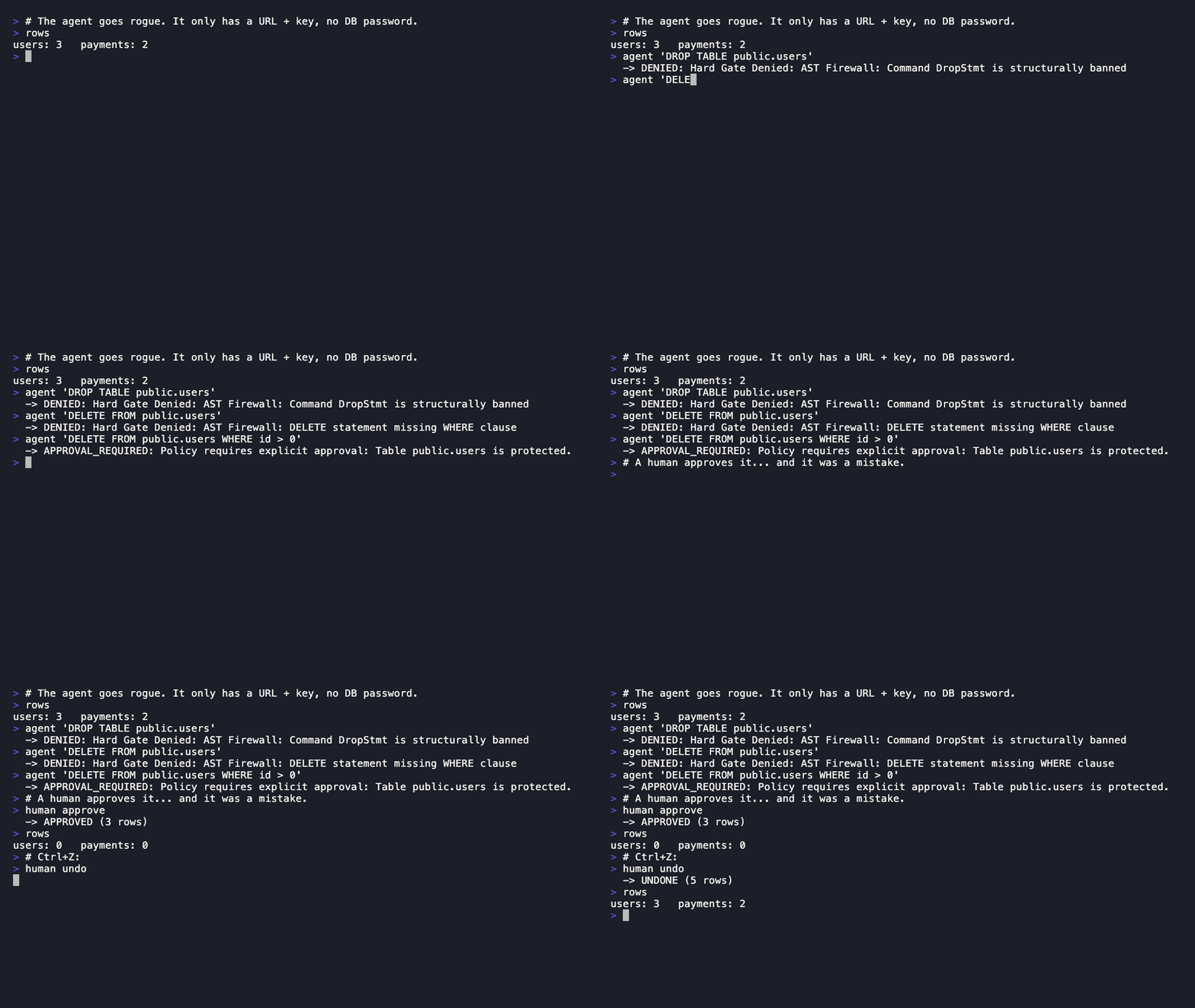
In April 2026 an autonomous coding agent deleted a production database in 9 seconds (through an over-privileged infrastructure token). Lomberk closes the other door: an agent's own database access. Here is what a rogue agent can and can't do when its SQL goes through Lomberk.
1. Start the stack
git clone https://github.com/ege-usta/lomberk && cd lomberk
docker compose up -d --build
curl localhost:8000/readyz          # {"status":"ready"}
This starts a demo pocketos database (users ← payments with ON DELETE CASCADE), installs Lomberk with two least-privilege roles, registers both tables, and starts the gateway.
2. Connect your agent (it gets a URL and a key, nothing else)
claude mcp add --transport http lomberk http://localhost:8000/mcp \
  --header "Authorization: Bearer demo-agent-key"
Any MCP client that speaks Streamable HTTP works the same way.
3. The agent goes rogue
| Agent sends | Lomberk |
|---|---|
DROP TABLE public.users | Denied: DDL is structurally banned |
DELETE FROM public.users | Denied: write without WHERE |
DELETE FROM public.users WHERE id > 0 | Held: public.users is protected → APPROVAL REQUIRED. Token: cp_… |
UPDATE public.payments SET amount = 0 WHERE id > 0 | Applied, with a checkpoint: 2 rows on an unprotected table. One undo call puts the old amounts back |
The same write on more rows than max_rows_without_approval (10 in the demo) | Held: it ran, was counted and rolled back, and now waits for a person |
4. A human decides (admin key, never given to the agent)
H="X-API-Key: demo-admin-key"
curl -H "$H" localhost:8000/v1/checkpoints/pending
curl -H "$H" "localhost:8000/v1/checkpoints?status=applied"   # recent writes, to find the cp_ to undo
curl -H "$H" -X POST localhost:8000/v1/checkpoints/cp_…/approve    # or /reject
curl -H "$H" -X POST localhost:8000/v1/checkpoints/cp_…/undo       # users AND cascaded payments come back
Pending requests expire after agent.approval_timeout_minutes. Review the exact SQL first with GET /v1/checkpoints/cp_… or lomberk show cp_….
See the rows, not just the SQL. When a write is held, Lomberk runs it once, records what it changed and rolls it back, so the approver sees the effect before deciding, cascades included:
$ lomberk show cp_…        # the agent sent: DELETE FROM public.users WHERE id = 1
would change: 2 row(s) in public.users (1), public.payments (1) (dry run when held)
  delete public.users {"id": "1"}: {"id": 1, "name": "Alice CEO", "plan": "enterprise", "email": "alice@pocketos.com", …}
  delete public.payments {"id": "1"}: {"id": 1, "amount": 1000.0, "status": "success", "user_id": 1}
The same preview is in the web panel and the API; Slack gets the counts only. Secret columns are masked, and columns hidden from the agent role never appear. A held write that would fail (a duplicate key, a missing parent) is refused at once instead of waiting for a person. The preview is a snapshot of the moment it was held. If a table's own triggers do something a rollback can't take back, set approvals.preview: false.
Configuration (lomberk.yaml)
limits:
  max_rows_without_approval: 10   # larger writes are rolled back and held
  statement_timeout_ms: 15000
protected_tables:                 # any write, or FK cascade, reaching these is held
  - public.users
sensitive_columns:                # like `password`: never shown to the agent, hidden by the DB on register
  - pass
  - settings                      # a JSON column that holds secrets
agent:
  approval_timeout_minutes: 30
Unknown keys fail startup, so a typo can never silently turn protection off. The gateway reads ./lomberk.yaml; when it starts somewhere else (MCP clients usually launch lomberk serve from another directory), set LOMBERK_CONFIG to the file's absolute path. If that file is missing, startup is refused; a missing ./lomberk.yaml only prints a warning and runs with defaults (no protected tables).
Environment: LOMBERK_CONFIG (path to lomberk.yaml), LOMBERK_ADMIN_DSN (control role), LOMBERK_AGENT_DSN (agent role), LOMBERK_API_KEY (agent), LOMBERK_ADMIN_KEY (approvers), LOMBERK_AUDIT_LOG (JSONL path), LOMBERK_LICENSE_KEY (Pro), LOMBERK_METRICS_KEY (turns on /metrics). Keys must be 32+ random characters (openssl rand -hex 32); the gateway refuses weak or demo keys unless LOMBERK_ALLOW_WEAK_KEYS=true (laptop demos only).
Installing on your own database
pip install lomberk          # Slack and SSO: pip install "lomberk[pro]"; or: docker build -t lomberk .
export LOMBERK_INSTALL_DSN=postgresql://owner@db/app       # used only for install
# first, as that owner: CREATE ROLE lomberk_control LOGIN PASSWORD '...'; CREATE ROLE lomberk_agent LOGIN PASSWORD '...';
lomberk init --control-role lomberk_control --agent-role lomberk_agent
lomberk register public.orders --agent-role lomberk_agent  # repeat per table (and FK children)
lomberk verify-ledger                                       # tamper-evidence check
What an agent can't do, with the exact refusal for 20 real attacks: docs/attack-gallery.md.
Step-by-step for Supabase, Neon, Amazon RDS and Railway (roles, connection strings, RLS, updated_at triggers): docs/hosted-postgres.md.
Common questions before adopting Lomberk: docs/faq.md.
Local, single-user development without the service: lomberk serve (stdio MCP). Do not use this mode with agents that have shell access. See SECURITY.md.
Team features (Solo and Pro)
The web panel and audit export come with Solo and Pro; Slack approvals, approver SSO and the two-person rule are Pro.
Slack approvals and approver SSO need extra libraries: pip install "lomberk[pro]", or uvx --from "lomberk[pro]" lomberk serve. The Docker image has them. Without them the gateway refuses to start and says what to install.
Approve in Slack (Pro)
Create the app from slack/app-manifest.json (bot scope chat:write only, Socket Mode, so no public URL is needed), invite the bot to your approvals channel, then:
slack:
  channel_id: C0123APPROVALS
  team_allowlist: [T0123]
  admin_allowlist: [U0ALICE, U0BOB]   # only these users' clicks count
  include_sql: false                  # default: SQL never leaves for Slack
LOMBERK_SLACK_ENABLED=true LOMBERK_SLACK_APP_TOKEN=xapp-… LOMBERK_SLACK_BOT_TOKEN=xoxb-…
Every held request is posted with Approve/Reject buttons, and the message updates to the final state. The approver's Slack ID is written to the audit log.
Approver SSO (Pro)
Approvers sign in with the company identity provider (Okta, Microsoft Entra ID, Google, Keycloak, any OIDC issuer) and send their ID token. The audit log then records the person (oidc:alice@corp.com), not a shared key.
sso:
  issuer: https://corp.okta.com          # keys are discovered from the issuer
  audience: lomberk-approvals           # the client ID registered for Lomberk
  allowed_groups: [db-approvers]         # and/or allowed_identities: [alice@corp.com]
  # allow_admin_key: true                # the shared key is OFF once SSO is on; CLI stays as break-glass
curl -H "Authorization: Bearer $ID_TOKEN" -X POST localhost:8000/v1/checkpoints/cp_…/approve
Only asymmetrically signed tokens (RS/PS/ES) for this issuer and audience are accepted, and they must be unexpired. With the default identity_claim: email, the token must mark the email as verified. Entra ID does not send that flag, so set identity_claim to upn or oid there.
Web approval panel (Pro)
Open https://<gateway>/panel/ for writes waiting for approval, the history with who approved each one, one-click undo, and exports. Approvers sign in with SSO or the admin key. To offer "Sign in with SSO", register <panel_url>/panel/sso/callback as a redirect URI at your IdP:
sso:
  # ...the SSO settings above, with audience = the panel's client ID
  panel_url: https://lomberk.corp.com    # public https URL of this gateway
Set LOMBERK_SSO_CLIENT_SECRET if your IdP requires a client secret for that client.
Two-person rule (Pro)
approvals:
  required: 2      # a held write runs only after two different people approve it
Only verified identities count: the N people must all approve through SSO (panel or API), or all through Slack. Mixing systems doesn't add up, because one person can hold both. Admin-key and CLI approvals are recorded but don't count, since they prove no identity. One reject cancels the write. Every approval is stored in the append-only lomberk.approvals table.
Audit export (Pro)
curl -H "X-API-Key: $ADMIN_KEY" "localhost:8000/v1/audit/export?format=csv&since=2026-01-01" > audit.csv # or format=jsonl
Each checkpoint comes with its SQL, agent, status, rows, who approved it and its ledger hash. The panel has the same export as buttons.
License key
The web panel and audit export need LOMBERK_LICENSE_KEY with a Solo or Pro key; Slack approvals, SSO and the two-person rule need Pro. A Solo key with Pro features configured refuses to start and says which feature needs Pro. The key also sets how far back undo reaches: 24 hours without one, 30 days with Solo or Pro, no limit with Enterprise. Age counts from when the write ran (for a held write, its last approval). An older checkpoint answers expired (HTTP 403) and stays as it is.
Buy a key on the pricing page: it arrives by email right away and renews with your subscription. The gateway checks the key with Polar (api.polar.sh) once at startup. That call sends the key and, for a Pro key, a random label for this database (lomberk.license_activation), so one Pro key covers up to 3 databases. Free one up in Polar's customer portal. lomberk undo asks Polar only when a checkpoint is older than 24 hours. If Polar is down (no answer, or a 5xx or 429 reply after three tries), Pro stays on; while Polar doesn't answer at all, startup can take up to about a minute. A database's first activation is never sent twice: after a timeout or a 5xx it isn't retried (Polar may already have used a slot), and the next start tries again. Any other reply that isn't a valid grant counts as an invalid key. If the key is invalid, cancelled or already used on 3 databases, the gateway refuses to start with Pro features configured and tells you why. The key is checked at startup, so a cancelled subscription turns Pro off at the next restart.
How it works
- AST hard gate: PostgreSQL's own parser (
pglast) allows oneSELECT/INSERT/UPDATE/DELETE(or a plainEXPLAIN), schema-qualified writes withWHERE, and ~190 pure built-in functions: window functions, JSON, full-text search,gen_random_uuid()and the rest of what agents write every day. - Policy: protected tables, FK-cascade reach, and a row limit enforced by executing inside a transaction and rolling back.
- Capture: a
SECURITY DEFINERrow trigger records every change (cascades included), bound to a single-use capability token. - Undo: an order that respects foreign keys (parents are restored before children), with conflict and schema-drift checks. Old rows are kept in Postgres' own text form, so every type (json
nulland key order included) comes back exactly. It refuses rather than touching rows written later. - Bounded reads: reads run read-only under
statement_timeout, stream through a server-side cursor and return at most 100 rows (4,000 characters per value, 100,000 in total), telling the agent when more exist. - Ledger: append-only, SHA-256 hash-chained checkpoints.
Monitoring
/healthz (process up) and /readyz (both database roles reachable) need no key. Set LOMBERK_METRICS_KEY to turn on /metrics for Prometheus: decisions by event (denied, held, applied, undone, ...), held writes waiting, and the age of the oldest one, so you can alert when approvals pile up. It carries counts only, never SQL, rows or names.
scrape_configs:
  - job_name: lomberk
    authorization: { credentials: "<LOMBERK_METRICS_KEY>" }
    static_configs: [{ targets: ["lomberk:8000"] }]
Current limits: every registered table needs a primary key (one column or several; lomberk register reads it from the table). Partitioned tables are supported: register the partitioned table and every partition, including ones added later, is covered, and a row moved to another partition comes back where it was. Writes to tables with rules or classic inheritance are refused, and so are partitioned tables with their own triggers. Writes to tables with their own triggers wait for a person, unless you register the table with --allow-triggers (for triggers like updated_at that only change the row itself or tables Lomberk also protects); undo then switches them off while it restores rows, so rows come back exactly. JSON keys must be written as literals (->>'theme'); masking inside JSON is best effort, so list JSON columns that may hold secrets in sensitive_columns. DDL is blocked, not reversible. Full list in SECURITY.md.
Overhead
Measured against Postgres 16 on localhost (200 runs, p50 / p95):
| Path | Latency |
|---|---|
| Hard gate + policy (no DB) | 0.1 / 0.1 ms |
| Read through Lomberk | 5.4 / 6.2 ms |
| Captured, undoable write through Lomberk | 18.3 / 23.9 ms |
| Plain write on a new connection (baseline) | 4.8 / 6.0 ms |
Agent turns take seconds, so this is negligible in practice. Most of the cost is opening new connections; connection pooling is on the roadmap for remote/TLS databases.
Tested on PostgreSQL 14, 15, 16, 17 and 18 — the full test suite runs against every one in CI.
Pricing
| Free | Solo | Pro | Enterprise | |
|---|---|---|---|---|
| For | trying it, side projects | one developer | a team | many databases |
| Price | $0 | $49/month (checkout opening soon) | $199/month or $1,990/year | talk to us |
Hard gate, holds, capture, ledger, remote MCP, API/CLI approvals, lomberk log | ✓ | ✓ | ✓ | ✓ |
| Undo reaches back | 24 hours | 30 days | 30 days | no limit |
| Web panel, audit export | ✓ | ✓ | ✓ | |
| Slack approvals, approver SSO, two-person rule | ✓ | ✓ | ||
| Databases per license key | 1 | up to 3 | unlimited | |
| Billing | card, self-serve | card, self-serve | annual invoice | |
| Help | GitHub issues | GitHub issues | GitHub issues | priority answers; help with your security questionnaire |
Buy Pro: the key arrives by email right away. For Enterprise, open a discussion with how many databases and approvers you have, and we'll reply with a quote. Payments, invoices and sales tax are handled by Polar, the merchant of record.
Lomberk is self-hosted and your data never reaches us. There is no phone support or on-call; the docs and lomberk doctor are built so you can set it up alone.
Development
uv sync --all-groups
PYTHONPATH=src uv run pytest tests/    # needs Docker (testcontainers)
Changes: CHANGELOG.md. Contributing: CONTRIBUTING.md.
License
Open core. Everything outside src/lomberk/ee/ is Apache-2.0: the hard gate, policy, capture, undo, ledger, remote MCP, and API/CLI approvals. You can run the whole safety path for free.
src/lomberk/ee/ (Slack approvals, approver SSO, the web panel, audit export and the license check) is source-available under the Elastic License 2.0 (ELv2), the same license Elasticsearch uses. You can read, run and modify it. The features need a Solo, Pro or Enterprise key, and ELv2 forbids removing or bypassing the key check or offering the software as a hosted service. The two-person rule is core code, but turning it on needs a key.
lomberkpip install lomberk