
tunnel
io.github.e2e-next/tunnel
Local HTTPS proxy and mock server for app tests: record, replay, mock and break API calls
Documentation
tunnel
An AI-first mock server and HTTPS proxy: point a phone, simulator or any HTTP client at it to inspect, record, mock and replay API calls — driven by your coding agent over MCP or the CLI, or by code that embeds it.
📖 中文文档


The problem
Testing a client against its real backend is slow and fragile:
- The cases that matter — an empty list, a failed payment, a slow or broken response — are hard to get out of a real server on demand.
- Real data drifts and test accounts get used up, so the same run gives a different result tomorrow.
- A proxy such as Charles can change an answer, but by hand, one click at a time: neither a test suite nor a coding agent can drive it.
- A separate mock server means pointing the app at another address and writing every answer yourself.
- A CI run that quietly reaches the real backend passes for the wrong reason.
What tunnel does
The app keeps calling its real hosts; it only needs its HTTP proxy pointed at tunnel and tunnel's certificate trusted. tunnel decrypts the hosts you name, logs every call, and answers each endpoint the way its rule says:
- Record the real answers once, each call a JSON file you can commit next to the tests.
- Mock with literal JSON, or with a JavaScript
handler(ctx)that can take the recorded answer and change one field of it. - Replay from the recordings without touching the network. A call nothing
answers is refused rather than sent to the real backend, and
tunnel requests --unmatchedlists it. - Break an endpoint on purpose: any status, a delay, a hung or dropped connection, a body cut off mid-JSON.
- Check what the app called: wait for a call instead of sleeping, then read it back whole.
A rule takes effect on the next request — no restart, no rebuild of the app.
What sets it apart
AI-first: your coding agent drives it
tunnel mcp gives Claude Code, Codex or any MCP client sixteen typed tools.
Every command also takes --json and exits with a code an agent can branch on,
and tunnel agents prints the guide for the version installed.
claude mcp add tunnel -- tunnel mcp        # Claude Code
codex mcp add tunnel -- tunnel mcp         # Codex
Then ask in plain words — "answer the feed with an empty list, then show me what the app called" — and the agent sets the rule, waits for the calls and reads them back.
Embedded in your test code
Each test case sets its own answers and checks what the app called. A Node or TypeScript suite starts tunnel inside its own process, with nothing to start first and no port to agree on:
import assert from 'node:assert/strict'
import { startTunnel } from 'tunnel-use'

const tunnel = await startTunnel({ proxyHost: '127.0.0.1' })
try {
  await tunnel.setRule({ key: 'GET:api.example.test/v5/feed', mode: 'json', json_response: { cards: [] } })
  // ... drive the app through tunnel.proxyUrl; here one request stands in for it
  const answer = await tunnel.check('GET', 'http://api.example.test/v5/feed')
  assert.equal(answer.status, 200)
  const wait = await tunnel.waitForRequest({ key: 'GET:api.example.test/v5/feed', timeout: 5 })
  assert.equal(wait.timed_out, false)
} finally {
  await tunnel.stop()
}
A Swift or Kotlin test case running inside the app does the same over the admin API.
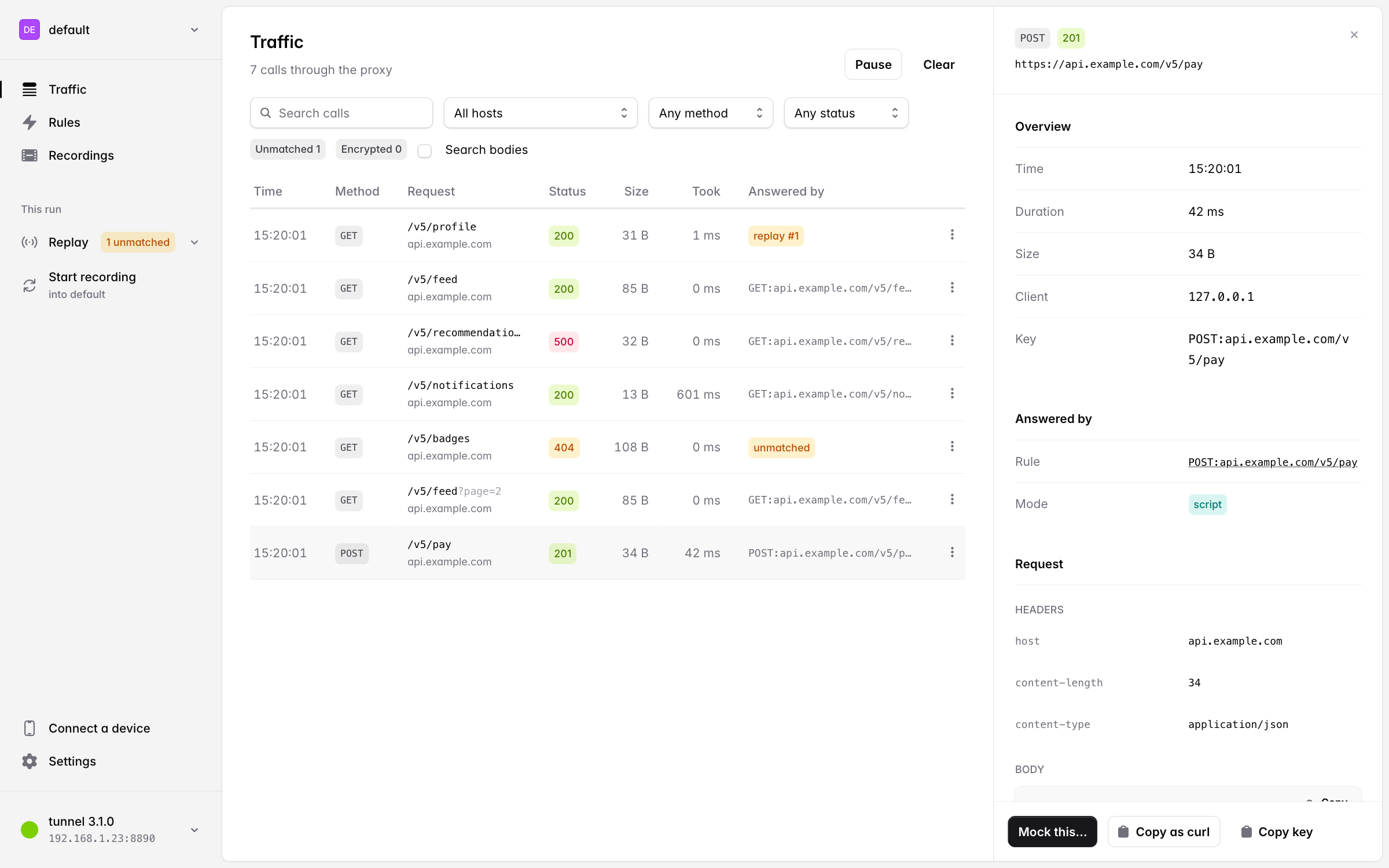
For people watching a run, the panel at http://127.0.0.1:8000/ shows the calls as they arrive:
Install
npm install -g tunnel-use # the package; the command is `tunnel`
Node 22.18 or newer.
Try it in a minute
No phone needed: here curl stands in for the app. Its HTTPS proxy points at
tunnel and it trusts tunnel's CA, which is all a device does.

mkdir try-tunnel && cd try-tunnel
tunnel init                    # keep the config, the CA and the recordings in .tunnel/ here
tunnel serve --background
export https_proxy=http://127.0.0.1:8890 CURL_CA_BUNDLE=.tunnel/ca.pem

tunnel ssl add jsonplaceholder.typicode.com          # decrypt this host
tunnel record start
curl https://jsonplaceholder.typicode.com/todos/1    # the real answer, recorded on its way through
tunnel record stop

tunnel mode replay
curl https://jsonplaceholder.typicode.com/todos/1    # the same answer, from the recording
curl https://jsonplaceholder.typicode.com/todos/2    # refused: never recorded, so never sent on

tunnel set GET jsonplaceholder.typicode.com/todos/1 --status 503 --delay 2 -d '{"error": "maintenance"}'
curl https://jsonplaceholder.typicode.com/todos/1    # a 503, two seconds later
tunnel requests --each                               # every call, and what answered it

tunnel stop && unset https_proxy CURL_CA_BUNDLE
npx tunnel-use <command> runs any of these without installing.
On a phone or simulator
tunnel serve
It prints the proxy address to set on the device and the CA to install:
tunnel 3.0.0
  panel:  http://127.0.0.1:8000/
  proxy:  0.0.0.0:8890
    set the device's HTTP proxy to 192.168.1.23 port 8890
  upstream: direct
  CA:     http://ca.tunnel/ once the device is proxied, or http://192.168.1.23:8890/ca.pem
          8B:6F:...:1C
Set up the device (Point a device at it has the steps for each platform), open http://127.0.0.1:8000/ to watch the calls arrive, and then:
tunnel requests                                        # what the client actually called
tunnel ssl add api.example.com                         # decrypt this host's HTTPS
tunnel set GET api.example.com/v5/feed -d '{"cards": []}'   # answer it with this
tunnel check GET https://api.example.com/v5/feed       # send one request through the proxy
How it compares
Recording and replay are not new, and tunnel is not the only proxy an agent can
drive. What it puts together, under MIT, is what a client test suite needs: the
device keeps calling its real hosts through a proxy, recordings are files you
commit, replay refuses whatever was never recorded, a JavaScript function can
edit a recorded answer, and it is driven as a CLI with --json, over HTTP,
in-process from Node or as an MCP server.
- Charles, Proxyman, Reqable, HTTP Toolkit are the GUIs to reach for when a person is watching the traffic, and Proxyman (with a paid licence) and Reqable have MCP servers too. tunnel is for when a test suite or an agent has to change the answers and check the calls, run after run.
- mitmproxy records (
-w) and replays (--server-replay), and anything else is a Python addon away. tunnel ships the test workflow itself: per-endpoint rules in JSON, scripts in JavaScript, waiting for a call, and a request log to assert on. - WireMock, MockServer, Hoverfly proxy, record and replay as well, and MockServer has an MCP endpoint. They are built mainly for testing a service against its dependencies; tunnel is built around a phone or a simulator: it decrypts only the hosts you name, has commands that put its CA on a simulator or an emulator, and installs with npm.
- MSW, nock, Polly.js intercept inside one JavaScript process, so a native
app's traffic never reaches them. tunnel sits on the network, and a Node suite
can still start it in-process with
startTunnel().
Documentation
| Page | What it covers |
|---|---|
| How it works | the two ports, and how each request is answered |
| Point a device at it | phones, simulators and emulators; the CA certificate; which hosts are decrypted; the upstream proxy |
| The panel | the web panel at 127.0.0.1:8000 |
| Rules | rule keys; the json, script, passthrough and replay modes; sessions; faults and delays; scenario files |
| The request log | what the app called, and waiting for a call |
| Record once, replay in CI | recordings, sessions in CI, running in the background, several devices at once |
| Calling tunnel from a test case | Swift and Kotlin test cases over the admin API |
| Using tunnel from TypeScript tests | the tunnel-use library: startTunnel() and function rules |
| Driving tunnel from a coding agent | tunnel agents and the MCP server |
| CLI reference | every command |
| Admin API v1 | the HTTP API the CLI, the panel and MCP are built on |
| Where the files live | the config, state and data directories |
| Testing and development | working on tunnel itself, and releasing it |
License
MIT — see LICENSE.
tunnel-usenpm install tunnel-use