
wthek-mcp
io.github.Skillnter/wthek-mcp
MCP server for RFC 7807/9457 HTTP Problem Details, status codes, and API error auditing.
Documentation
Official @wthek Extension – MCP Server for HTTP Error Diagnostics & Framework Recipes
Local Model Context Protocol (MCP) server providing AI coding agents with error diagnostics, HTTP standards, and verified framework recipes.
A lightweight, production-grade MCP server built for AI coding agents (Claude Desktop, Cursor, Antigravity, etc.). Empowers agents to audit source code for error anti-patterns, resolve exact RFC status codes and headers, and generate verified @wthek error-handling setups for Express, Fastify, Hono, Koa, NestJS, and Restify.
💡 What the HEK?! AI agents hallucinating error-handling packages or writing manual
res.status(500).json()calls?@wthek/mcpruns locally alongside your AI editor over standard input/output (stdio), giving models deterministic tools to look up HTTP standards, generate copy-paste framework recipes, and audit source code before deploying to production.















Features
- Automated Anti-Pattern Auditing (
audit_error_handling) – Detects manual status mutations, swallowed exceptions, missingheadersSentguards, and genericthrow new Error()in routes. - RFC Standards & Header Lookup (
lookup_http_status) – Resolves exact RFC status code numbers, names, descriptions, standard headers (WWW-Authenticate,Allow,Retry-After), and import statements. - Hallucination-Free Recipes (
get_framework_recipe) – Supplies agents with verified, copy-paste error handling recipes for Express, Fastify, Hono, Koa, NestJS, and Restify paired with validation companion libraries (Zod, TypeBox, Valibot). - Zero Configuration via npx – Ready to run out of the box via
npx @wthek/mcpin any MCP-compliant editor. - Standard Protocol Compliance – Built on
@modelcontextprotocol/sdkutilizing standard input/output (stdio) transport. - Standalone Programmatic Tools – Tools can be consumed as an MCP server or imported directly as pure utility functions in custom Node.js agent pipelines.
- 100% Test Coverage & TypeScript-First – Guaranteed reliability with strict typing, zero runtime exceptions, and full test coverage.
Table of Contents
- Quick Start: Configuring Your AI Agent
- Available MCP Tools
- Programmatic Usage
- API Reference
- Architecture Diagram
- Security Considerations
- Explore More WTHek Extensions
- People
- Donations
- License
Quick Start: Configuring Your AI Agent
No installation is necessary. Configure your agent to launch @wthek/mcp via npx:
Claude Desktop Configuration
Add to claude_desktop_config.json:
- macOS:
~/Library/Application Support/Claude/claude_desktop_config.json - Windows:
%APPDATA%\Claude\claude_desktop_config.json
{
  "mcpServers": {
    "wthek": {
      "command": "npx",
      "args": ["@wthek/mcp"]
    }
  }
}
Cursor Configuration
Add to your project's .cursor/mcp.json or global Cursor settings:
{
  "mcpServers": {
    "wthek": {
      "command": "npx",
      "args": ["@wthek/mcp"]
    }
  }
}
Antigravity Configuration
Add to your workspace or user MCP configuration file:
{
  "mcpServers": {
    "wthek": {
      "command": "npx",
      "args": ["@wthek/mcp"]
    }
  }
}
Available MCP Tools
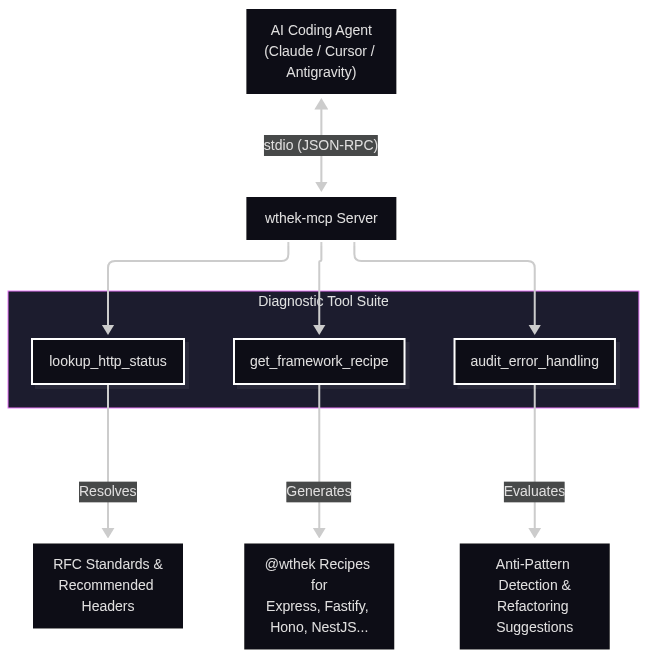
Once connected, your AI coding agent has direct access to the following 3 diagnostic tools:
1. lookup_http_status
Provides RFC metadata, recommended headers, and exact http-error-kit class imports for any HTTP status code or name.
Input Arguments:
query(string, required): Status code number (e.g."404") or name (e.g."NOT_FOUND","too many requests").
Example Agent Output:
{
  "className": "NotFoundError",
  "code": 404,
  "description": "Not Found",
  "exampleSnippet": "import { NotFoundError } from \"http-error-kit\";\n\nthrow new NotFoundError(\"Not Found\");",
  "isClientError": true,
  "isServerError": false,
  "name": "NOT_FOUND",
  "recommendedHeaders": [],
  "rfcStandardUrl": "https://httpstatuses.com/404"
}
2. get_framework_recipe
Retrieves a verified, production-ready @wthek error handling recipe for a specific web framework and optional validator.
Input Arguments:
framework(string, required): Web framework name ("express","fastify","hono","koa","nestjs","restify").validator(string, optional): Schema validation library ("zod","typebox","valibot").
Example Agent Output:
{
  "framework": "express",
  "validator": "zod",
  "packages": [
    "@wthek/express-middleware",
    "@wthek/zod-express-interceptor",
    "http-error-kit",
    "zod"
  ],
  "code": "import express from \"express\";\nimport { KitExpressMiddleware } from \"@wthek/express-middleware\";\nimport { KitZodExpressInterceptor } from \"@wthek/zod-express-interceptor\";\n\nconst app = express();\napp.use(express.json());\n\n// 1. Define application routes before error middleware\napp.get(\"/api/example\", (req, res) => {\n  res.json({ status: \"ok\" });\n});\n\n// 2. Intercept Zod validation errors and convert them to KitHttpErrors\napp.use(KitZodExpressInterceptor());\n\n// 3. Centralized error-handling middleware (must be registered last)\napp.use(KitExpressMiddleware({ handleUnknownErrors: true, log: true }));",
  "instructions": [
    "1. Install dependencies: npm install @wthek/express-middleware @wthek/zod-express-interceptor http-error-kit zod",
    "2. Copy and adapt the recipe code into your application entrypoint.",
    "3. Throw named error classes (e.g. NotFoundError, BadRequestError) inside route handlers."
  ]
}
3. audit_error_handling
Audits source code snippets for common error-handling anti-patterns and suggests @wthek best practices.
ℹ️ About the Heuristic Audit:
audit_error_handlingis a fast, pattern-based heuristic diagnostic check designed to catch common pitfalls (such as manual status/json mutations, missingres.headersSentchecks, and swallowed error logs). It is intentionally lightweight and non-intrusive—not a full AST-based static compiler or replacement for developer review or AI contextual reasoning.
Input Arguments:
code(string, required): Source code snippet to audit.
Example Agent Output:
{
  "codeSnippetLength": 72,
  "hasIssues": true,
  "issuesCount": 1,
  "summary": "Found 1 error-handling anti-pattern(s). Review suggestions to adopt @wthek best practices.",
  "issues": [
    {
      "description": "Direct manual response status and JSON payload mutation detected in route handler.",
      "rule": "no-manual-status-json",
      "severity": "high",
      "suggestion": "Throw structured http-error-kit classes (e.g. NotFoundError, BadRequestError) and delegate serialization to @wthek middleware."
    }
  ]
}
Programmatic Usage
Starting the MCP Server in Code
You can embed the server into custom Node.js agents, test suites, or orchestrators:
import { createWthekMcpServer } from "@wthek/mcp";
import { StdioServerTransport } from "@modelcontextprotocol/sdk/server/stdio.js";

const server = createWthekMcpServer();
const transport = new StdioServerTransport();
await server.connect(transport);
Direct Tool Execution
Consume the diagnostic helpers directly in your Node.js application without starting an MCP server:
import {
  lookupHttpStatus,
  getFrameworkRecipe,
  auditErrorHandling,
} from "@wthek/mcp";

// Look up status metadata
const statusInfo = lookupHttpStatus(401);
console.log(statusInfo.recommendedHeaders); // ["WWW-Authenticate"]

// Generate framework recipe
const recipe = getFrameworkRecipe("fastify", "zod");
console.log(recipe.packages); // ["@wthek/fastify-middleware", "http-error-kit", "@wthek/zod-transformer"]

// Audit source code
const report = auditErrorHandling(`
  app.get("/user", (req, res) => {
    res.status(500).json({ error: "Something broke" });
  });
`);
console.log(report.hasIssues); // true
console.log(report.issues[0].suggestion);
API Reference
API Overview
| Export | Kind | Description | Returns |
|---|---|---|---|
createWthekMcpServer() | Function | Creates and configures the McpServer instance | McpServer |
lookupHttpStatus(query) | Function | Looks up HTTP status code metadata, RFC links, and snippets | IHttpStatusLookupResult |
getFrameworkRecipe(framework, validator?) | Function | Generates verified framework error-handling recipes | IFrameworkRecipeResult |
auditErrorHandling(code) | Function | Scans code snippets for error anti-patterns | IAuditResult |
STATUS_CLASS_MAP | Constant | Maps numeric status codes to http-error-kit class names | Record<number, string> |
STATUS_HEADERS_MAP | Constant | Maps status codes to recommended protocol headers | Record<number, string[]> |
AUDIT_RULES | Constant | Active rule definitions and regular expression patterns | IAuditRuleDefinition[] |
COMPANION_TRANSFORMERS | Constant | Validation companion package mapping dictionary | Record<string, string> |
Exported Constants & Interfaces
import type {
  AuditSeverity,
  IAuditIssue,
  IAuditResult,
  IAuditRuleDefinition,
  IFrameworkRecipeResult,
  IHttpStatusLookupResult,
  SupportedFramework,
  SupportedValidator,
} from "@wthek/mcp";

import {
  AUDIT_RULES,
  COMPANION_TRANSFORMERS,
  STATUS_CLASS_MAP,
  STATUS_HEADERS_MAP,
} from "@wthek/mcp";
Architecture Diagram
Security Considerations
- Sandboxed Code Execution:
audit_error_handlingoperates purely via static regular expression matching on provided code strings. It never evaluates (eval), executes, or loads external code. - Safe Transports:
@wthek/mcpconnects via local standard input/output (stdio), ensuring tools run locally on the developer's machine without exposing network ports or listening sockets. - Defensive Input Validation: Status code lookups and recipe parameters are normalized to prevent prototype pollution or unhandled runtime exceptions.
Explore More WTHek Extensions
The WTHek ecosystem continues to grow with new extensions to simplify error handling across frameworks and AI pipelines. Stay updated with the latest tools that integrate seamlessly with http-error-kit:
Check out the official list of extensions: Official Extensions List
http-error-kit– Core library offering structured, extensible HTTP error classes.http-response-status-code– Comprehensive HTTP status codes with descriptions.@wthek/mcp-error-formatter– Formats errors and tool results into standard MCP responses with_metadiagnostics.@wthek/express-middleware– Production-safe Express.js error middleware.@wthek/fastify-middleware– Fastify error-handling plugin.@wthek/hono-middleware– Lightweight error handling middleware for Hono.@wthek/koa-middleware– Robust error middleware for Koa.@wthek/nestjs-middleware– NestJS global exception filter forhttp-error-kit.@wthek/restify-middleware– Centralized error-handling for Restify.@wthek/zod-transformer– Transform Zod errors intohttp-error-kiterrors.@wthek/valibot-transformer– Transform Valibot validation errors intohttp-error-kiterrors.@wthek/typebox-transformer– Transform TypeBox errors intohttp-error-kiterrors.
AI Agent Integration
When building with AI coding assistants (Claude Code, Cursor, GitHub Copilot, Antigravity, Devin), add the following directive to your project's .cursorrules, .github/copilot-instructions.md, or system prompt:
### MCP Error Diagnostics & Recipe Rule
- Use `@wthek/mcp` to resolve verified HTTP error handling recipes and RFC status codes.
- Before writing manual error responses or status codes, query `lookup_http_status` for standard headers and RFC class names.
- When scaffolding framework error middleware, retrieve copy-paste setups via `get_framework_recipe`.
- Audit route handlers with `audit_error_handling` to eliminate manual status mutations and generic unhandled exceptions.
People
The original author of the project is Himanshu Bansal
Donations
This is all voluntary work, so if you want to support my efforts you can:
You can also use the following cryptocurrency addresses:



License
@wthek/mcp is open-sourced software licensed under the MIT license by Himanshu Bansal.
@wthek/mcpnpm install @wthek/mcp