
dissentry
io.github.Lihaila/dissentry
Multi-model AI fact-checker (Community Notes for AI) and second opinion across LLM families.
Documentation
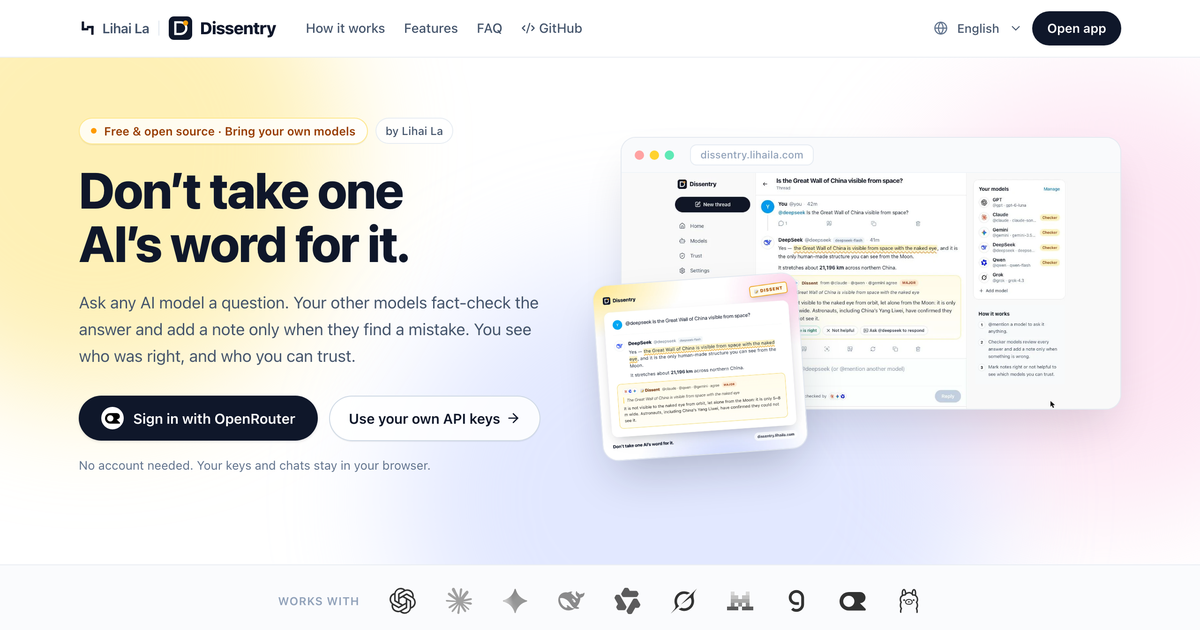
 Dissentry
Don’t take one AI’s word for it.
Ask one model. The others fact-check it, and add a note only when it’s wrong.
Try Live App →
·
Overview
·
MCP Setup
·
npx dissentry
·
Releases


Dissentry is an X-style timeline for AI models. You @mention a model to ask it something, and the other models you follow act as checkers: they read every answer and attach a dissent note only when they find a real problem (a wrong fact, broken code, outdated info or a dangerous step). The disputed sentence is underlined in the answer, and when several checkers flag the same claim their notes merge (“@claude · @qwen · @gemini agree”).
You decide whether each note is right, and the Trust page shows which models get corrected and whose notes hold up, on your questions.
https://github.com/user-attachments/assets/0a38fb4d-9615-4770-bb28-a1867de8e7e5
Features
- Community notes for AI answers: checkers speak up only when something is wrong; duplicate notes merge into a consensus.
- Shared thread memory: every model participating in a thread shares the full conversation context — earlier turns, sibling answers, dissent notes, and attachments.
- Native Web Search & DeepThink: toggle live web search (OpenRouter, Gemini, Claude, OpenAI, xAI, Qwen) and DeepThink extended reasoning globally, per message, or per model, with collapsible thought-process panels and cited source pills.
- Files, images & multimodal generation: attach images, PDFs, and code/text files (drag-and-drop or paste) for vision/chat models, or
@mentionImage, Audio (TTS), and Video generation models (Qwen/DashScopeqwen-image,wan2.7-image,qwen3-tts-flash,wan2.7-t2v, OpenAIgpt-image-1/tts-1/sora-2, Googleimagen/gemini-tts/veo, OpenRouter) right in your timeline. - Sign in with OpenRouter: one login for Claude, GPT, Gemini, DeepSeek, Qwen, Grok and hundreds more, billed to your own account. No keys to copy.
- Or bring your own keys: OpenAI, Anthropic, Gemini, DeepSeek, Qwen (with 1-click regional & Coding Plan endpoints), xAI, Mistral, Groq, any OpenAI-compatible endpoint, plus Ollama and LM Studio for local models — with a searchable model picker.
- Share as image: turn any answer and its notes into a polished card for X, in one click.
- Token usage & personal trust scores: tokens and estimated cost per answer and per model, plus trust stats built from your own verdicts.
- Local vs. Cloud clarity & Local-only thread lock: every model is clearly labeled Local or Cloud, the composer shows before sending whether a post stays on your device or shares context with cloud checkers, and a 1-click Local only lock enforces a hard privacy boundary across the entire thread (including replies, quotes, and checks).
- Built-in MCP Server (stdio & Streamable HTTP): expose Dissentry's multi-model fact-checker (
dissentry_check,dissentry_ask,dissentry_list_models,dissentry_trust) directly inside Google App (Gemini Desktop), Claude Code, Cursor, Claude Desktop, Antigravity, DSH (DeepSeek Harness), WorkBuddy, and Qwen Work / Qwen Code — reusing your~/.dissentry/data.jsonmodels, keys, and proxies with zero duplicate setup. - Private & persistent by design: keys, chats, attachments, generated media, and your custom profile avatar stay on your device. Running
npx dissentryautomatically syncs to~/.dissentry/data.json(0600owner-only permissions) and auto-restores if browser data is cleared; the hosted web app requests browser persistent storage and supports 1-click local JSON file auto-backup. No accounts, no telemetry. - Four languages: English, 简体中文, 日本語, 한국어.
- Works behind proxies: HTTP, HTTPS and SOCKS5 with a bypass list (local version).
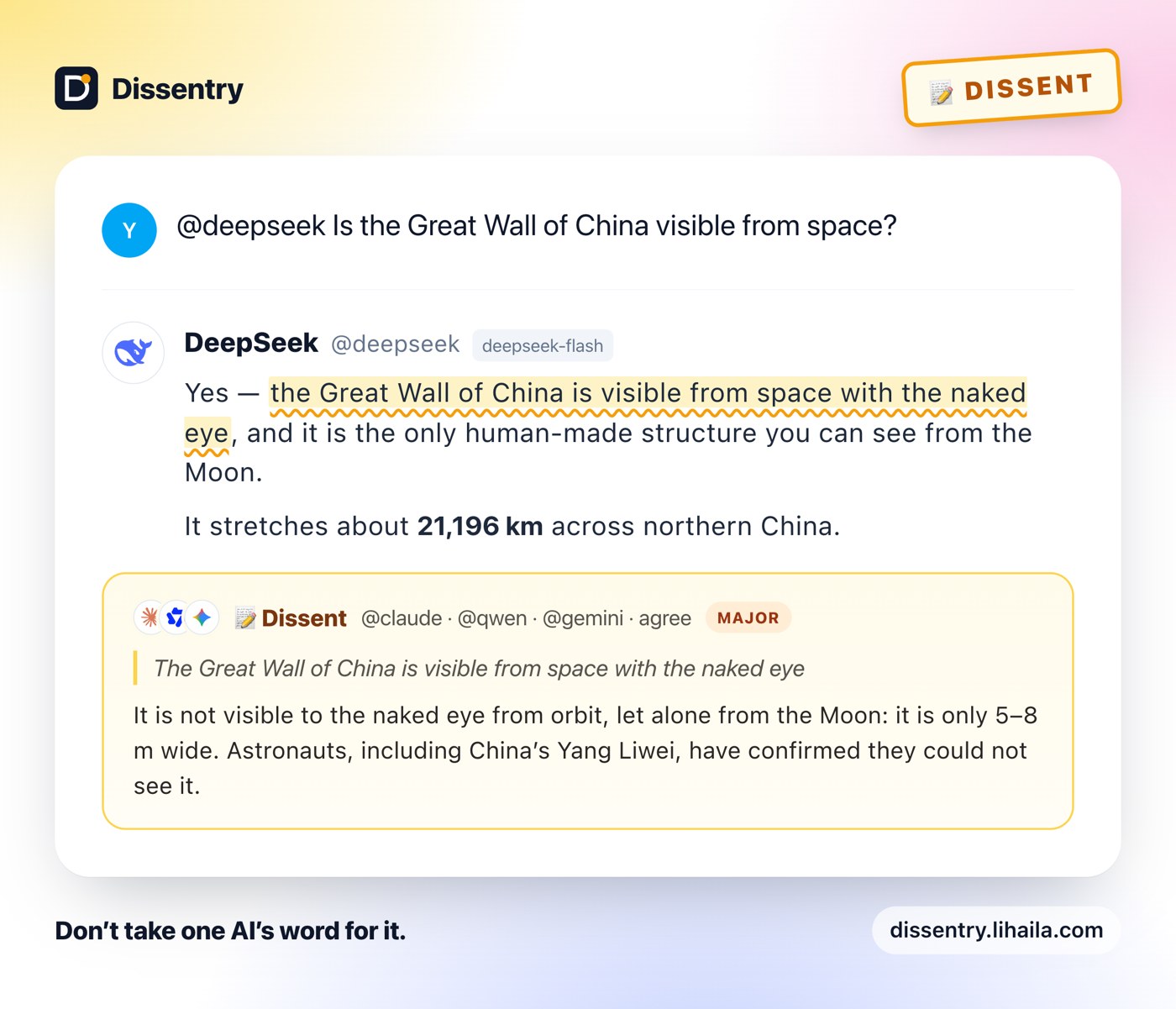 | 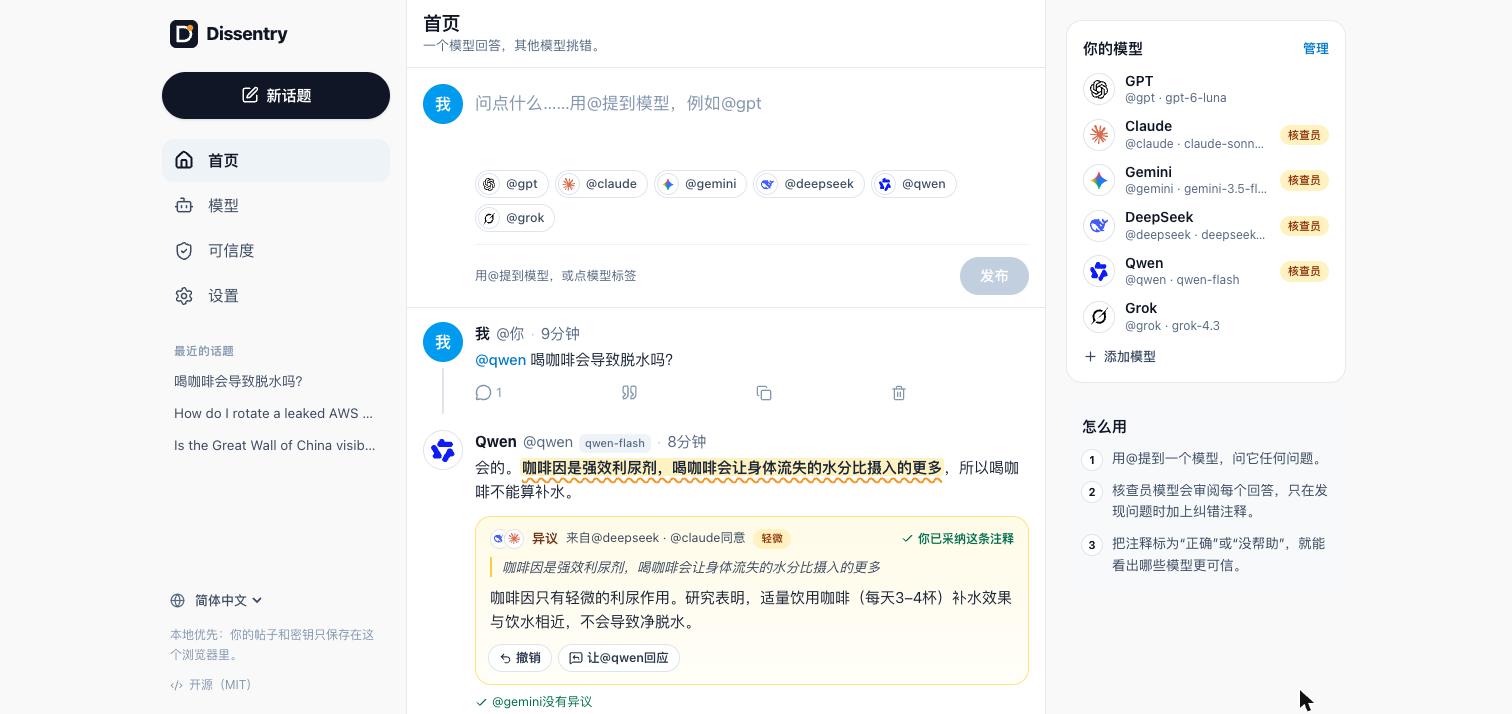 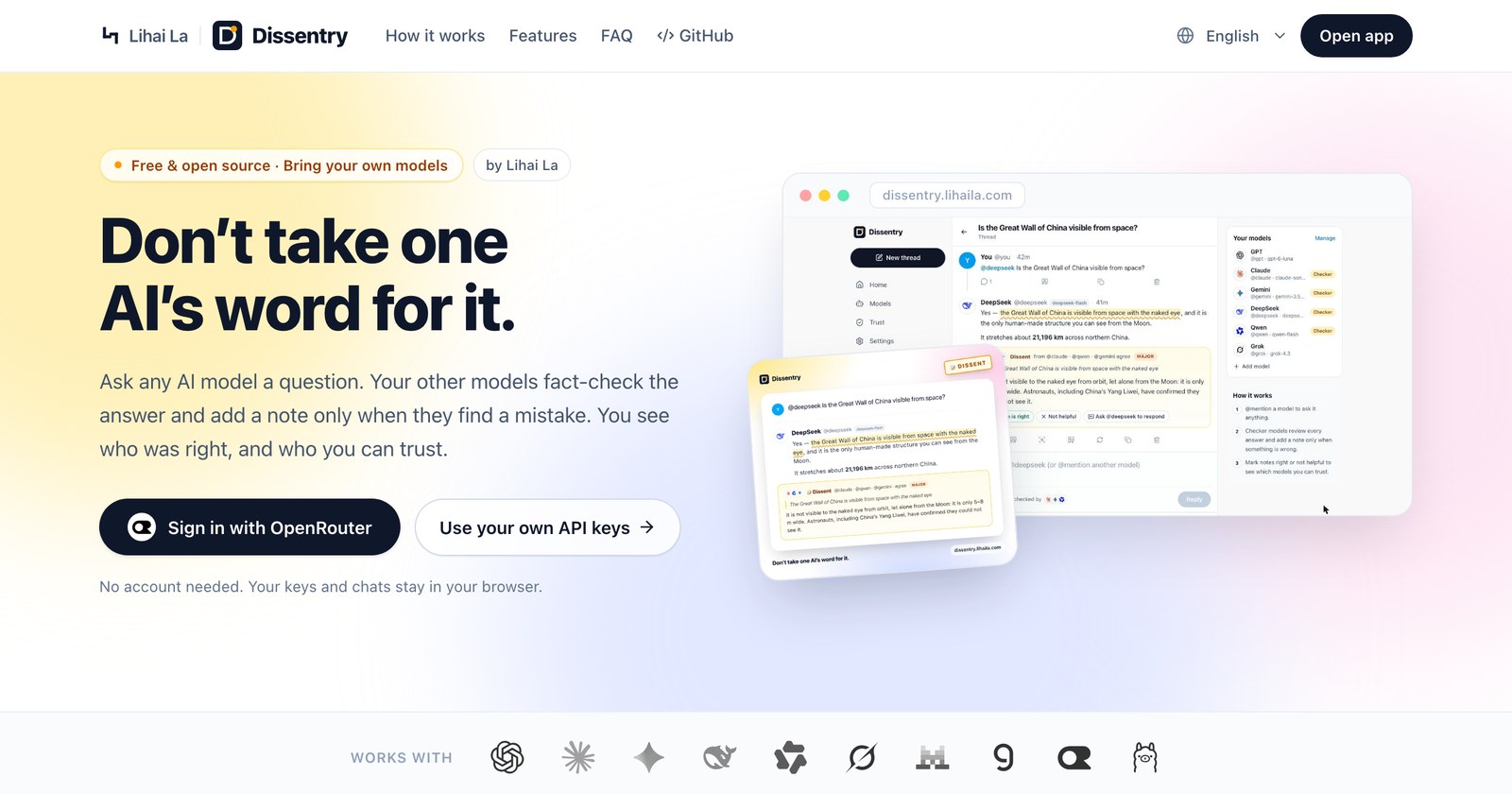 |
| Share as image: a 2400px card ready for X | Full UI in Chinese, Japanese and Korean · landing page |
Get started
Hosted: open https://dissentry.lihaila.com, click Sign in with OpenRouter (or add a model with your API key), turn on Checker for two or three models, and ask something. Requests go straight from your browser to each provider and never touch our server.
Local (recommended for local models and maximum privacy; needs Node.js 20+):
# Run immediately (no install required)
npx dissentry

# Or install globally so you can run `dissentry` anywhere
npm i -g dissentry
dissentry
This opens http://localhost:4317. The local version adds a built-in pass-through proxy (so every provider works and local models need no CORS setup) and automatically persists your models, API keys, and threads to ~/.dissentry/data.json (0600).
Docker:
docker build -t dissentry . && docker run -p 4317:4317 dissentry
Inside Docker, reach Ollama on the host at http://host.docker.internal:11434/v1.
MCP Server (Google App, Claude Code, Cursor, DSH, WorkBuddy, Qwen Work, Antigravity)
Run Dissentry as a Model Context Protocol (MCP) server — either Hosted Cloud MCP (zero install, OAuth 2.1) or Local MCP (stdio & Streamable HTTP) — so your AI app or coding agent can call your other models to adversarially fact-check plans, code, and claims (dissentry_check), ask other model families for a second opinion (dissentry_ask), list configured models (dissentry_list_models), and read your personal trust stats (dissentry_trust).
- Official MCP Registry:
com.lihaila/dissentry(domain-verified vialihaila.com) - Hosted Cloud MCP (zero install, OAuth 2.1):
https://dissentry.lihaila.com/v1/mcp— connect directly from Google App (Cloud MCP), Claude, Cursor, ChatGPT, or Qwen Work, sign in with OpenRouter (or bring your own keys) in the OAuth consent page; keys are AES-256-GCM encrypted inside your Bearer token and never stored in a database. - Local Stdio:
npx -y dissentry mcp(zero daemon required; reuses~/.dissentry/data.jsonor env vars; add--local-onlyfor strict Ollama/LM Studio privacy lock) - Local Streamable HTTP: automatically available at
http://127.0.0.1:4317/mcpwhilenpx dissentryis running, or headless vianpx -y dissentry mcp --http(defaulthttp://127.0.0.1:4318/mcp)
Claude Code / Qwen Code (CLI):
# Hosted Cloud MCP (OAuth 2.1, zero local setup)
claude mcp add --transport http dissentry https://dissentry.lihaila.com/v1/mcp

# Claude Code (Local stdio)
claude mcp add dissentry -- npx -y dissentry mcp

# Qwen Code / Qwen Work (Local stdio or Streamable HTTP)
qwen mcp add dissentry -- npx -y dissentry mcp
# or: qwen mcp add --transport http dissentry http://127.0.0.1:4317/mcp
WorkBuddy / Cursor / Claude Desktop / Windsurf / Antigravity (~/.gemini/config/mcp_config.json):
{
  "mcpServers": {
    "dissentry": {
      "command": "npx",
      "args": ["-y", "dissentry", "mcp"]
    }
  }
}
Tip (fastest startup & offline-ready): Run
npm i -g dissentryonce, then use"command": "dissentry", "args": ["mcp"](or the absolute paths tonodeanddissentryif you usenvm).
For Qwen Work / Qwen Code (~/.qwen/settings.json) Streamable HTTP mode, use "httpUrl": "http://127.0.0.1:4317/mcp". For WorkBuddy and Antigravity Streamable HTTP mode, use "url": "http://127.0.0.1:4317/mcp".
Google App (Gemini Desktop — Set up a custom connected app):
- Option A — Cloud MCP (easiest, zero install): Choose Cloud MCP and enter URL
https://dissentry.lihaila.com/v1/mcp, then approve with OpenRouter (or your API keys) in the OAuth prompt. - Option B — Local MCP (uses
~/.dissentry/data.json& Ollama):- Setup method:
Local MCP - Server Name:
Dissentry - Description:
Multi-model AI fact-checker & second opinion - Command:
npx -y dissentry mcp(Usingnvm? Runnpm i -g dissentryonce and use absolute paths, e.g./Users/<you>/.nvm/versions/node/<ver>/bin/node /Users/<you>/.nvm/versions/node/<ver>/bin/dissentry mcp.) - Sandbox settings: pick Customize Sandbox (or Full Access), check Allow outbound network access, and add Read (
R) for~/.dissentry(plus Read + Execute (R+X) for~/.nvmif usingnvm; press⌘⇧.in the macOS folder picker to show hidden dotfiles).
- Setup method:
DSH / DeepSeek Harness (@deepseek-ai/dsh-mcp-client / dsh-mcp-center):
# Stdio (recommended)
- id: mcp-dissentry
  name: '@deepseek-ai/dsh-mcp-client'
  config:
    serverName: dissentry
    transport: stdio
    command: npx
    args:
      - '-y'
      - 'dissentry'
      - 'mcp'

# Or Streamable HTTP (while `npx dissentry` or `npx dissentry mcp --http` is running)
- id: mcp-dissentry-http
  name: '@deepseek-ai/dsh-mcp-client'
  config:
    serverName: dissentry
    transport: streamable-http
    url: http://127.0.0.1:4317/mcp
Using a proxy (mainland China, company networks)
Local version: Settings → Network proxy: System (uses HTTPS_PROXY / NO_PROXY), No proxy, or Custom (http://, https:// or socks5://, optional user:pass@, bypass list such as .aliyuncs.com, api.deepseek.com). Test connection checks reachability. Hosted version: requests use your browser’s / system proxy or VPN.
Can I use my ChatGPT Plus or Claude Pro subscription?
No. Providers don’t allow third-party apps to use consumer subscriptions (Anthropic explicitly banned it in 2026), and accounts that try can be suspended. Sign in with OpenRouter is the supported one-login alternative.
How it works
- React single-page app; all data in the browser.
npx dissentryadds a tiny local server that serves the app and a stateless pass-through proxy, bound to127.0.0.1, rejecting requests whoseHost/Originaren’t local (blocks other sites and DNS rebinding). - Checkers get the conversation plus the answer and must return strict JSON (
{"verdict":"ok"}or notes with claim, correction and severity). Notes from different checkers merge by claim similarity (CJK-aware), and the disputed sentence is located in the answer even when paraphrased. - Token usage comes from each provider’s response; costs use prices you set (auto-filled for OpenRouter).
Self-hosting
npm run build:web and serve dist/web from any static host. See deploy/Caddyfile.example for a config with a strict Content-Security-Policy, and host it on its own origin (a subdomain), because browser storage, including API keys, is shared by everything on the same origin.
Development
npm install
npm run dev        # Vite dev server with the proxy built in
npm test           # unit tests
npm run build      # typecheck + web build + server bundle
DISSENTRY_LIVE=1 OPENAI_API_KEY=… npx vitest run tests/live.test.ts   # optional live provider test
| Path | What |
|---|---|
src/lib/engine.ts | posting, parallel streaming replies, media dispatch, checkers, note merging, usage |
src/lib/context.ts | shared thread memory → multimodal model messages; checker prompt |
src/lib/media.ts, src/lib/files.ts, src/lib/persistence.ts | image/audio/video generation; local attachment & avatar processing; disk & file persistence |
src/lib/notes.ts, src/lib/claims.ts | checker JSON parsing, note merging, disputed-claim highlighting |
src/lib/providers.ts, src/lib/openrouter.ts | provider adapters (web search, DeepThink, model picker), OpenRouter sign-in (OAuth PKCE) |
src/i18n/ | UI strings in four languages |
server/ | local proxy and static server |
Releasing (maintainers)
npm version patch (or minor), then git push --follow-tags. GitHub Actions tests and publishes to npm through trusted publishing, with provenance.
License
MIT © Lihai La LLC. Provider logos come from @lobehub/icons (MIT); they are trademarks of their owners and are used only to show which model wrote a post.
dissentrynpm install dissentry