
ha-nexus-agent
io.github.Fistacho/ha-nexus-agent
MCP server for Home Assistant: entities, automations, dashboards, ESPHome, energy, HACS
Documentation

Nexus Agent — MCP for Home Assistant
Let your AI assistant build, fix and run your Home Assistant — dashboards, automations, energy, ESPHome and more.
354 tools across 32 domains · Home Assistant add-on or Docker · MIT





Works with Claude Code, Claude Desktop, VS Code (Copilot), Cursor, Windsurf, OpenAI Codex CLI, Gemini CLI — any MCP client.
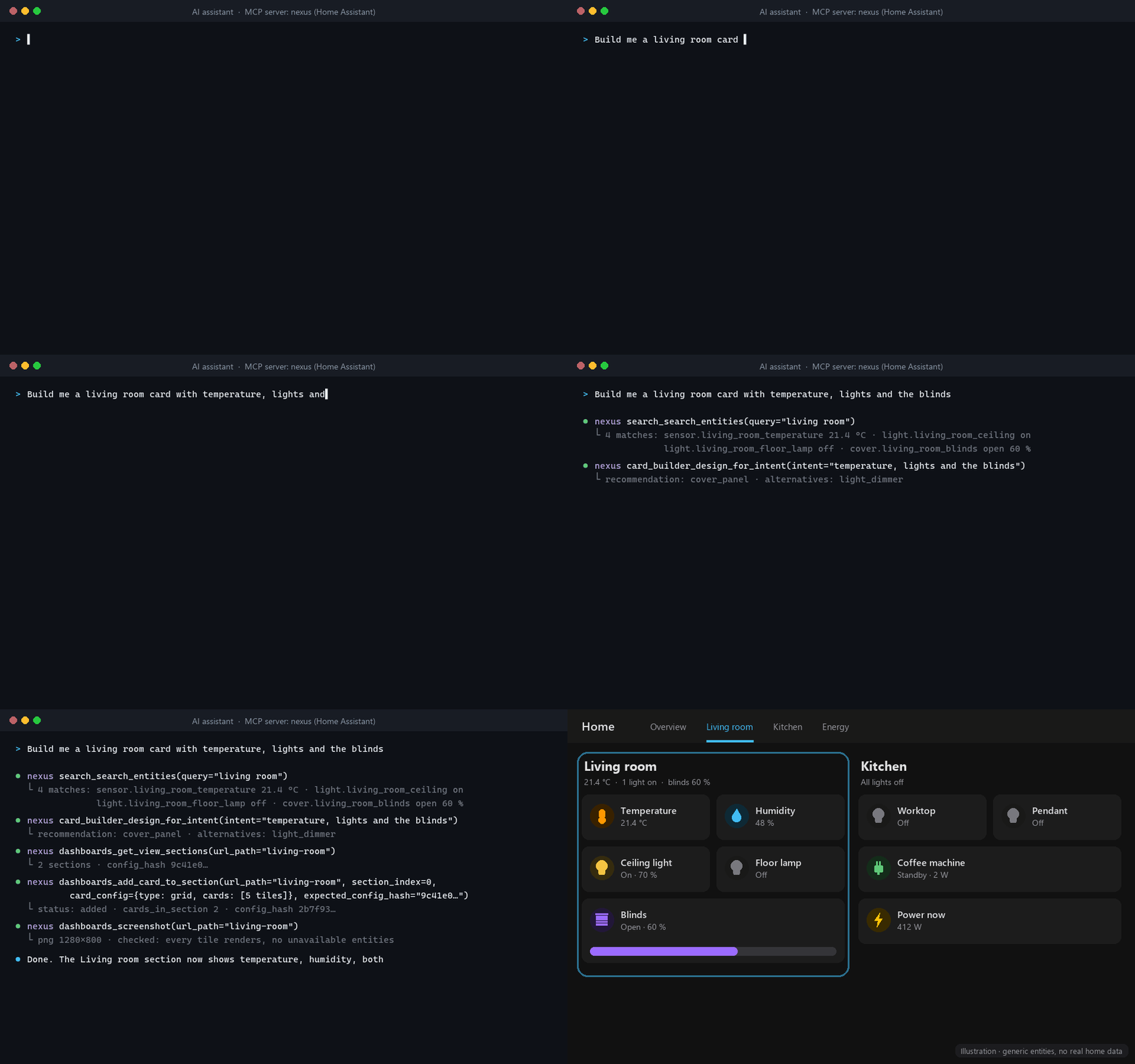
Illustration of a typical session. Tool names, parameters and result shapes are nexus' real API; the entities and the dashboard are generic, not a real home.
Latest release: v1.0.1 — fixes the MCP Registry listing of 1.0.0 (stable tool API, Docker quick start; breaking changes in the 1.0.0 notes). Release notes · all releases
Installation — Home Assistant Add-on (Recommended)

- Click the button above to add the repository to Home Assistant.
- Find Nexus Agent in the Add-on Store → Install → Start.
- Click Open Web UI, copy the ready-made config for your AI client and paste it in (details).
Then ask: "Give me a summary of my home — what's on, what's unavailable, what needs updating."
- Want to look before it can change anything? Turn on read-only mode first.
- Home Assistant Container or Core (no add-ons)? See Run without the add-on (Docker).
Manual Installation (Add-on Store)
If the MY button does not work for your setup:
-
In Home Assistant go to Settings → Add-ons → Add-on Store
-
Click the three-dot menu (⋮) → Repositories
-
Add:
https://github.com/Fistacho/ha-nexus-agent -
Find Nexus Agent → Install → Start → Open Web UI
The web UI shows your API key and generates ready-to-paste config for every MCP client.
Connecting MCP Clients
Open Nexus with the Open Web UI button on the add-on's page (Settings → Add-ons → Nexus Agent) after starting it — that page shows your real API key and the exact, ready-to-paste config for every client below. This works over HA's ingress proxy whether or not you've also enabled Show in sidebar on that same add-on page — the sidebar entry is just a shortcut to the same URL. Outside of ingress (or without a valid Authorization: Bearer header), the same page hides the key.
The MCP endpoint is a Streamable HTTP transport (not SSE) at:
http://your-ha-ip:7123/mcp
Authenticate with an Authorization: Bearer YOUR_API_KEY header. Since nexus 1.0.0 this is the only way: the old ?token= query string no longer authenticates (a request that still uses it gets 401 with a hint).
Claude Code CLI
claude mcp add nexus --transport http "http://your-ha-ip:7123/mcp" --header "Authorization: Bearer YOUR_API_KEY" --scope user
(--transport http, not sse — Nexus speaks Streamable HTTP. Syntax per the Claude Code MCP docs.)
VS Code
Create .vscode/mcp.json:
{
  "servers": {
    "nexus": {
      "type": "http",
      "url": "http://your-ha-ip:7123/mcp",
      "headers": {
        "Authorization": "Bearer YOUR_API_KEY"
      }
    }
  }
}
Cursor
Add to ~/.cursor/mcp.json:
{
  "mcpServers": {
    "nexus": {
      "url": "http://your-ha-ip:7123/mcp",
      "type": "http",
      "headers": {
        "Authorization": "Bearer YOUR_API_KEY"
      }
    }
  }
}
Claude Desktop, Gemini CLI, OpenAI Codex CLI, Windsurf
Claude Desktop
Add to %APPDATA%/Claude/claude_desktop_config.json (Win) or ~/Library/Application Support/Claude/claude_desktop_config.json (Mac):
{
  "mcpServers": {
    "nexus": {
      "command": "python",
      "args": ["server.py"],
      "cwd": "/path/to/ha-nexus-agent",
      "env": {
        "HA_URL": "http://homeassistant.local:8123",
        "HA_TOKEN": "your_ha_token_here"
      }
    }
  }
}
Gemini CLI
gemini mcp add --transport http --header "Authorization: Bearer YOUR_API_KEY" nexus "http://your-ha-ip:7123/mcp"
OpenAI Codex CLI
Codex reads the key from an environment variable and sends it as Authorization: Bearer:
export NEXUS_API_KEY="YOUR_API_KEY"   # keep this in your shell profile
codex mcp add nexus --url "http://your-ha-ip:7123/mcp" --bearer-token-env-var NEXUS_API_KEY
That writes the same entry you could add to ~/.codex/config.toml by hand:
[mcp_servers.nexus]
url = "http://your-ha-ip:7123/mcp"
bearer_token_env_var = "NEXUS_API_KEY"
Windsurf
Add to ~/.codeium/windsurf/mcp_config.json:
{
  "mcpServers": {
    "nexus": {
      "url": "http://your-ha-ip:7123/mcp",
      "type": "http",
      "headers": {
        "Authorization": "Bearer YOUR_API_KEY"
      }
    }
  }
}
Tip: Copy the exact config with your real key from the Open Web UI button on the add-on's page (ingress). The same URL outside of ingress hides the key — see Security.
What can you ask?
Once connected, just talk to your assistant. Some things people use nexus for:
Everyday
- "Turn off every light downstairs and close the blinds."
- "Why is the bedroom sensor unavailable since yesterday?"
- "Which automations, scripts and Node-RED flows use
binary_sensor.front_door?"
Build
- "Build me a living room card with temperature, lights and the blinds — then show me a screenshot."
- "Create an automation: notify me if the garage door is open after 10 PM. Lint it and check every entity exists before saving."
- "Make a dark theme with orange accents and set it as default."
Energy & history
- "How much energy did we use per day last week, compared to the week before?"
- "Add my solar inverter and battery to the Energy dashboard."
Maintenance
- "What updates and repairs are pending? Summarise them by risk."
- "Compile the kitchen ESPHome display, flash it over the air and show me its logs."
- "Checkpoint my config in git, then clean up unused entities and orphaned devices."
Why nexus?
- One small tool per action — 354 of them. Each tool does one thing, has typed parameters and a
description written for models (
Use when/Not for/Returns). Clients that load every tool up front can switch totool_mode: search: a BM25 tool search plus call-by-name proxies, 6 tools intools/listinstead of the full catalogue. - Safe by default, opt-in for the risky parts. Server-wide read-only mode,
disabled_namespaces, writes that run code (Node-RED flows) off until you enable them,confirm=Truegates on 18 tools, stale-read guards (config_hash) on dashboard section edits, restore points before Node-RED and NeonPlan changes, git checkpoints of/config. - Beyond the core APIs. ESPHome compile / validate / OTA and LVGL display widgets, Node-RED flows, AdGuard Home DNS and filter lists, the Supervisor (add-ons, backups), long-term statistics, live WebSocket subscriptions, NeonPlan 3D house plans and a 38-tool Card Builder.
- It can see what it built.
dashboards_screenshotrenders any view to PNG, so the assistant checks its own dashboard work instead of guessing. - Every tool is annotated and tested. Read / write / destructive hints follow a written contract (ADR-0002) checked by the test suite, so clients can auto-approve reads and ask before writes.
How it compares
Other good options exist — pick the one that fits. Compared on 2026-11-21 from each project's own README; corrections are welcome in Discussions.
| nexus | ha-mcp | HA Vibecode Agent | HA built-in MCP Server | |
|---|---|---|---|---|
| Runs as | Add-on, or Docker image | HACS integration (in-process, any install type), add-on, Docker, uvx | Add-on or Docker, plus an npm MCP package on your computer | Built into Home Assistant |
| Scope | Whole instance + Supervisor | Whole instance | Whole instance | Entities exposed to Assist |
| Tool style | 354 single-purpose tools | 86 tools, many multi-action (ha_manage_*) | ~100 tools | Assist intents |
| Automations, scripts, scenes | ✅ CRUD, traces, linter, reference check | ✅ | ✅ | ❌ |
| Create helpers | ❌ (set values only) | ✅ | ✅ | ❌ |
| Dashboards | Section-aware edits with config_hash, resources, screenshots, Card Builder; no create/delete | Create/delete, JSON-Patch edits with config_hash, auto-backup, screenshots (beta) | Cards, layouts, themes | ❌ |
| Read-only / limits | Server-wide read_only, disabled_namespaces, opt-in code-running writes | Read Only Mode, per-connection /readonly URL, per-tool toggles, approval policies | Not documented | Only what you expose to Assist |
| Undo | confirm gates, git checkpoint + rollback, restore points | Automatic backup before edits | Git commit of every change in a separate repo | — |
| Also has | ESPHome + LVGL, Node-RED, AdGuard Home, statistics, WebSocket subscriptions | Z-Wave / ZHA / Matter, OAuth / OIDC, Agent Skills, tool search | Deploy workflow for hand-written YAML | Nothing to install |
Where the others are ahead: ha-mcp has a much larger community, a read-only URL per connection
(nexus' read_only applies to the whole server), dashboard create/delete with automatic backups,
OAuth/OIDC, and installs as an integration on every Home Assistant install type. Vibecode Agent
commits every change to its own git repository automatically and can create helpers. The built-in
MCP Server needs no install at all and is the right choice if you only want voice-style control.
Read-only mode
The safest way to try nexus: the AI can read everything and change nothing. Set the add-on option read_only: true (then restart), or NEXUS_READ_ONLY=true when running standalone. Every tool that is not annotated read-only, including generic service calls, is hidden from tools/list and refused if called by name; the server enforces this, not the client. 169 of 354 tools stay. The startup log shows Tool policy applied: read_only=True …. It limits changes, not reading: combine it with disabled_namespaces (e.g. files,git,supervisor) to narrow what can be read. More.
Even with read_only: false, the writes that run arbitrary code stay off until you opt in: nodered_write_enabled for Node-RED flows (Node-RED) and addon_exec_options_enabled for other add-ons' options that run code (Security). All options: Add-on Options.
Run without the add-on (Docker)
For Home Assistant Container or any HA reachable over the network. You need a long-lived access token (HA → Profile → Security → Long-Lived Access Tokens). Use an HA address reachable from inside the container (an IP is safest).
stdio — your MCP client starts the container itself:
{
  "mcpServers": {
    "nexus": {
      "command": "docker",
      "args": ["run", "-i", "--rm", "-e", "HA_URL", "-e", "HA_TOKEN", "-e", "NEXUS_READ_ONLY",
               "ghcr.io/fistacho/nexus-agent:1.0.1"],
      "env": { "HA_URL": "http://192.168.1.10:8123", "HA_TOKEN": "your_long_lived_token", "NEXUS_READ_ONLY": "true" }
    }
  }
}
That is Claude Desktop's claude_desktop_config.json; VS Code's .vscode/mcp.json uses the same entry under "servers". Claude Code:
claude mcp add nexus -e HA_URL=http://192.168.1.10:8123 -e HA_TOKEN=your_long_lived_token -e NEXUS_READ_ONLY=true \
  -- docker run -i --rm -e HA_URL -e HA_TOKEN -e NEXUS_READ_ONLY ghcr.io/fistacho/nexus-agent:1.0.1
HTTP — one long-running server for several clients (NEXUS_HTTP=1 is required; without it the container runs stdio and exits when started with -d):
docker run -d --name nexus --restart unless-stopped -p 7123:7123 \
  -e NEXUS_HTTP=1 -e HA_URL=http://192.168.1.10:8123 -e HA_TOKEN=your_long_lived_token \
  -e NEXUS_API_KEY=$(openssl rand -hex 32) \
  ghcr.io/fistacho/nexus-agent:1.0.1
Connect to http://<docker-host>:7123/mcp with Authorization: Bearer <NEXUS_API_KEY>. Mount your HA config folder (-v /path/to/config:/config) to use the file/git tools. Tools that need the Supervisor (supervisor_*, add-on discovery) return an error in standalone mode. Details, env vars and uvx: DOCS.md.
1.0.1 is the release this README describes; any tag from the releases page, or latest, works the same way.
Standalone (outside HA)
Without Docker, from a clone of the repository:
git clone https://github.com/Fistacho/ha-nexus-agent
cd ha-nexus-agent
pip install -r requirements.txt
cp .env.example .env
# Edit .env: set HA_URL and HA_TOKEN
python server.py               # stdio: point your MCP client's "command" at this
NEXUS_HTTP=1 python server.py  # or HTTP on port 7123
In HTTP mode, open http://localhost:7123 on the same machine to get your API key and MCP client configs (the Setup UI trusts only localhost outside the add-on).
Getting a Home Assistant token
- In HA: Profile → Security → Long-Lived Access Tokens
- Create Token → name it
nexus - Paste as
HA_TOKENin.env(or pass it with-e HA_TOKEN)
Docker Image
The image is ghcr.io/fistacho/nexus-agent, signed with cosign since 0.25.0. run.sh detects the absence of /data/options.json (only present under the real Supervisor) and reads HA_URL/HA_TOKEN and the NEXUS_* variables from the environment instead. Verify the signature before trusting a pulled image:
cosign verify --certificate-oidc-issuer https://token.actions.githubusercontent.com \
  --certificate-identity-regexp '^https://github\.com/Fistacho/ha-nexus-agent/' \
  ghcr.io/fistacho/nexus-agent:1.0.1
The add-on itself (config.yaml's image:) points at this exact same
multi-arch manifest tag — Supervisor picks the right architecture at pull
time regardless of the image name (an explicit platform= argument to the
Docker Engine pull itself), so no per-architecture image name is needed. Only
aarch64 and amd64 are published as of 0.25.0 (see
CHANGELOG.md — HA itself dropped Core/Supervised support
for 32-bit hosts in 2025.12, and the build tooling this repo uses for signed
images has no supported path to add armhf/armv7/i386 back). Everyone on
those architectures keeps working on 0.24.x, which still builds locally via
the Dockerfile, but cannot update past it.
server.json in this repo declares this same image as an
MCP Registry OCI package (stdio,
HA_URL/HA_TOKEN required, NEXUS_READ_ONLY/NEXUS_DISABLED_NAMESPACES
optional); nexus is listed in the registry from 1.0.1 (ADR-0005). Full
operational details (options, security posture, ESPHome): DOCS.md.
Tools
354 tools across 32 categories:
All 32 namespaces and what they do
| Category | Tools | Highlights |
|---|---|---|
entities_* | 19 | list (paginated + field selection), turn on/off/toggle, bulk_control, voice expose, set_value, remove orphaned entity |
services_* | 19 | call_service (confirm gate on 8 guarded services — restart/stop/host reboot/host shutdown/restore backup/update.install/group.remove, see Confirmation Gates), notify, light color, camera snapshot/record, media controls |
automations_* | 31 | CRUD + full YAML, traces, scripts, scenes, scene CRUD (get/set/delete_scene_config), validate_best_practices (static linter), validate_automation_references (live registry check), list/set/remove groups, confirm gates on delete |
blueprints_* | 5 | list, import from URL, save (persist imported YAML), delete, instantiate |
areas_* | 9 | list, create, update (rename, icon, floor, aliases), delete, get_states, control_area |
devices_* | 4 | list, update (rename/move/disable), remove |
calendar_* | 4 | list calendars/events, create/delete event |
todo_* | 5 | list, add/update/remove items |
helpers_* | 11 | input_boolean/number/text/select/datetime, timers, counters |
history_* | 5 | state history, logbook, error log, system info |
system_* | 12 | check_config, backup, restart/stop (confirm gate), get_updates, get_system_health, get_repairs |
dashboards_* | 15 | get/save config, add cards/views, section-aware editing of type: sections views (list sections, add/update/remove cards in a section, add section), screenshot (Puppet), add/remove/update resources (JS/CSS) |
files_* | 6 | read/write config files, YAML validation (!include, !secret) |
git_* | 11 | commit, rollback (confirm gate), log, safe_write_with_checkpoint |
ws_* | 7 | listen state changes, events, subscribe_trigger, render_template |
supervisor_* | 20 | add-on install/start/stop/update/logs/stats, backups, core/host info |
hacs_* | 7 | list/install/uninstall/update repos via the built-in Marketplace (HA 2026.11+) or HACS (older HA), pending upgrades |
energy_* | 9 | grid, solar, battery sources, energy preferences |
zones_* | 8 | create/update/delete zones, person location |
labels_* | 14 | labels, categories, assign to entities/devices |
search_* | 7 | fuzzy search, orphan devices, unused entities, deep_search |
integrations_* | 13 | config_flow (install like in UI), options flow CRUD, enable/disable, remove (confirm gate) |
voice_* | 10 | Assist pipelines CRUD, STT/TTS/wake-word engines |
themes_* | 8 | list/create/update/delete Lovelace themes |
card_builder_* | 38 | Cards CRUD, style presets, CSS properties, media, renderer config, embedded block schema (list_block_types, get_block_schema, list_button_toggle_features), embedded styles knowledge (list_style_categories, list_style_targets, list_style_snippets, build_styles), 10 turnkey templates (make_template_card), build_from_recipe high-level builder, validate_config, check_schema_sync, upload SVG/media/image-from-url, design patterns, design principles |
snapshot_* | 2 | Aggregated one-call context — states + areas + devices + entities + integrations, domain/area/field filters, pagination |
esphome_* | 18 | list devices + online status, read / write config YAML, get entities, compile / validate / OTA upload via Dashboard API, add-on logs, ping; LVGL: list LVGL devices, get pages/widgets/styles, client-side validate (unique IDs, page refs), add/delete widgets |
statistics_* | 4 | long-term recorder statistics — list IDs, get sum/mean/min/max by hour/day/week/month, get_energy_statistics (auto-discovers kWh/m³ sensors) |
adguard_* | 6 | AdGuard Home add-on: get_config (status, DNS, filters, safe search, access lists), set_dns_config (allowlisted DNS fields, upstreams tested before writing), check_host (which rule/list filters a domain), filter lists: add_filter (waits up to 180 s, works for lists too large for HA's adguard.add_url), remove_filter, set_filter_enabled |
nodered_* | 12 | Node-RED add-on: list_flows, get_flow (secrets hidden), search_nodes, find_entity_usage (which flows use an HA entity), get_info (version, palette modules), get_diagnostics; list_backups; writes (opt-in nodered_write_enabled) with automatic backup and rev conflict check: create_flow, update_flow, delete_flow, set_flow_enabled, restore_backup |
neonplan_* | 11 | NeonPlan 3D integration: get_status, list_plans, get_plan, validate_plan (references, HA areas/entities), suggest_bindings, list_restore_points; writes with validation, restore point and revision check: save_plan, patch_plan (JSON Patch), create_restore_point, restore_restore_point, upload_background_image |
discover_* | 4 | BM25 tool search — query the tool catalogue, list namespaces, fetch full docstrings |
Ask the server itself: discover_list_namespaces, discover_tool_search("query") and discover_get_tool_doc return the live catalogue with full descriptions.
Features
- 354 MCP tools across 32 categories, one action per tool
- Built-in tool search —
discover_tool_search("query")finds the right tool without flooding the AI's context - Confirmation gates — 18 destructive tools, plus 8 guarded services reachable via
services_call_service, requireconfirm=True; without it they return the exact command to re-run. See Confirmation Gates. - Automation linter —
automations_validate_best_practicescatches 7 common YAML mistakes before they cause issues - Live reference validator —
automations_validate_automation_referencescross-checks every entity_id and service call against the running HA instance - Updates monitor —
system_get_updateslists all pending updates across core, add-ons and HACS - Repair issues —
system_get_repairssurfaces active issues from HA's repair centre - Lovelace resources — add/remove/update custom JS modules and CSS without editing YAML
- Dashboard screenshot — render any Lovelace view to PNG via the Puppet engine (see below)
- Real-time WebSocket — subscribe to state changes, events and triggers live
- Git versioning — commit
/config, checkpoint before a risky write (git_safe_write_with_checkpoint), rollback behind a confirm gate - YAML validation before writing any config file (
!include,!secretaware) - Setup web UI — generates ready-to-use MCP config for every client
- HA Add-on native — one-click install, no manual token setup
- API key auth —
/mcprequires the key as anAuthorization: Bearerheader - Ingress-gated Setup UI — the API key and one-click client config are only shown to Home Assistant's ingress proxy or a valid Bearer token; see Security
Security
-
Setup UI (
GET /) andPOST /regenerateonly reveal the API key / accept a key reset from callers Home Assistant has already authenticated:- via the HA ingress proxy (the Open Web UI button on the add-on's page, or the Nexus sidebar entry if you've enabled Show in sidebar) — this is the intended way to open Nexus;
- via a valid
Authorization: Bearer <API_KEY>header — for scripted/CLI access; - in standalone mode only (no Supervisor, e.g.
.envdeployment) — fromlocalhost, since there is no ingress proxy to authenticate the caller there.
Any other caller gets the page with the key, tool count and active policy omitted (or
403for/regenerate). -
GET /healthis intentionally unauthenticated and minimal — it returns only{"status": "ok"}, nothing else, because the Supervisor watchdog that polls it only needs a 200 response. The tool count,ha_urland activeread_only/disabled_namespacespolicy used to leak here to anyone on the LAN; they now live only on the ingress-gated Setup UI page above.- The Supervisor Watchdog itself is off by default and must be turned on with the Watchdog toggle on the add-on's Info tab — listing
watchdog:in the add-on's own manifest does not enable it by itself.
- The Supervisor Watchdog itself is off by default and must be turned on with the Watchdog toggle on the add-on's Info tab — listing
-
/mcpaccepts onlyAuthorization: Bearer <API_KEY>(scheme case-insensitive), compared in constant time. The?token=<API_KEY>query string was removed in nexus 1.0.0 because it ended up in HTTP access logs and shell/browser history, and a bare key without theBearerscheme is refused too; see Connecting MCP Clients for every client's header config. -
Access logs never contain the raw key — a client still sending a pre-1.0.0
?token=...URL is rejected, and the add-on redacts that value in uvicorn's access log before it's written. -
Startup logs never print the raw key — only the path of the file it's stored in (
/config/.nexus_api_key). -
Tool-exposure policy (
read_only,disabled_namespaces) — see Add-on Options — narrows what a client can see/call at the MCP protocol level itself: a hidden tool is refused attools/call, not merely omitted fromtools/list.read_onlydoes not restrict what an already-visible read tool can read (e.g.files_read_config_file,git_log,supervisor_get_addon_logs); combine withdisabled_namespacesto also narrow that. -
Add-on options that run code are opt-in (ADR-0008). By default
supervisor_set_addon_optionsrefuses to add, change or remove another add-on's option whose name (at any depth) says it runs code — commands, scripts, packages, plugins, environment variables,authorized_keys— on every add-on, not only those with the Supervisormanagerrole. Such code would run with that add-on's privileges, and amanageradd-on can change nexus's own options. Turn onaddon_exec_options_enabledonly if you trust whoever drives nexus that far. The check is by key name: an option that runs code under an innocent name (for example a free-text socat address) is not caught. -
Found a vulnerability? See SECURITY.md for how to report it privately.
Confirmation Gates
confirm is a human-in-the-loop checkpoint, not a security boundary — it
stops an AI assistant from running a disruptive action without the caller
explicitly asking twice; it does not stop a script, automation, YAML file +
reload, blueprint, services_fire_event or button.press from reaching the
same effect indirectly (an accepted residual risk — the indirect paths run
inside HA Core's own automation engine, outside anything nexus mediates).
The actual security boundary is read_only/disabled_namespaces,
which hides the tool (or the guarded services below) entirely.
18 tools require confirm=True before they do anything:
| Tool | Effect gated |
|---|---|
system_restart_ha | restarts HA Core |
system_stop_ha | stops HA Core |
supervisor_restart_core | restarts HA Core |
supervisor_restart_host | reboots the host |
supervisor_restore_backup | restores a full backup, discarding changes since |
supervisor_delete_backup | permanently deletes a backup |
supervisor_uninstall_addon | deletes an add-on and its data |
automations_delete_automation | deletes an automation config |
automations_delete_script | deletes a script config |
automations_remove_group | removes an automation/script group |
automations_delete_scene | deletes a scene config |
dashboards_remove_dashboard_resource | removes a Lovelace JS/CSS resource |
git_rollback_file | reverts one file in /config to a prior commit |
git_rollback_to_commit | reverts all of /config to a prior commit |
integrations_remove_integration | removes a config entry |
files_delete_config_file | deletes a file under /config |
esphome_upload_device | flashes new firmware, no automatic rollback |
services_call_service | only when domain.service is one of eight guarded services: homeassistant.restart/stop, hassio.host_reboot/host_shutdown/restore_full/restore_partial, update.install, group.remove — ignored for every other service |
ws_call_service never accepts confirm for those same eight guarded
services — it refuses them outright with {"error": "guarded_service_refused", "use": "services_call_service"}, since none of
them return a response payload anyway.
Add-on Options
| Option | Default | Description |
|---|---|---|
log_level | info | Add-on's own log verbosity (debug|info|warning|error) |
api_key | (auto-generated) | Pin the MCP API key instead of letting nexus generate one |
read_only | false | Hide and refuse every tool that is not read-only (ADR-0003), and every MCP prompt. See Security for what it does not restrict. Requires a restart. |
disabled_namespaces | [] | List of tool namespaces (e.g. ["supervisor", "git"]) to hide and refuse entirely. An unknown namespace name refuses to start with a readable error in the add-on log. Requires a restart. |
nodered_write_enabled | false | Allow the five nodered_* write tools (create/update/delete/enable/restore flows). Full trust: a flow runs any code inside the Node-RED add-on, which holds a Supervisor token with the manager role and Node-RED's node secrets — see Node-RED and ADR-0007. read_only still hides them. Requires a restart. |
addon_exec_options_enabled | false | Allow supervisor_set_addon_options to add, change or remove other add-ons' options that run code on their next start: commands (init_commands), packages (npm_packages, system_packages, python_packages, packages), plugins, environment variables, SSH authorized_keys. Off, other options still change if those are sent back as read. Full trust when on (ADR-0008). Requires a restart. |
tool_mode | full | full exposes every tool in tools/list, unchanged. search instead shows only 3 lookup tools (discover_tool_search, discover_get_tool_doc, discover_list_namespaces) plus 3 call-by-name proxies, one per tool class (discover_call_read_tool / _write_tool / _destructive_tool) — a much smaller catalogue for context-constrained clients. Every tool search hides still works if called directly by name, and stays subject to read_only/disabled_namespaces exactly as in full mode — this option only changes what tools/list shows. discover must stay out of disabled_namespaces while this is search (the add-on refuses to start otherwise — it would leave tools/list empty). Requires a restart. |
read_only and disabled_namespaces combine as a union — a tool hidden by either one is hidden. Both are evaluated once at startup; there is no per-session or per-client variant. tool_mode is a context-budget convenience, not a security boundary — it never widens or narrows what read_only/disabled_namespaces already decided.
Network (add-on)
Since 0.23.0 the add-on runs with host_network: true (ADR-0004) — the only way it can
reach the ESPHome Device Builder add-on's trusted-peer ingress site at
127.0.0.1:<its ingress_port>, the same path Home Assistant Core itself uses to reach
it. This is a deliberate trade-off, not a default anyone should ignore: the add-on's
Supervisor security rating drops by one point as a result, since a host-networked
container can reach the host's own loopback interface, not just its own network
namespace.
Practically, Docker no longer publishes ports: from config.yaml — nexus reconstructs
your choice itself at startup from the add-on's Network tab (Configuration tab, or
Info tab → Network):
- Default (
7123) — nexus binds0.0.0.0:7123; MCP + Setup UI are reachable on the LAN at that port, same as before 0.23.0. - Remapped to another port — nexus binds the LAN socket there instead;
ingress_portstays fixed at7123regardless, so Home Assistant's own ingress ("Open Web UI") keeps working either way. - Disabled/unmapped — no LAN socket at all; only Home Assistant ingress can reach nexus. This is the only way to turn the LAN endpoint off entirely.
The Network tab is the only place to choose the LAN port. The port option that
existed before 1.0.0 did nothing since 0.23.0 and was removed.
AdGuard Home
adguard_* tools work with the community AdGuard Home add-on (slug
*_adguard). That add-on runs AdGuard's API on 127.0.0.1:45158 with host
networking, the address Home Assistant's own adguard integration connects
to; nexus reaches it the same way thanks to host_network: true (above). No
extra add-on permission is needed: the Supervisor API is only used to find the
add-on and check it is started.
adguard_get_config— read-only overview.adguard_set_dns_config— changes only the fields you pass, from a fixed allowlist. If upstream, fallback, bootstrap or PTR resolvers change, AdGuard'stest_upstream_dnsruns first and the write is refused unless every server answersOK(a domain-specific upstream reported as a warning also blocks it). Changes apply to every device using AdGuard as DNS immediately. Hidden inread_onlymode.adguard_check_host— which rule and filter list match a domain.adguard_add_filter— adds a blocklist or allowlist byhttps://URL and waits up to 180 s for AdGuard to download and parse it (HA'sadguard.add_urlservice stops after 10 s, so large lists fail there). A URL already on either list returnsalready_existsand nothing is sent.adguard_remove_filter— removes one list by its exact URL (not_foundif it is not on that list).adguard_set_filter_enabled— turns one list on or off, keeping its name and URL; enabling waits up to 180 s for the download.- The three filter tools are hidden in
read_onlymode. Refreshing lists stays with HA'sadguard.refreshservice.
If you added a web login in AdGuard Home itself, these tools return
adguard_auth_required. Standalone installs (no Supervisor) are not supported.
Node-RED
nodered_* tools work with the community Node-RED add-on (slug
*_nodered). That add-on starts Node-RED with its Admin API on
127.0.0.1:46836 and login turned off there (Home Assistant's ingress and
the add-on's own nginx handle login in front of it); nexus reaches that
address thanks to host_network: true (above). No Home Assistant password
or extra permission is needed: the Supervisor API is only used to find the
add-on and check it is started.
Writing flows is off by default. The five write tools stay hidden (and refused if called) until you turn on the add-on option
nodered_write_enabledand restart nexus. Turning it on means full trust in whoever drives nexus: a deployed flow runs any code inside the Node-RED add-on, which holds a Supervisor token with themanagerrole (it can, for example, change nexus's own options and liftread_only) and can read the secrets stored in Node-RED's nodes (credential_secret,flows_cred.json). nexus's own guards (self-protection,read_only) do not reach code running inside Node-RED. ADR-0007.
nodered_list_flows,nodered_get_flow,nodered_search_nodes,nodered_get_info,nodered_get_diagnostics— read-only.nodered_find_entity_usage— which nodes and flows reference an entity: Home Assistant node selectors (exact, substring, regex), templates, function code and JSON data. Useful before renaming or removing an entity, next tosearch_find_relatedfor HA automations.nodered_create_flow,nodered_update_flow,nodered_delete_flow,nodered_set_flow_enabled(only withnodered_write_enabled) — every change saves all flows to/data/nodered_backups/inside the nexus add-on first (newest 30 kept, not under/config), then deploys with therevit just read, so a deploy someone made in the meantime is refused (rev_conflict) instead of overwritten. Only the changed flows restart. Node types must be installed in Node-RED, because an unknown type would stop every flow.nodered_list_backups,nodered_restore_backup— undo a change (restore checks the backup's node types and that it comes from this add-on).- Secrets: Node-RED never returns node credentials. In every answer the
placeholder replaces fields whose key looks secret, values of env entries
and HTTP headers whose name looks secret (or is
Authorization),Bearer/Basicvalues, URLs withuser:pass@, and JSON strings holding any of these (the whole string).nodered_update_flowputs the stored value back when the placeholder is sent unchanged, but refuses (secret_redirect_blocked) to change the type of such a node, or itshost/url/broker/port/server/proxywhen it has hidden values or stored credentials, unless the secret is given explicitly incredentials. A node with stored credentials cannot change its type at all through nexus. - Limits of the redaction: secrets typed into function code, templates or
other free text without one of the patterns above are not detected; JSON
strings over 200 000 characters are not parsed for secrets; a node whose
namelooks secret also has itsvaluehidden. - Limits of
secret_redirect_blocked: it compares the node's configured type and destination fields only. A destination chosen at runtime (e.g.msg.urlfor an http request node, or a function node that builds the request) is out of its reach — which is part of why writes are opt-in. - The five write tools are also hidden in
read_onlymode.
If the Node-RED Admin API answers 401/403 (a non-standard setup), these
tools return nodered_auth_required. Standalone installs (no Supervisor)
are not supported.
NeonPlan 3D
neonplan_* tools work with the HACS integration NeonPlan 3D
(neonplan3d, built against 3.0.6) through Home Assistant's WebSocket API.
No add-on option or permission is needed; writes need nexus's token to be
an admin (as the NeonPlan editor does).
neonplan_get_status,neonplan_list_plans,neonplan_get_plan,neonplan_list_restore_points— read-only.neonplan_validate_plan— structure, duplicate ids, openingroom_id/edge/position, entity fields, and everyarea_idand entity id against the live Home Assistant.nullentity fields are bound automatically by NeonPlan from the room's area, so they get a warning; use an entity id or"none"for a predictable plan.neonplan_suggest_bindings— the entities of a room's area grouped by the plan field they fit; nothing is written.neonplan_patch_plan(JSON Patch) andneonplan_save_plan(whole plan) — validation errors block; replacing a plan that has floors (withsave_plan, orpatch_planon path"") needsoverwrite=true;expected_revisionis checked; a restore point is taken and the revision checked again right before saving; the plan is read back. NeonPlan itself has no conflict check, so close NeonPlan editors with unsaved changes first (neonplan_get_statuslists open screens).neonplan_create_restore_point,neonplan_restore_restore_point— at most 20 restore points per plan.neonplan_upload_background_image— png/jpeg/webp from/configor as base64, up to 8 MiB as a data URL; NeonPlan deletes images no plan references at its next start.- The five write tools are hidden in
read_onlymode. On an integration version other than 3.0.x writes are refused unlessforce=true.
Dashboard Screenshots
dashboards_screenshot renders any Lovelace view to a base64-encoded PNG by delegating to the Puppet headless Chromium add-on. Nexus itself contains no browser dependencies — this approach works on every architecture nexus ships for (aarch64, amd64 — see Docker Image for why 32-bit dropped in 0.25.0).
Setup
- In HA: Settings → Add-ons → Add-on Store → ⋮ → Repositories
Add:https://github.com/balloob/home-assistant-addons - Install Puppet, set its
access_tokenoption to a HA long-lived access token, then start it - Done — Nexus discovers Puppet automatically via the Supervisor
Docker / standalone:
# Run the Puppet container as a sidecar, then point Nexus at it:
NEXUS_SCREENSHOT_ENGINE_URL=http://puppet:10000
Usage
dashboards_screenshot(url_path="caly-dom", width=1280, height=800, wait_ms=3000)
dashboards_screenshot(url_path="lovelace/0", full_page=True)   # full scrollable page
Returns {"image_base64": "...", "format": "png", "size_bytes": ...}.
Git Versioning
Nexus keeps a git history of your HA config directory. Before every risky change, use git_safe_write_with_checkpoint — it commits current state first, then applies the change.
All rollback operations require confirm=True to prevent accidental data loss:
git_init_config()
git_safe_write_with_checkpoint("automations.yaml", new_content)
git_rollback_file("automations.yaml", confirm=True)        # undo single file
git_rollback_to_commit("abc1234", confirm=True)            # full rollback
git_log(limit=10)                                          # see history
Automation Linter
automations_validate_best_practices checks YAML against 7 rules before you save:
| Rule | Severity | What it catches |
|---|---|---|
state_trigger_no_for | ⚠️ warning | State trigger without for: duration — fires on every flicker |
no_alias | ⚠️ warning | Missing alias: — hard to find in logs |
missing_mode | ℹ️ info | No mode: declared — silently defaults to single |
triggers_without_ids | ℹ️ info | Multiple triggers without id: — breaks trigger.id conditions |
deprecated_service_key | ℹ️ info | service: in actions — use action: (HA 2024.8+) |
no_description | ℹ️ info | No description: field |
restart_mode_caution | ℹ️ info | mode: restart — can cause mid-run side-effects |
automations_validate_best_practices(yaml_content="""
alias: Turn off lights
trigger:
  - platform: state
    entity_id: binary_sensor.motion
    to: "off"
action:
  - service: light.turn_off
    target:
      entity_id: light.living_room
""")
# → {"warnings": 2, "infos": 1, "issues": [...]}
Environment Variables
| Variable | Required | Default | Description |
|---|---|---|---|
HA_URL | Yes | http://homeassistant.local:8123 | Home Assistant URL |
HA_TOKEN | Standalone only | — | Long-lived access token |
SUPERVISOR_TOKEN | Add-on only | auto-injected | Set automatically by HA |
HA_CONFIG_PATH | For git/file tools | /config | Path to HA config directory |
NEXUS_HTTP | No | unset (stdio) | Standalone: 1 serves Streamable HTTP on NEXUS_PORT; unset, the server speaks stdio (the add-on always runs HTTP) |
NEXUS_API_KEY | No | auto-generated | API key for HTTP mode (Authorization: Bearer); set it yourself when running in Docker |
NEXUS_PORT | No | 7123 | HTTP port inside the container (standalone NEXUS_HTTP=1; in the add-on the Network tab decides) |
NEXUS_SCREENSHOT_ENGINE_URL | No | auto-discovered | Explicit URL to Puppet engine (Docker/standalone) |
ESPHOME_DASHBOARD_URL | Standalone only, for esphome_* compile/validate/upload | — | ESPHome Device Builder's trusted-peer ingress URL. The add-on discovers this automatically via the Supervisor and does not need it set; standalone installs must set it explicitly or those tools return esphome_not_configured. |
NEXUS_READ_ONLY | No | false | Standalone equivalent of the read_only add-on option — see Add-on Options |
NEXUS_DISABLED_NAMESPACES | No | (empty) | Standalone equivalent of disabled_namespaces, comma-separated (e.g. supervisor,git) |
NEXUS_NODERED_WRITE_ENABLED | No | false | Standalone equivalent of nodered_write_enabled |
NEXUS_ADDON_EXEC_OPTIONS_ENABLED | No | false | Standalone equivalent of addon_exec_options_enabled; without a Supervisor supervisor_* tools don't work, so it has no effect there |
NEXUS_TOOL_MODE | No | full | Standalone equivalent of the tool_mode add-on option (full|search) — see Add-on Options |
Contributing & community
- Questions, ideas, show your setup: GitHub Discussions
- Bugs and feature requests: open an issue (templates ask for the versions we need)
- Code: CONTRIBUTING.md — dev setup, tests, lint, and how to add a tool
- Security issues: privately, see SECURITY.md
Changelog
Every release is described in CHANGELOG.md; tagged builds are on Releases.
⭐ Star if nexus saved you time — it helps other Home Assistant users find it.
Questions, ideas or a dashboard you built with it? Share them in Discussions.
ghcr.io/fistacho/nexus-agent:1.0.1docker pull ghcr.io/fistacho/nexus-agent:1.0.1:undefined