
obsidian
io.github.BiteFoundry/obsidian
Local Obsidian vault MCP server, CLI, and TUI in Rust with Braille graph & safe edits.
Documentation
@bitefoundry/obsidian
Search local Obsidian vaults, manage Markdown notes and tasks, and inspect backlinks from the terminal.




BiteFoundry · Latest release notes
Highlights
| Pillar | Capabilities |
|---|---|
| Zero-Auth Native Vault Discovery | Automatically discovers every local Obsidian vault from %APPDATA%\obsidian\obsidian.json (Windows), ~/Library/Application Support/obsidian/obsidian.json (macOS), or ~/.config/obsidian/obsidian.json (Linux) — 100% local-first Markdown files on disk, zero API keys or cloud auth required. |
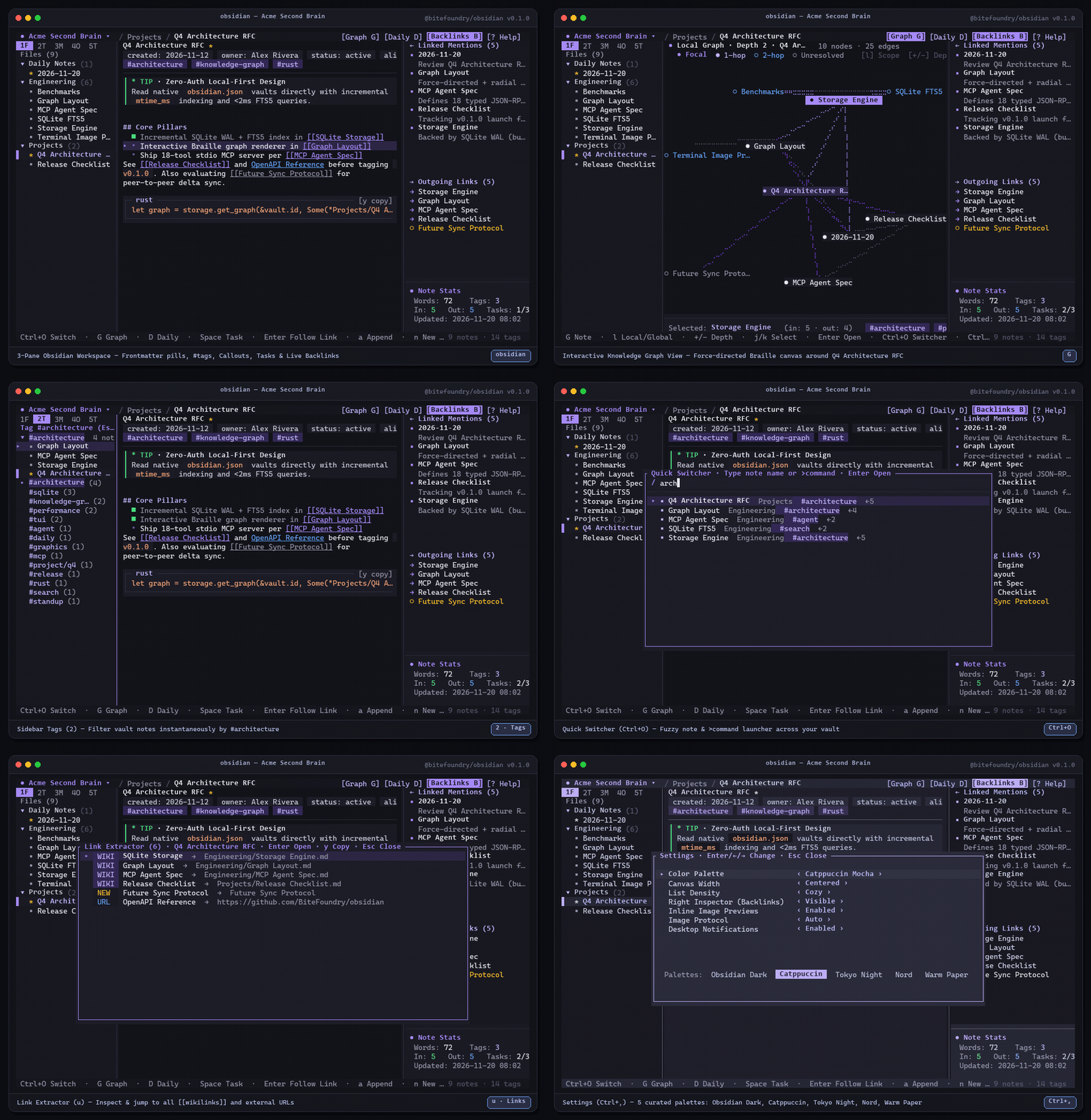
| Obsidian-Native 3-Pane TUI | Signature Obsidian purple (#a78bfa / #7c3aed) Minimal-Chrome workspace (bitefoundry-obsidian): collapsible 5-Tab Left Sidebar ([) (1 Files · 2 Tags · 3 Bookmarks · 4 Outline · 5 Tasks), Live Note Canvas with YAML Frontmatter pills, #tag chips, semantic Callout cards, interactive - [ ] checkboxes (Space/x updates the .md file atomically), clickable [[wikilinks]], inline HD ![[image.png]] previews (v), Right Backlinks & Outgoing Inspector (B), Quick Switcher (Ctrl+O), Daily Notes (D), and 5 curated palettes (Obsidian Dark, Catppuccin Mocha, Tokyo Night, Nord, Warm Paper). |
Interactive Knowledge Graph (G) | Force-directed & radial Braille Canvas Knowledge Graph rendered right inside the terminal: purple focal edges, 1-hop / 2-hop / unresolved ghost nodes, Local vs Global scope (l), hop depth (+/-), node cycling (j/k/Tab), and Enter jump-to-note. |
| SQLite WAL + FTS5 + 4-in-1 Agent Interface | Incremental mtime_ms + size_bytes filesystem scanner powering SQLite WAL + FTS5 search (Korean/CJK queries also match inside longer words), background watcher IPC daemon (bitefoundry-obsidian daemon), scriptable --json CLI, local HTTP JSON API (bitefoundry-obsidian serve, :8792), and stdio MCP server (bitefoundry-obsidian mcp, 20 typed tools with confirm: true .trash/ safety guard). |
Quick Start
# 1. Install the native CLI globally
npm i -g @bitefoundry/obsidian

# 2. Launch directly — auto-discovers your existing local Obsidian vaults!
bitefoundry-obsidian

# Optional: install a short shell alias (`ob` -> `bitefoundry-obsidian`)
bitefoundry-obsidian alias install

# Or scaffold a starter local vault anywhere:
bitefoundry-obsidian init ~/Documents/SecondBrain
bitefoundry-obsidian vaults list
bitefoundry-obsidian notes read "Roadmap" --json
Read a local note with its modification time and omission counts. Use a vault-relative path if several notes share its name. For full detail, add --full in the CLI or pass compact: false to read_note in MCP.
Upgrade from 0.1.x
Update shell scripts from obsidian notes list or obs notes list to bitefoundry-obsidian notes list. In MCP settings, change "command": "obsidian" or "command": "obs" to "command": "bitefoundry-obsidian" and keep "args": ["mcp"].
For npm, run npm install -g @bitefoundry/obsidian. Use a separate prefix when another program supplies an old command in the existing npm prefix. For a source install, run cargo install --git https://github.com/BiteFoundry/obsidian --locked. For a standalone install, download the asset named bitefoundry-obsidian for your platform. Shared npm prefix · Standalone updater transition
Keybindings Cheat Sheet
| Key | Action | Context |
|---|---|---|
Ctrl+O / Ctrl+K / Ctrl+P | Quick Switcher & Command Palette (fuzzy notes + >commands) | Global |
G | Toggle Interactive Knowledge Graph View (Braille force-directed canvas) | Global |
l / + - / j k / Enter | Toggle Local/Global scope · Depth · Cycle nodes · Open node | Graph View |
D | Open or create Today's Daily Note (reads .obsidian/daily-notes.json) | Global |
[ / Ctrl+B | Toggle collapsible Left Sidebar | Global |
1 2 3 4 5 | Switch Sidebar tabs: Files · Tags · Bookmarks · Outline · Tasks | Global |
B | Toggle Right Inspector (Linked Mentions / Backlinks & Outgoing Links) | Global |
Space / x | Toggle live - [ ] / - [x] checkbox surgically in the .md file | Canvas / Tasks |
Enter / Backspace / Alt+← | Follow [[wikilink]] / Navigate back in note history stack | Canvas |
a / n / b | Quick Append · New Note · Bookmark | Global |
e / Ctrl+E | Edit inline · Open in $VISUAL or $EDITOR and reindex on success | Note |
u / h / v / y | Link Extractor · Toggle Inline Hrefs · HD Image Preview · Copy Code/Note | Global |
Ctrl+V / Ctrl+F | Paste clipboard PNG into Attachments/ · File Picker (z zoxide jump) | Global |
Ctrl+S / Ctrl+, / . / ? | Vault Switcher · Settings (5 Palettes) · Context Menu · Keybinding Help | Global |
CLI, HTTP API & MCP
CLI (--json & --vault ready)
# Discover, register, scaffold & reindex local vaults
bitefoundry-obsidian vaults list --json
bitefoundry-obsidian vaults add ~/Vaults/Work --name work
bitefoundry-obsidian vaults use work
bitefoundry-obsidian init ~/Vaults/Starter
bitefoundry-obsidian reindex

# Search, read, author, daily notes & surgical checkbox toggles
bitefoundry-obsidian search "Architecture" --json
bitefoundry-obsidian notes list --folder Projects --json
bitefoundry-obsidian notes list --folder Projects --json --limit 50 --cursor "<next_cursor>"
bitefoundry-obsidian notes read "Q4 Architecture RFC"
bitefoundry-obsidian notes read "Q4 Architecture RFC" --json
bitefoundry-obsidian notes read "Q4 Architecture RFC" --json --full
bitefoundry-obsidian notes create "Sprint Retro" --folder Notes --tags "retro,q4"
bitefoundry-obsidian notes append "Q4 Architecture RFC" "- [ ] Verify the release"
bitefoundry-obsidian notes replace "Q4 Architecture RFC" --find "Draft review" --replace "Review complete" --json
bitefoundry-obsidian notes move "Q4 Architecture RFC" "Archive/Q4 Architecture RFC" --json
bitefoundry-obsidian daily "--append=- [ ] Review PRs"
bitefoundry-obsidian tasks --open --json   # paginated response (default 50; use --cursor or --all)
bitefoundry-obsidian toggle-task "Q4 Architecture RFC" 14

# Knowledge Graph & Link Intelligence
bitefoundry-obsidian backlinks "Q4 Architecture RFC" --json
bitefoundry-obsidian links "Q4 Architecture RFC" --json
bitefoundry-obsidian graph "Q4 Architecture RFC" --depth 2 --json
bitefoundry-obsidian orphans --json
bitefoundry-obsidian tags architecture --json

# Background watcher daemon & diagnostics
bitefoundry-obsidian daemon start
bitefoundry-obsidian doctor --json
notes read prints raw Markdown. With --json, it returns a compact object by default (rel_path, title, raw_markdown, mtime_ms, omitted, and hint); add --full to include summary, parsed, backlinks, outgoing_links, and images (--compact is kept as an alias for the default compact output). In --full output, parsed includes rendering blocks and body copies that can be around 10x the raw note size; select metadata with jq or use MCP read_note with compact: false when you do not need AST blocks. daily --json follows the same compact-by-default and --full rule, except that calls with a non-empty --append without --full return a minimal receipt (rel_path, created, appended). notes list --json and tasks --json return paginated objects with returned, total, has_more, next_cursor, and notes/tasks (default page size 50, max 500; pass --cursor to continue or --all for every item). search --json returns query, limit (clamped to 1..200), returned, has_more, next_cursor (null), and results; when has_more is true, raise --limit up to 200 or narrow the query. Use notes edit <NOTE> for arbitrary body edits in your editor. notes replace edits a single literal match in the Markdown body and returns replaced, matches, and rel_path. When a --json command fails at runtime, stdout contains {"ok":false,"error":{"code","message"}} (with candidates on ambiguous note references), stderr is empty, and the exit code is 1; argument parsing errors print clap usage to stderr with exit code 2.
| v0.2.3 | Equivalent command |
|---|---|
notes list --json | jq '.[]' | notes list --json --all | jq '.notes[]' |
tasks --open --json | jq '.[]' | tasks --open --json --all | jq '.tasks[]' |
search Q --json | jq '.[]' | search Q --json | jq '.results[]' |
notes read X --json | jq '.summary' | notes read X --json --full | jq '.summary' |
daily --json | jq '.note.summary' | daily --json --full | jq '.note.summary' |
Local HTTP JSON API (bitefoundry-obsidian serve)
bitefoundry-obsidian serve --bind 127.0.0.1 --port 8792 --token "$API_TOKEN"
curl -H "Authorization: Bearer $API_TOKEN" "http://127.0.0.1:8792/api/v1/search?q=Architecture"
curl -H "Authorization: Bearer $API_TOKEN" "http://127.0.0.1:8792/api/v1/graph?note=Q4%20Architecture%20RFC&depth=2"
Without --token, serve prints a random token for the run on stderr (--allow-keyless turns this off on loopback). Requests from other websites and unknown Host names are rejected, a non-loopback --bind requires --token, and vault= accepts registered vaults only. Browser apps on another origin need --allow-origin <origin>.
Full endpoint catalog and OpenAPI schema: docs/API.md · docs/openapi.yaml.
MCP Server (bitefoundry-obsidian mcp)
{
  "mcpServers": {
    "obsidian": {
      "command": "bitefoundry-obsidian",
      "args": ["mcp"]
    }
  }
}
Full tool catalog and argument schemas: docs/MCP.md · npm packaging details: docs/NPM.md.
move_note renames or moves a note within a vault, updates incoming wikilinks and Markdown links that need a new target, and rewrites relative Markdown links, images, and attachments inside the moved note so they keep pointing to the same files. Ambiguous note references return an error; pass a vault-relative path when multiple notes share a title or alias. Use append_note and replace_note_text for Markdown, toggle_task for checkboxes, and update_frontmatter for YAML properties. Editing surfaces and move examples
@bitefoundry Enterprise Terminal Suite
| Package | Commands | Workspace | Interfaces |
|---|---|---|---|
@bitefoundry/teams | teams | Microsoft Teams (Chats, Channels, Meetings & Threads) | TUI · CLI · HTTP · MCP |
@bitefoundry/outlook | outlook | Microsoft Outlook (Mail, Calendar & Contacts) | TUI · CLI · HTTP · MCP |
@bitefoundry/onenote | onenote | Microsoft OneNote (Notebooks, Sections & Pages) | TUI · CLI · HTTP · MCP |
@bitefoundry/sharepoint | sharepoint, bitefoundry-onedrive | Microsoft SharePoint & OneDrive (Sites, Libraries & Lists) | TUI · CLI · HTTP · MCP |
@bitefoundry/atlassian | atlassian, confluence, conf | Atlassian Jira (Kanban, Sprints, JQL) & Confluence Wiki | TUI · CLI · HTTP · MCP |
@bitefoundry/notion | notion | Notion (Editorial Pages, Interactive Blocks & Databases) | TUI · CLI · HTTP · MCP |
@bitefoundry/obsidian | bitefoundry-obsidian | Obsidian (Local Vaults, Backlinks & Interactive Knowledge Graph) | TUI · CLI · HTTP · MCP |
Disclaimer: Unofficial terminal client for Obsidian vaults. Not affiliated with, endorsed by, or sponsored by Dynalist Inc. (Obsidian).
ghcr.io/bitefoundry/obsidian:0.4.2docker pull ghcr.io/bitefoundry/obsidian:0.4.2:undefined