
mcp-digitalhuman
io.github.AceDataCloud/mcp-digitalhuman
Create lip-synced videos and voice clips from authorized media, and check existing tasks.
Documentation
Digital Human

A Model Context Protocol (MCP) server for the AceDataCloud Digital Human API.
Features
- Create lip-synced digital human videos from a source face video or image
- Clone voices from short reference audio samples
- Poll, batch-retrieve, list recent history, or delete Digital Human tasks
Connect locally
Use the local stdio package and an AceDataCloud API token. The public hosted HTTPS endpoint could not be verified, so this README does not offer it as a connection option. The local MCP process still calls AceDataCloud's API; it does not run the underlying service offline.
- Open Ace Data Cloud → Applications. Sign in, or register an account first.
- Find General application. If it has not been created, choose Initialize General Application. A general key can use the services available to your account; a dedicated application's key is limited to its service. Check the required service/model access and current pricing.
- Copy the API Key from the application card, or open Keys / Manage Keys → Create to create a separate key for this integration. Give it a recognizable name so you can revoke or rotate it independently.
- When creating a key, review Expiration Time, Set Usage Limitation, and Allowed APIs. Enable only the restrictions you need, allow the operations you will call, then click Create and copy the token from the key list. Task lookup does not grant permission to submit a generation. Confirm the application's balance can cover your first request; any trial allowance is whatever your account currently displays.
- Copy only the token value, without quotation marks, spaces, or
Bearer. An API Key / API Token field expects this raw value; only a manually configured HTTPAuthorizationheader needs theBearerprefix. Aplatform-...account-management token cannot replace a generation API key.
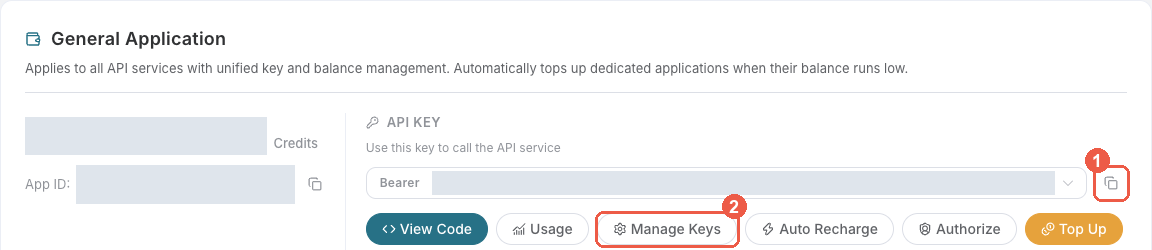
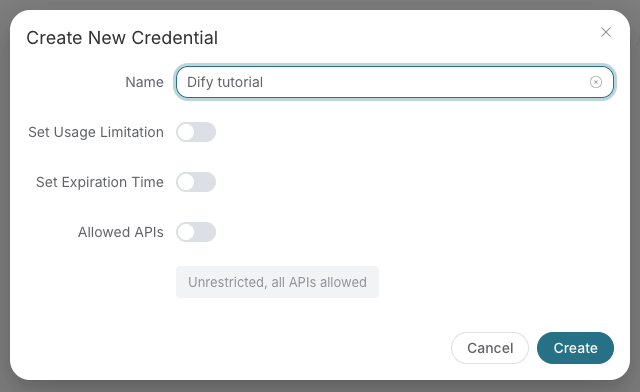
Save the key in the client's credential store or the environment variable shown below. Never put it in a prompt, shared workflow, screenshot, or Git commit. If authentication fails, check the full copied value, application/service access, expiration, usage limit, and balance before creating another key.
Local stdio
In a client with MCP Registry support, search for io.github.AceDataCloud/mcp-digitalhuman and select the PyPI stdio package. Supply your application token in the client’s secret settings. After connecting, open the tool list and check for digitalhuman_create_video and digitalhuman_get_task. Listing tools confirms the local connection without submitting a generation. Use only media you own or have permission to use.
Install the package and give the local process an API token:
python -m pip install mcp-digitalhuman
export ACEDATACLOUD_API_TOKEN='YOUR_API_TOKEN'
mcp-digitalhuman
For Claude Desktop local MCP, merge this entry into the file opened by its developer settings (~/Library/Application Support/Claude/claude_desktop_config.json on macOS). uvx requires uv on PATH:
{
  "mcpServers": {
    "digitalhuman": {
      "command": "uvx",
      "args": ["mcp-digitalhuman"],
      "env": {"ACEDATACLOUD_API_TOKEN": "YOUR_API_TOKEN"}
    }
  }
}
Keep this user-level file private. Self-hosted HTTP uses mcp-digitalhuman --transport http --port 8000; expose it only with suitable network and TLS controls. Local execution still calls the AceDataCloud API.
Check the connection
Confirm that the MCP client loads its tools. For an existing task ID, digitalhuman_get_task makes an authenticated query; loading the tool alone does not prove downstream API access. A real service request can be billed. If it returns 401, check the API token; if it returns 403 or an account/balance error, read that response before retrying.
Development
pip install -e ".[dev,test]"
pytest -q
ruff check .
Documentation
API parameter behavior
digitalhuman_get_tasks_batch retrieves exactly the supplied IDs in input order using authenticated single-task requests. It does not list recent history. A failed retrieval is reported as an error rather than replaced with unrelated tasks.
Use digitalhuman_list_tasks(limit=20, type="voices") to list the authenticated caller's recent tasks, newest first. limit is 1–100; optional type is videos or voices. created_at_min and created_at_max filter strictly after/before Unix timestamps in seconds. This uses the API's retrieve_batch history action, without an ID array. The result retains count and detailed items; media URLs and voice IDs are nested in each item's response. started_at, finished_at and elapsed can be null while processing.
mcp-digitalhumanpip install mcp-digitalhumanRelated Servers
io.github.AceDataCloud/mcp-acedatacloud
Manage your AceData Cloud account: services, pricing, APIs, docs, balance, usage, keys & orders
io.github.AceDataCloud/mcp-acemusic
Create ACE Music songs and lyrics with Ace Data Cloud; query the original task for results.
io.github.AceDataCloud/mcp-aichat
MCP server for AI dialogue using various LLM models via AceDataCloud