
scenewright
com.saas-diary/scenewright
Build rooms, furniture and props in Blender from plain-language requests, with checks and fixes.
Documentation
Scenewright MCP server for Blender
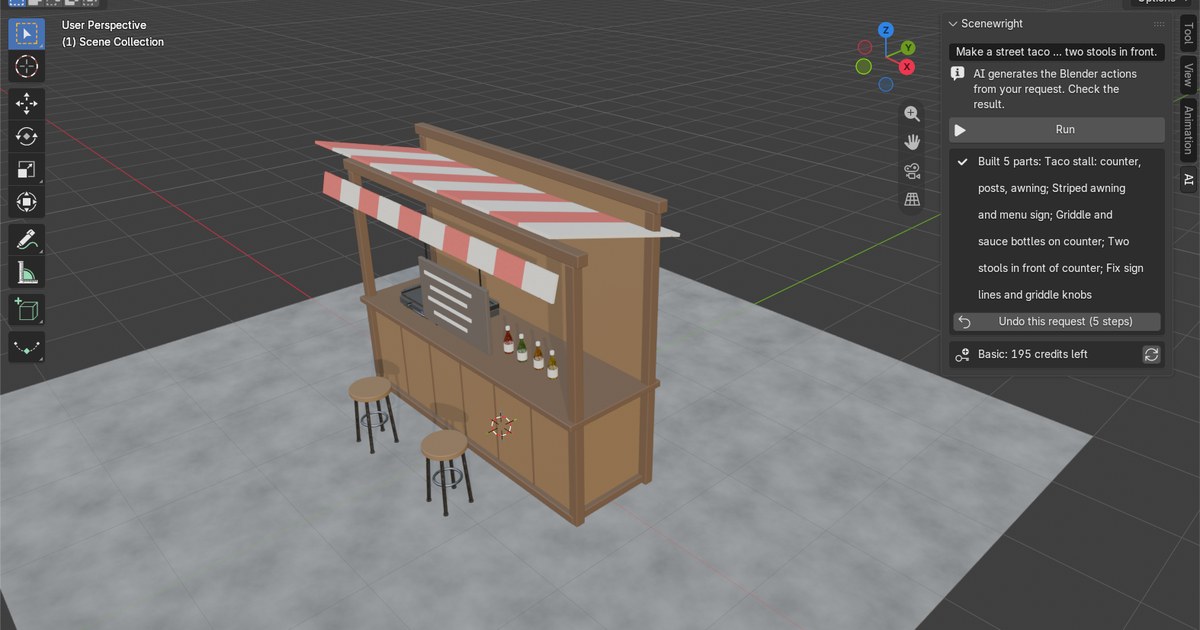
Build rooms, furniture, props and whole scenes in Blender by asking Claude Desktop, Cursor or any MCP app. Scenewright plans big requests in steps, builds them in the scene that is open in Blender, checks the result (floating, overlapping or untextured objects) and fixes what it finds. Every step is a normal Blender undo step, and one call takes back the whole request.
"Build a cozy bedroom with a bed, a desk, a lamp and a rug" → a finished room in your Blender scene.
What you need
- Blender 4.2 or newer with the Scenewright add-on: get it at https://saas-diary.com/blender/ai/ (free credits to start, no card).
- In Blender: Edit > Preferences > Add-ons > Scenewright → turn on "Let AI apps on this computer use Scenewright". Keep Blender open while you work.
- For the one-click file in Claude Desktop, nothing else: Claude Desktop runs it with its own Node.js. For the JSON setup (Cursor, Claude Code and others), Node.js 18 or newer from https://nodejs.org/.
Install
Claude Desktop (one click)
Download scenewright-0.1.0.mcpb
and open it. Claude Desktop shows an install dialog.
Claude Desktop, Cursor, Windsurf, VS Code and others (JSON)
{
  "mcpServers": {
    "scenewright": {
      "command": "npx",
      "args": ["-y", "--package=https://saas-diary.com/blender/ai/download/scenewright-mcp-0.1.0.tgz", "scenewright-mcp"]
    }
  }
}
- Claude Desktop: Settings > Developer > Edit Config (
claude_desktop_config.json) - Cursor: Settings > MCP > Add new global MCP server (
~/.cursor/mcp.json)
Claude Code
claude mcp add scenewright -- npx -y --package=https://saas-diary.com/blender/ai/download/scenewright-mcp-0.1.0.tgz scenewright-mcp
Claude plugin
This repository is also a Claude plugin (.claude-plugin/plugin.json and .mcp.json). The plugin starts
server/index.js with Node.js 18 or newer. It downloads no packages, and it connects only to the Scenewright
add-on on 127.0.0.1 on this computer.
Tools
| Tool | What it does |
|---|---|
build_scene | Build or change things in the open scene from a plain-language request (English or Japanese). |
get_build_status | Whether a build is still running, and the result of the last request. |
stop_build | Stop the request that is building now. |
undo_last_build | Take back every step of the last request at once. |
get_scene_summary | A short text summary of the objects in the scene. |
get_viewport_screenshot | A picture of the 3D Viewport, to look at the result. |
Try these
- "A small living room with a sofa, a coffee table, a bookshelf and warm lamp light"
- "A medieval market stall with crates, barrels and a cloth roof"
- "Low-poly rocks and boulders scattered on a ground plane"
- "Make the walls darker and add a rug under the table"
Credits and privacy
- Each build uses the Scenewright credits of the account in the add-on, the same as pressing Run in the panel. Plans and credit packs: https://saas-diary.com/blender/ai/
- Only programs on this computer can connect: the add-on listens on
127.0.0.1only, the connection is off until you turn it on, and every request must carry a random key that the add-on writes to your user folder. - Privacy: https://saas-diary.com/blender/ai/legal/#privacy
Help
Something not working? Write to contact@saas-diary.com. Requests for new tools are welcome: the most asked for go into the next version.
Made by GRAMSHIFT. MIT license (this MCP server). The Scenewright add-on and service are sold separately.
https://github.com/gramshiftofficial/scenewright-mcp/releases/download/v0.1.0/scenewright-0.1.0.mcpb# mcpb: https://github.com/gramshiftofficial/scenewright-mcp/releases/download/v0.1.0/scenewright-0.1.0.mcpb